> ## Documentation Index
> Fetch the complete documentation index at: https://docs.abbyy.com/llms.txt
> Use this file to discover all available pages before exploring further.

# TextTypeEnum

> TextTypeEnum in der ABBYY FineReader Engine API — Typen von erkanntem Text (normal, Schreibmaschine, OCR-A, OCR-B usw.).

Mit den Aufzählungskonstanten von TextTypeEnum wird der [Typ des erkannten Textes](/de/fine-reader/engine/specifications/text-types) beschrieben.

```
typedef enum {
 TT_Normal       = 0x00000001,
 TT_Typewriter   = 0x00000002,
 TT_Matrix       = 0x00000004,
 TT_Index        = 0x00000008,
 TT_Handwritten  = 0x00000010,
 TT_OCR_A        = 0x00000020,
 TT_OCR_B        = 0x00000040,
 TT_MICR_E13B    = 0x00000080,
 TT_MICR_CMC7    = 0x00000100,
 TT_Gothic       = 0x00000200,
 TT_Receipt      = 0x00000400
} TextTypeEnum;
```

<div id="elements">
  ## Elemente
</div>

<table>
  <thead>
    <tr>
      <th>
        <p>
          <strong>Name</strong>
        </p>
      </th>

      <th>
        <p>
          <strong>Description</strong>
        </p>
      </th>
    </tr>
  </thead>

  <tbody>
    <tr>
      <td>
        <p>
          <a name="tt_gothic" />

          TT\_Gothic
        </p>
      </td>

      <td>
        <p>
          This value tells ABBYY FineReader Engine to presume that the text on
          the recognized image is printed with the Gothic type. It may look as
          follows:

        </p>

        <p>
          <img alt="Fraktur" src="https://mintcdn.com/abbyy/lsETHFYUFiongXSm/images/fine-reader/engine/fraktur.gif?s=60631bc03fc57153a652e8c0cf8319b7" width="381" height="58" data-path="images/fine-reader/engine/fraktur.gif" />
        </p>
      </td>
    </tr>

    <tr>
      <td>
        <p>
          <a name="tt_handwritten" />

          TT\_Handwritten
        </p>
      </td>

      <td>
        <p>
          This value corresponds to handwritten and handprinted text. For
          example:
        </p>

        <div>
          <table>
            <tbody>
              <tr>
                <td>
                  <p>
                    <img alt="Handwritten" src="https://mintcdn.com/abbyy/lsETHFYUFiongXSm/images/fine-reader/engine/handwritten.gif?s=eb96a041fc31731a266367140aba4931" width="384" height="60" data-path="images/fine-reader/engine/handwritten.gif" />
                  </p>
                </td>

                <td>
                  <p>handwritten</p>
                </td>
              </tr>

              <tr>
                <td>
                  <p>
                    <img alt="Handprint" src="https://mintcdn.com/abbyy/lsETHFYUFiongXSm/images/fine-reader/engine/handprint.gif?s=2bf9c46810c0f951ecd7ff16a4c974db" width="156" height="36" data-path="images/fine-reader/engine/handprint.gif" />
                  </p>
                </td>

                <td>
                  <p>handprinted</p>
                </td>
              </tr>
            </tbody>
          </table>
        </div>
      </td>
    </tr>

    <tr>
      <td>
        <p>
          <a name="tt_index" />

          TT\_Index
        </p>
      </td>

      <td>
        <p>
          This constant corresponds to a special set of characters including
          only digits written in ZIP-code style. They look as follows:{" "}

        </p>

        <p>
          <img alt="Index_LetterSet" src="https://mintcdn.com/abbyy/lsETHFYUFiongXSm/images/fine-reader/engine/index_letterset.gif?s=3e291cc6f5e6fe879dce1d5d4c32b6e7" width="230" height="36" data-path="images/fine-reader/engine/index_letterset.gif" />
        </p>
      </td>
    </tr>

    <tr>
      <td>
        <p>
          <a name="tt_matrix" />

          TT\_Matrix
        </p>
      </td>

      <td>
        <p>
          This value tells ABBYY FineReader Engine to presume that the text on
          the recognized image is printed on a dot-matrix printer. It may look
          as follows:

        </p>

        <p>
          <img alt="page_frag_matrix" src="https://mintcdn.com/abbyy/i-EfCQVmseNiPQcp/images/fine-reader/engine/page_frag_matrix.gif?s=1962e6472243407eed136b24daa15487" width="130" height="20" data-path="images/fine-reader/engine/page_frag_matrix.gif" />
        </p>
      </td>
    </tr>

    <tr>
      <td>
        <p>
          <a name="tt_micr_cmc7" />

          TT\_MICR\_CMC7
        </p>
      </td>

      <td>
        <p>
          This value corresponds to a special set of characters, which includes
          only digits and A, B, C, D, E characters, written in MICR barcode font
          (CMC-7). MICR (Magnetic Ink Character Recognition) characters can only
          be recognized for the Latin languages and may look as follows:

        </p>

        <p>
          <img alt="cmc7" src="https://mintcdn.com/abbyy/6udH-pkk8zkVafYH/images/fine-reader/engine/cmc7.gif?s=af90f1285dbc351e3705e669fef750f0" width="493" height="33" data-path="images/fine-reader/engine/cmc7.gif" />
        </p>
      </td>
    </tr>

    <tr>
      <td>
        <p>
          <a name="tt_micr_e13b" />

          TT\_MICR\_E13B
        </p>
      </td>

      <td>
        <p>
          This value corresponds to a special set of characters including only
          digits and A, B, C, D characters printed in magnetic ink. MICR
          characters are found in a variety of places, including personal
          checks. However, they can only be recognized for the Latin languages
          and may look as follows:

        </p>

        <p>
          <img alt="MICR-E13B" src="https://mintcdn.com/abbyy/lsETHFYUFiongXSm/images/fine-reader/engine/micr-e13b.gif?s=9587c9eed26493a0dbcdf898a0d9e770" width="230" height="30" data-path="images/fine-reader/engine/micr-e13b.gif" />
        </p>
      </td>
    </tr>

    <tr>
      <td>
        <p>
          <a name="tt_normal" />

          TT\_Normal
        </p>
      </td>

      <td>
        <p>This value corresponds to a common typographic type of text.</p>
      </td>
    </tr>

    <tr>
      <td>
        <p>
          <a name="tt_ocr_a" />

          TT\_OCR\_A
        </p>
      </td>

      <td>
        <p>
          This value corresponds to a monospaced font, designed for Optical
          Character Recognition. Largely used by banks, credit card companies
          and similar businesses. It may look as follows:

        </p>

        <p>
          <img alt="OCR-A" src="https://mintcdn.com/abbyy/i-EfCQVmseNiPQcp/images/fine-reader/engine/ocr-a.gif?s=a63e9297f2d5cab54dece46e06fe692e" width="209" height="33" data-path="images/fine-reader/engine/ocr-a.gif" />
        </p>
      </td>
    </tr>

    <tr>
      <td>
        <p>
          <a name="tt_ocr_b" />

          TT\_OCR\_B
        </p>
      </td>

      <td>
        <p>
          This value corresponds to a font designed for Optical Character
          Recognition. It may look as follows:

        </p>

        <p>
          <img alt="OCR-B" src="https://mintcdn.com/abbyy/i-EfCQVmseNiPQcp/images/fine-reader/engine/ocr-b.gif?s=9a5c9f1bd80b92cbe4d5d6bdb5bfe930" width="192" height="33" data-path="images/fine-reader/engine/ocr-b.gif" />
        </p>
      </td>
    </tr>

    <tr>
      <td>
        <p>
          <a name="tt_receipt" />

          TT\_Receipt
        </p>
      </td>

      <td>
        <p>
          Dieser Wert entspricht dem Text eines Kassenbons. Dieser Texttyp ist
          für die Erkennung von Kassenbons, Rechnungen usw. ausgelegt. Im Gegensatz
          zu den anderen Typen spielt die tatsächliche Schriftart des Textes keine
          Rolle. Stattdessen teilt er dem Erkennungsmodul mit, dass Text
          von geringer Qualität vorliegen kann, überwiegend in nichtproportionaler
          oder normaler Schrift. Ein typischer Kassenbon-Text kann wie folgt aussehen:
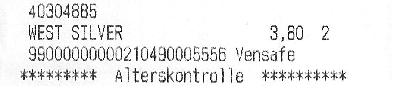
        </p>

        <p>
          <img alt="receipt_text" src="https://mintcdn.com/abbyy/i-EfCQVmseNiPQcp/images/fine-reader/engine/receipt_text.gif?s=2ce7098b557b6d9ec7f286111999f501" width="400" height="86" data-path="images/fine-reader/engine/receipt_text.gif" />
        </p>
      </td>
    </tr>

    <tr>
      <td>
        <p>
          <a name="tt_typewriter" />

          TT\_Typewriter
        </p>
      </td>

      <td>
        <p>
          This value tells ABBYY FineReader Engine to presume that the text on
          the recognized image is typed on a typewriter. It may look as follows:

        </p>

        <p>
          <img alt="page_frag_typewrite" src="https://mintcdn.com/abbyy/i-EfCQVmseNiPQcp/images/fine-reader/engine/page_frag_typewrite.gif?s=15047c20346a9343a1764bc74c0175a2" width="130" height="21" data-path="images/fine-reader/engine/page_frag_typewrite.gif" />
        </p>
      </td>
    </tr>
  </tbody>
</table>

<div id="used-in">
  ## Verwendung in
</div>

[IRecognizerParams::TextTypes](/de/fine-reader/engine/api-reference/parameter-objects/preprocessing-analysis-recognition-and-synthesis-parameters/recognizerparams#texttypes)

<div id="see-also">
  ## Siehe auch
</div>

[Autodetektion für Texttypen verwenden](/de/fine-reader/engine/guided-tour/advanced-techniques/using-text-type-autodetection)

[Texttypen](/de/fine-reader/engine/specifications/text-types)