> ## Documentation Index
> Fetch the complete documentation index at: https://docs.abbyy.com/llms.txt
> Use this file to discover all available pages before exploring further.
# Dialogfeld „Batch Type Properties“
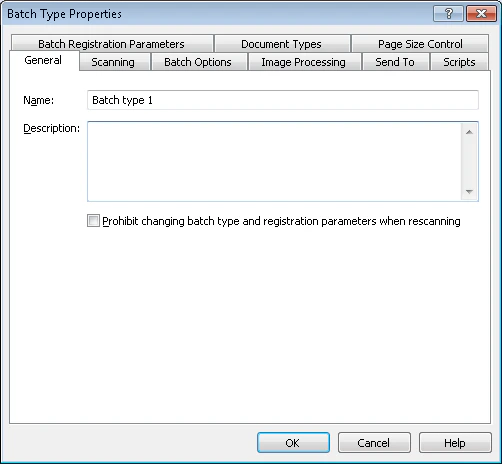
> Im Dialogfeld „Batch Type Properties“ in ABBYY Scanning Station können Scanner-, Trennungs-, Bildverarbeitungs-, Export-, Skript- und Registrierungseinstellungen bearbeitet werden.
Im Dialogfeld **Batch Type Properties** können Sie die Eigenschaften des ausgewählten Batch-Typs bearbeiten. Jede Registerkarte konfiguriert eine andere Einstellungsgruppe.
## Registerkarten für Batch-Typ-Eigenschaften
| Registerkarte | Konfigurieren |
| --------------------------------- | --------------------------------------------------------------------------------------------------------------------------------- |
| **Allgemein** | [Batch-Typ-Name und Kommentar](/de/flexi-capture/scanning-station/shared/interface/batch-type-general-page) |
| **Scannen** | [Scannerquelle](/de/flexi-capture/scanning-station/shared/interface/scanning-options-page) |
| **Batch Options** | [Optionen für Dokument- und Stapeltrennung](/de/flexi-capture/scanning-station/shared/interface/batch-type-separation) |
| **Bildverarbeitung** | [Bildverarbeitungsparameter](/de/flexi-capture/scanning-station/shared/interface/image-processing-options) |
| **Senden an** | [Exportoptionen](/de/flexi-capture/scanning-station/interface/batch-type-export) |
| **Skripte** | [Skripte](/de/flexi-capture/scanning-station/shared/interface/batch-type-scripts) |
| **Seitenformatkontrolle** | [Kontrolle der Seitenparameter](/de/flexi-capture/scanning-station/shared/interface/batch-type-size) |
| **Dokumenttypen** | [Dokumenttypen](/de/flexi-capture/scanning-station/shared/interface/batch-type-regparams) |
| **Dokumenttypen** | [Registrierungsparameter für Batches und Dokumente](/de/flexi-capture/scanning-station/shared/interface/reg-params) für Dokumente |
| **Batch-Registrierungsparameter** | [Registrierungsparameter für Batches und Dokumente](/de/flexi-capture/scanning-station/shared/interface/reg-params) für Batches |
## Eigenschaften des Batch-Typs ändern
Wählen Sie den Batch-Typ in der Dropdown-Liste **Selected batch type** in den [Symbolleisten des Hauptfensters](/de/flexi-capture/scanning-station/interface/toolbars) aus.
Klicken Sie auf die Schaltfläche **Batch Type Properties**.