> ## Documentation Index
> Fetch the complete documentation index at: https://docs.abbyy.com/llms.txt
> Use this file to discover all available pages before exploring further.

# Eine Verbindung zu ABBYY Vantage konfigurieren

> Konfigurieren Sie in Pega die Serveradresse von ABBYY Vantage und das OAuth 2.0-Authentifizierungsprofil, damit der Connector eine Verbindung zu ABBYY Vantage herstellen kann.

export const VantageRegion = ({children}) => {
  const STORAGE_KEY = "abbyy.vantage.region";
  const REGIONS = [{
    code: "eu",
    label: "Europe"
  }, {
    code: "us",
    label: "North America"
  }, {
    code: "au",
    label: "Australia / Asia-Pacific"
  }];
  const [region, setRegion] = useState("eu");
  const [open, setOpen] = useState(false);
  const containerRef = useRef(null);
  const dropdownRef = useRef(null);
  function safeGetSavedRegion() {
    try {
      const saved = typeof window !== "undefined" ? window.localStorage.getItem(STORAGE_KEY) : null;
      const valid = new Set(REGIONS.map(r => r.code));
      return saved && valid.has(saved) ? saved : "eu";
    } catch {
      return "eu";
    }
  }
  function safeSetSavedRegion(code) {
    try {
      if (typeof window !== "undefined") {
        window.localStorage.setItem(STORAGE_KEY, code);
      }
    } catch {}
  }
  function dispatchRegionChanged(code) {
    try {
      if (typeof window !== "undefined") {
        window.dispatchEvent(new CustomEvent("abbyy:region-changed", {
          detail: {
            code
          }
        }));
      }
    } catch {}
  }
  function replaceRegionInString(text, currentRegion) {
    if (typeof text !== "string") return text;
    const hostRegex = /https:\/\/vantage-(eu|us|au)\.abbyy\.com/gi;
    const tokenRegex = /https:\/\/vantage-\[region\]\.abbyy\.com/gi;
    const bareHostRegex = /vantage-(eu|us|au)\.abbyy\.com/gi;
    const bareTokenRegex = /vantage-\[region\]\.abbyy\.com/gi;
    return text.replace(hostRegex, `https://vantage-${currentRegion}.abbyy.com`).replace(tokenRegex, `https://vantage-${currentRegion}.abbyy.com`).replace(bareHostRegex, `vantage-${currentRegion}.abbyy.com`).replace(bareTokenRegex, `vantage-${currentRegion}.abbyy.com`);
  }
  useEffect(() => {
    setRegion(safeGetSavedRegion());
  }, []);
  useEffect(() => {
    const root = containerRef.current;
    if (!root) return;
    const anchors = root.querySelectorAll("a[href]");
    anchors.forEach(a => {
      const href = a.getAttribute("href");
      if (href) {
        const next = replaceRegionInString(href, region);
        if (next !== href) {
          a.setAttribute("href", next);
        }
      }
    });
    const walker = typeof document !== "undefined" ? document.createTreeWalker(root, NodeFilter.SHOW_TEXT, null) : null;
    if (walker) {
      const toUpdate = [];
      let node = walker.nextNode();
      while (node) {
        const updated = replaceRegionInString(node.nodeValue, region);
        if (updated !== node.nodeValue) {
          toUpdate.push([node, updated]);
        }
        node = walker.nextNode();
      }
      toUpdate.forEach(([textNode, value]) => {
        textNode.nodeValue = value;
      });
    }
  }, [region, children]);
  useEffect(() => {
    const root = containerRef.current;
    if (!root) return;
    const anchors = root.querySelectorAll("a[href]");
    anchors.forEach(a => {
      a.style.fontWeight = "600";
      a.style.textDecoration = "underline";
      a.style.textUnderlineOffset = "2px";
    });
  }, [region, children]);
  useEffect(() => {
    const onRegionChanged = evt => {
      const code = evt && evt.detail && evt.detail.code;
      if (!code || code === region) return;
      setRegion(code);
    };
    if (typeof window !== "undefined") {
      window.addEventListener("abbyy:region-changed", onRegionChanged);
    }
    return () => {
      if (typeof window !== "undefined") {
        window.removeEventListener("abbyy:region-changed", onRegionChanged);
      }
    };
  }, [region]);
  useEffect(() => {
    const onClickAway = e => {
      if (!dropdownRef.current) return;
      if (!dropdownRef.current.contains(e.target)) {
        setOpen(false);
      }
    };
    document.addEventListener("click", onClickAway, true);
    return () => document.removeEventListener("click", onClickAway, true);
  }, []);
  const onSelect = code => {
    setRegion(code);
    safeSetSavedRegion(code);
    dispatchRegionChanged(code);
    setOpen(false);
  };
  const current = REGIONS.find(r => r.code === region) || REGIONS[0];
  return <div className="not-prose">
      <div className="mb-4 inline-flex items-center gap-2" ref={dropdownRef}>
        <span className="text-sm text-zinc-950/80 dark:text-white/80">Tenant Region:</span>
        <div className="relative">
          <button type="button" aria-haspopup="listbox" aria-expanded={open ? "true" : "false"} onClick={() => setOpen(v => !v)} className="h-8 px-3 rounded-md bg-zinc-900/5 dark:bg-white/5 border border-zinc-950/20 dark:border-white/20 text-sm inline-flex items-center gap-2">
            <span className="text-zinc-950 dark:text-white">{current.label}</span>
            <svg width="8" height="24" viewBox="0 -9 3 24" className="transition-transform text-gray-400 overflow-visible dark:text-gray-600 ml-auto" style={{
    transform: open ? "rotate(270deg)" : "rotate(90deg)"
  }}>
              <path d="M0 0L3 3L0 6" fill="none" stroke="currentColor" strokeWidth="1.5" strokeLinecap="round"></path>
            </svg>
          </button>
          {open ? <div role="listbox" className="absolute z-50 left-full top-0 ml-2 w-56 rounded-xl border border-zinc-950/20 dark:border-white/20 bg-white dark:bg-zinc-900 shadow-lg p-2">
              {REGIONS.map(r => {
    const selected = r.code === region;
    return <button key={r.code} type="button" role="option" aria-selected={selected ? "true" : "false"} onClick={() => onSelect(r.code)} className={"w-full flex items-center justify-between px-3 py-2 rounded-lg text-sm hover:bg-zinc-950/5 dark:hover:bg-white/10 text-zinc-950 dark:text-white" + (selected ? " font-medium" : "")}>
                    <span style={selected ? {
      color: "#ff2038"
    } : undefined}>{r.label}</span>
                    <span className={selected ? "ml-3" : "ml-3 invisible"} style={selected ? {
      color: "#ff2038"
    } : undefined}>✓</span>
                  </button>;
  })}
            </div> : null}
        </div>
      </div>
      <div ref={containerRef} className="prose dark:prose-invert max-w-none">{children}</div>
    </div>;
};

Nachdem Sie die Anwendung importiert und einen Case-Typ konfiguriert haben, konfigurieren Sie eine Verbindung zu ABBYY Vantage. Geben Sie die Serveradresse von ABBYY Vantage an und richten Sie anschließend das Authentifizierungsprofil ein.

<div id="configure-the-vantage-server-address">
  ## Vantage-Serveradresse konfigurieren
</div>

<Steps>
  <Step title="Die BaseURL-Einstellung öffnen">
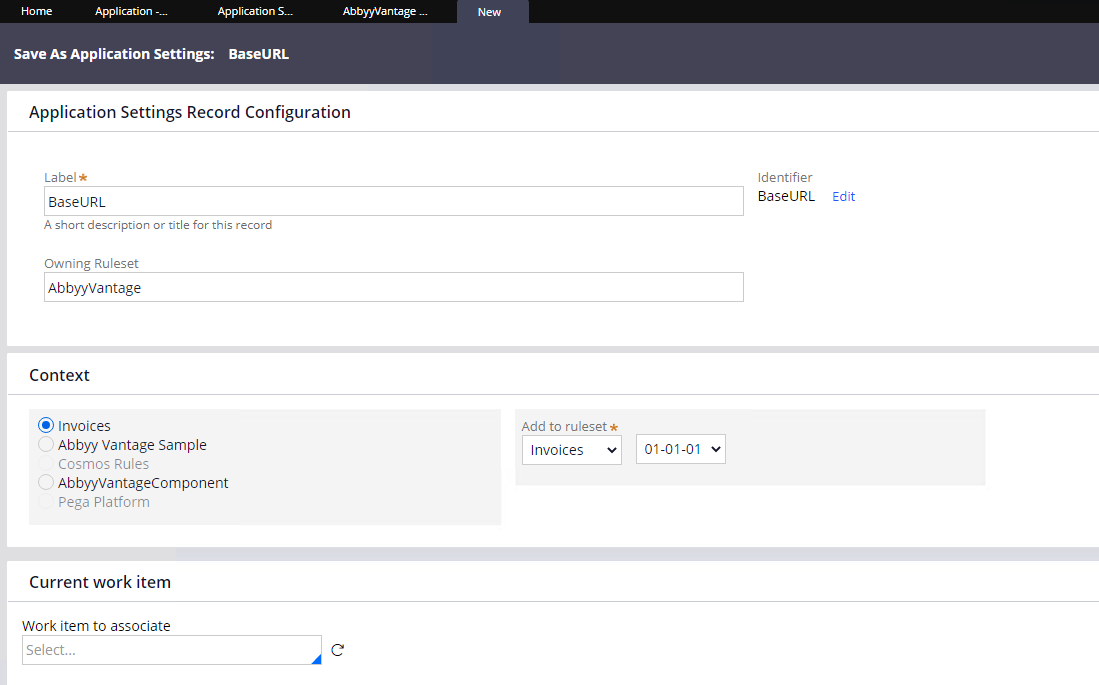
    Öffnen Sie **Records > SysAdmin > Application Settings** und wählen Sie **AbbyyVantage – BaseURL** aus. Klicken Sie auf **Save As**, speichern Sie die Regel in Ihrem Anwendungskontext und klicken Sie anschließend auf **Create and open**.

    <Frame>
      <img src="https://mintcdn.com/abbyy/sAK9EyrYIxrZ9f2p/images/vantage/developer/connectors/pega/base-url-setting.png?fit=max&auto=format&n=sAK9EyrYIxrZ9f2p&q=85&s=820aa6ab26cb131428a548c9e3501b76" alt="Anwendungseinstellung AbbyyVantage – BaseURL in Pega" width="1099" height="685" data-path="images/vantage/developer/connectors/pega/base-url-setting.png" />
    </Frame>
  </Step>

  <Step title="Die Serveradresse angeben">
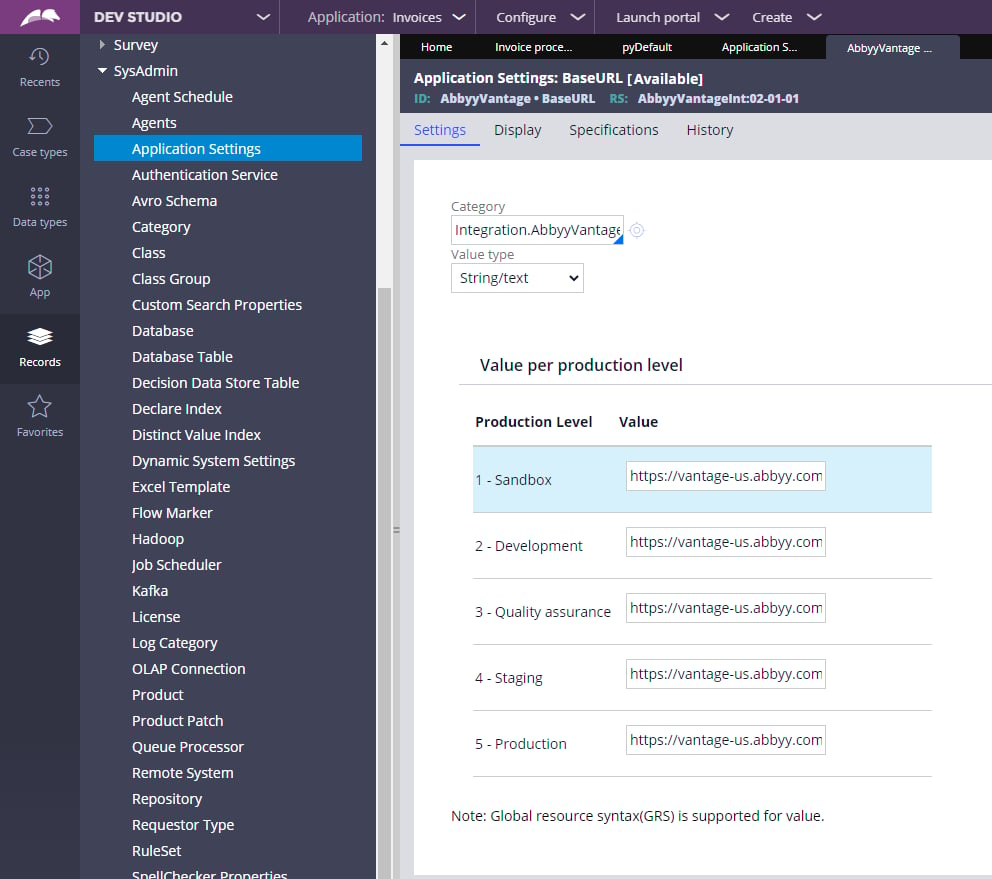
    Geben Sie für jede Produktionsstufe, die Sie verwenden möchten, die Adresse des ABBYY Vantage-Servers an. Fügen Sie am Ende der Serveradresse keinen Schrägstrich (`/`) ein.

    <Frame>
      <img src="https://mintcdn.com/abbyy/sAK9EyrYIxrZ9f2p/images/vantage/developer/connectors/pega/base-url-production-levels.png?fit=max&auto=format&n=sAK9EyrYIxrZ9f2p&q=85&s=63740e4d8702c9e5112df5b6d2b380ac" alt="ABBYY Vantage-Serveradresse für jede Produktionsstufe" width="992" height="879" data-path="images/vantage/developer/connectors/pega/base-url-production-levels.png" />
    </Frame>
  </Step>
</Steps>

Verwenden Sie die ABBYY Vantage-Serveradresse für Ihre Region:

<VantageRegion>
  ```
  https://vantage-[region].abbyy.com
  ```
</VantageRegion>

<div id="check-the-production-level">
  ### Produktionsstufe prüfen
</div>

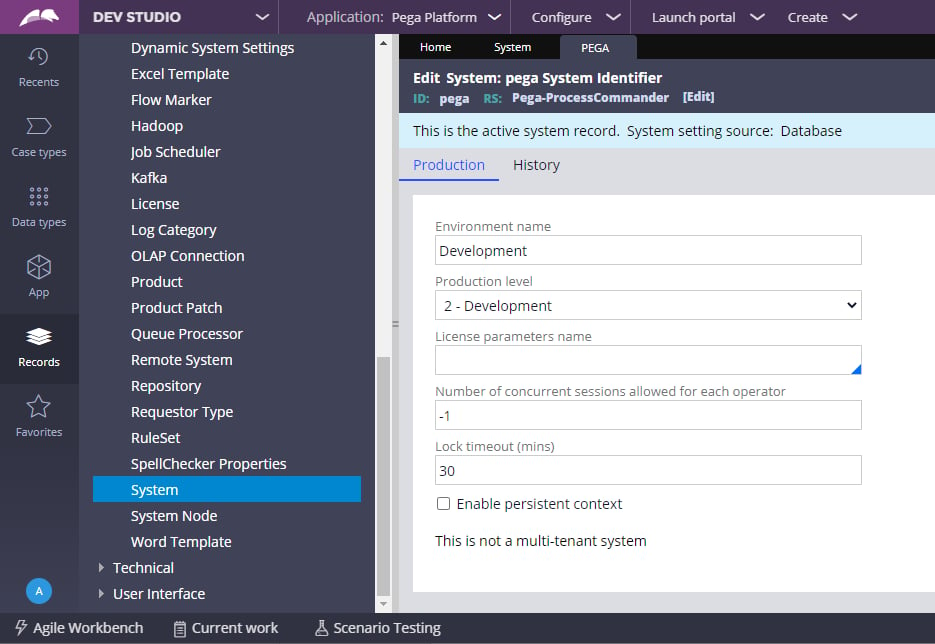
Wenn Sie die aktuelle Produktionsstufe Ihres Systems überprüfen möchten, führen Sie die folgenden Schritte aus.

<Steps>
  <Step title="Zu PRPC Admin wechseln">
    Wechseln Sie in die Zugriffsgruppe **PRPC Admin**.
  </Step>

  <Step title="Ihr System öffnen">
    Öffnen Sie **Dev Studio > SysAdmin > System** und wählen Sie Ihr System aus.

    <Frame>
      <img src="https://mintcdn.com/abbyy/sAK9EyrYIxrZ9f2p/images/vantage/developer/connectors/pega/check-production-level.png?fit=max&auto=format&n=sAK9EyrYIxrZ9f2p&q=85&s=b76f410c52ffd1a96d7ecb19321c487f" alt="Pega-Systemeinstellungen mit angezeigter Produktionsstufe" width="935" height="644" data-path="images/vantage/developer/connectors/pega/check-production-level.png" />
    </Frame>
  </Step>
</Steps>

<div id="configure-the-authentication-profile">
  ## Authentifizierungsprofil konfigurieren
</div>

Der Connector authentifiziert sich bei ABBYY Vantage mit einem OAuth 2.0-Client. Erstellen Sie in ABBYY Vantage einen Public API-Client und geben Sie dann dessen Zugangsdaten im Pega-Authentifizierungsprofil ein.

<Steps>
  <Step title="Einen Public API-Client in ABBYY Vantage erstellen">
    Erstellen Sie in ABBYY Vantage einen Public API-Client und speichern Sie dessen Client-ID und Client-Secret. Aktivieren Sie in den **OAuth 2.0 Flows Settings** die Option **Allow client credentials flow** und weisen Sie über **Manage Roles** die Rollen zu, die der Connector benötigt, z. B. **Skill-Benutzer**. Weitere Informationen finden Sie unter [Configure a Public API client](/de/vantage/documentation/tenant-admin/tenant-management/configure-client).
  </Step>

  <Step title="Die Client-Zugangsdaten in Pega eingeben">
    Öffnen Sie **Records > Security > Authentication Profile** und wählen Sie das Profil **AbbyyVantage** aus. Geben Sie die Client-ID und das Client-Secret in die Felder **Client identifier** und **Client secret** ein.
  </Step>

  <Step title="Das Authentifizierungsprofil speichern">
    Speichern Sie die Änderungen im Authentifizierungsprofil.
  </Step>
</Steps>

<div id="set-the-access-token-endpoint">
  ### Den Zugriffstoken-Endpunkt festlegen
</div>

Geben Sie den Zugriffstoken-Endpunkt für Ihre Region an:

<VantageRegion>
  ```
  https://vantage-[region].abbyy.com/auth2/connect/token
  ```
</VantageRegion>

Wenn der ABBYY Vantage-Benutzer in mehreren Mandanten registriert ist, geben Sie die Mandantenkennung im Endpunkt an:

```
https://vantage-[region].abbyy.com/auth2/<tenant-identifier>/connect/token
```

Um die Mandantenkennung zu finden, melden Sie sich als Mandantenadministrator im ABBYY Vantage-Mandanten an, öffnen Sie **Konfiguration > Allgemein** und kopieren Sie die Mandantenkennung.

<div id="next-steps">
  ## Nächste Schritte
</div>

Weiter mit [Dokumente in einem Pega Case verarbeiten](/de/vantage/connectors/pega/process-documents).