> ## Documentation Index
> Fetch the complete documentation index at: https://docs.abbyy.com/llms.txt
> Use this file to discover all available pages before exploring further.
# The Character Properties Dialog Box
> The Character Properties dialog box in the ABBYY FineReader Engine API — Windows dialog for editing trained character captions, effects, italic/bold/superscript settings, and other character properties during user pattern training.
This topic applies to FRE for Windows.
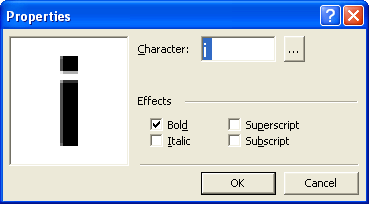 The left dialog window displays an "average" character image (all similar images are put one under another). The Character field displays the character caption.
If the caption is incorrect, type the correct caption. If you train ABBYY FineReader to recognize characters you cannot type, you may use two-character combinations as captions, or you may copy the necessary character from the character table. Click the
The left dialog window displays an "average" character image (all similar images are put one under another). The Character field displays the character caption.
If the caption is incorrect, type the correct caption. If you train ABBYY FineReader to recognize characters you cannot type, you may use two-character combinations as captions, or you may copy the necessary character from the character table. Click the  button to open the table.
## Effects group
* If the characters you train are set in italics or bold and you want to keep these effects in the recognized text, do not forget to set the Italic and/or Bold items in [Pattern Training dialog box](/fine-reader/engine/guided-tour/advanced-techniques/using-gui-elements/training-user-patterns/pattern-training-dialog-box).
* If the character you train is superscript (subscript), set the Superscript (Subscript) item in the Effects group.
## See also
[IEngine::EditUserPattern](/fine-reader/engine/api-reference/engine-object-iengine-interface/supplementary-methods/edituserpattern-method)
[User Pattern Dialog Box](/fine-reader/engine/api-reference/engine-object-iengine-interface/supplementary-methods/edituserpattern-method/user-pattern-dialog-box)
button to open the table.
## Effects group
* If the characters you train are set in italics or bold and you want to keep these effects in the recognized text, do not forget to set the Italic and/or Bold items in [Pattern Training dialog box](/fine-reader/engine/guided-tour/advanced-techniques/using-gui-elements/training-user-patterns/pattern-training-dialog-box).
* If the character you train is superscript (subscript), set the Superscript (Subscript) item in the Effects group.
## See also
[IEngine::EditUserPattern](/fine-reader/engine/api-reference/engine-object-iengine-interface/supplementary-methods/edituserpattern-method)
[User Pattern Dialog Box](/fine-reader/engine/api-reference/engine-object-iengine-interface/supplementary-methods/edituserpattern-method/user-pattern-dialog-box)