> ## Documentation Index
> Fetch the complete documentation index at: https://docs.abbyy.com/llms.txt
> Use this file to discover all available pages before exploring further.
# The User Pattern Dialog Box
> The User Pattern dialog box in the ABBYY FineReader Engine API — Windows dialog that displays trained characters and captions in Images or List mode for managing user pattern files.
This topic applies to FRE for Windows.
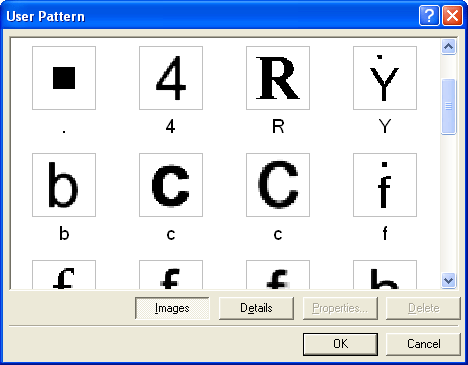
All the trained characters, together with their captions images, are displayed in this dialog box. Images with the same captions are put one under another.
The trained characters are displayed in two modes:
Displays pairs "image — caption".
 Displays a table with the character image, caption and properties columns. You may edit the character caption and properties right in this table.
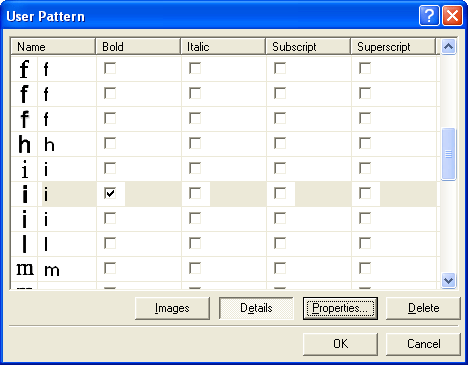 Click the Images or Details buttons to switch between modes.
The Properties button opens the [Character Properties dialog box](/fine-reader/engine/api-reference/engine-object-iengine-interface/supplementary-methods/edituserpattern-method/character-properties-dialog-box). You may change the character caption and properties in this dialog box.
The Delete button deletes the selected characters from the pattern.
## See also
[IEngine::EditUserPattern](/fine-reader/engine/api-reference/engine-object-iengine-interface/supplementary-methods/edituserpattern-method)
[Character Properties dialog box](/fine-reader/engine/api-reference/engine-object-iengine-interface/supplementary-methods/edituserpattern-method/character-properties-dialog-box)
Click the Images or Details buttons to switch between modes.
The Properties button opens the [Character Properties dialog box](/fine-reader/engine/api-reference/engine-object-iengine-interface/supplementary-methods/edituserpattern-method/character-properties-dialog-box). You may change the character caption and properties in this dialog box.
The Delete button deletes the selected characters from the pattern.
## See also
[IEngine::EditUserPattern](/fine-reader/engine/api-reference/engine-object-iengine-interface/supplementary-methods/edituserpattern-method)
[Character Properties dialog box](/fine-reader/engine/api-reference/engine-object-iengine-interface/supplementary-methods/edituserpattern-method/character-properties-dialog-box)