> ## Documentation Index
> Fetch the complete documentation index at: https://docs.abbyy.com/llms.txt
> Use this file to discover all available pages before exploring further.
# The Dictionary Dialog Box
> The Dictionary dialog box in the ABBYY FineReader Engine API — Windows dialog for editing a user dictionary, including importing words from ANSI- and Unicode-encoded text files.
This topic applies to FRE for Windows.
This dialog box appears when editing user dictionary via the [Edit](/fine-reader/engine/api-reference/language-related-objects/dictionary/edit-method) method of the [Dictionary](/fine-reader/engine/api-reference/language-related-objects/dictionary) object in Windows.
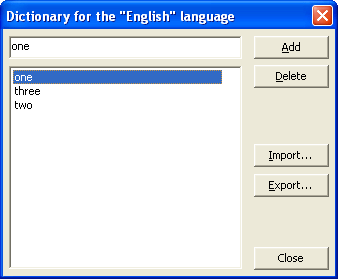 | Option | Option Description |
| ------------------------ | ------------------------------------------------------------------------------------------------------------------------------------------------------------------------------------------------------------- |
| The top dialog box field | Enter the word you want to add to the dictionary here. |
| Word list | Displays all user dictionary words. Select the word you want to delete. |
| Add (button) | Adds the word you typed in the top line to the dictionary. |
| Delete (button) | Deletes the selected word from the dictionary. |
| Import (button) | Imports an already existing dictionary (for example, any text file in Windows ANSI- and Unicode-encoding (the only requirement is that words must be separated by spaces or other non-alphabetic characters). |
| Export (button) | Exports your ABBYY FineReader user dictionary. |
| Close (button) | Closes the dialog box. |
## See also
[Dictionary](/fine-reader/engine/api-reference/language-related-objects/dictionary)
[IDictionary::Edit](/fine-reader/engine/api-reference/language-related-objects/dictionary/edit-method)
| Option | Option Description |
| ------------------------ | ------------------------------------------------------------------------------------------------------------------------------------------------------------------------------------------------------------- |
| The top dialog box field | Enter the word you want to add to the dictionary here. |
| Word list | Displays all user dictionary words. Select the word you want to delete. |
| Add (button) | Adds the word you typed in the top line to the dictionary. |
| Delete (button) | Deletes the selected word from the dictionary. |
| Import (button) | Imports an already existing dictionary (for example, any text file in Windows ANSI- and Unicode-encoding (the only requirement is that words must be separated by spaces or other non-alphabetic characters). |
| Export (button) | Exports your ABBYY FineReader user dictionary. |
| Close (button) | Closes the dialog box. |
## See also
[Dictionary](/fine-reader/engine/api-reference/language-related-objects/dictionary)
[IDictionary::Edit](/fine-reader/engine/api-reference/language-related-objects/dictionary/edit-method)