> ## Documentation Index
> Fetch the complete documentation index at: https://docs.abbyy.com/llms.txt
> Use this file to discover all available pages before exploring further.
# License Parameters
> License parameters in the FineReader Engine License Manager: text types, export formats, additional modules, and other features enabled by your license.
Select License parameters to view, in addition to the license properties described under [License Manager Utility](/fine-reader/engine/licensing/license-manager-utility), the detailed information about the features that are allowed by your license: text types, export formats, additional modules, etc. See the full list of possible features in the [Modules](/fine-reader/engine/licensing/modules) section.
The license parameters are displayed in the table below the list of the licenses in the License Manager. To view or hide license parameters, use the License Parameters/Hide License Parameters button in the main window of the License Manager.
License Parameters
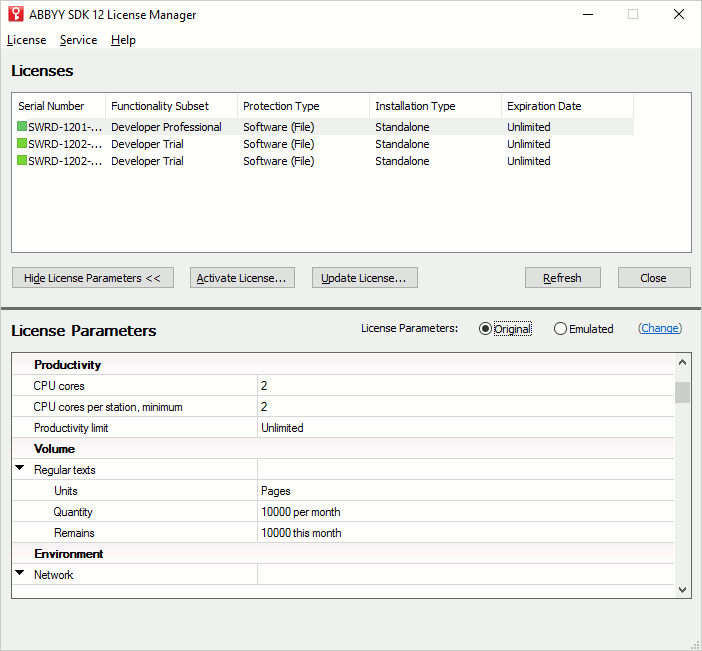 The License Parameters table provides information about your license. The following information about your ABBYY FineReader Engine 12 license is available:
* Functionality subset of the license (Developer or Runtime, and any license limitations, e.g., Trial).
* Type of protection (software, hardware, or online protection).
* ABBYY FineReader Engine 12 serial number.
* Customer Project ID.
* License expiration date.
* Performance limitation: CPU core limit (the number of CPU cores which can be used for recognition), minimum number of CPU cores which can be used on a station, performance limit (e.g., characters per second).
* Environment limitation: usage in a network, on virtual machines, on Amazon EC2 and Microsoft Azure.
* List of features that are allowed by your license: text types, export formats, additional modules, etc. (see the [Modules](/fine-reader/engine/licensing/modules) section).
You can also access all these license parameters via the API. Use properties and methods of the [License](/fine-reader/engine/api-reference/license-related-objects/license) object.
## Runtime license emulation
You can use your Developer's license in the Runtime emulated mode. This allows you to test your application which uses the ABBYY FineReader Engine 12 library.
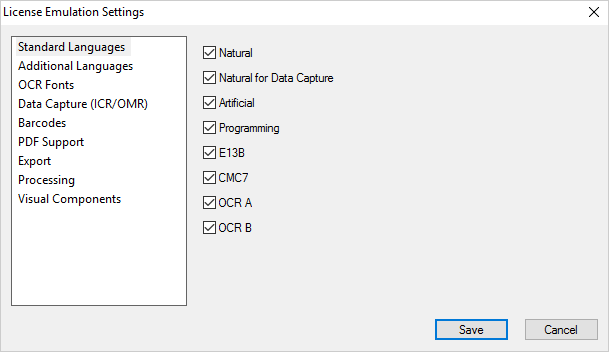
To try emulation, select Emulated mode for license parameters. To change settings, click Change and in the License Emulation Settings dialog box that appears, select modules that will be enabled for your Runtime License (you can select only those modules which are supported by your Developer License). If some modules are not used for your Runtime License, disable them.
License Emulation Settings
The License Parameters table provides information about your license. The following information about your ABBYY FineReader Engine 12 license is available:
* Functionality subset of the license (Developer or Runtime, and any license limitations, e.g., Trial).
* Type of protection (software, hardware, or online protection).
* ABBYY FineReader Engine 12 serial number.
* Customer Project ID.
* License expiration date.
* Performance limitation: CPU core limit (the number of CPU cores which can be used for recognition), minimum number of CPU cores which can be used on a station, performance limit (e.g., characters per second).
* Environment limitation: usage in a network, on virtual machines, on Amazon EC2 and Microsoft Azure.
* List of features that are allowed by your license: text types, export formats, additional modules, etc. (see the [Modules](/fine-reader/engine/licensing/modules) section).
You can also access all these license parameters via the API. Use properties and methods of the [License](/fine-reader/engine/api-reference/license-related-objects/license) object.
## Runtime license emulation
You can use your Developer's license in the Runtime emulated mode. This allows you to test your application which uses the ABBYY FineReader Engine 12 library.
To try emulation, select Emulated mode for license parameters. To change settings, click Change and in the License Emulation Settings dialog box that appears, select modules that will be enabled for your Runtime License (you can select only those modules which are supported by your Developer License). If some modules are not used for your Runtime License, disable them.
License Emulation Settings
 ## See also
[License Manager Utility](/fine-reader/engine/licensing/license-manager-utility)
[Methods Which Increase the License Counter](/fine-reader/engine/licensing/counter-increasing-methods)
## See also
[License Manager Utility](/fine-reader/engine/licensing/license-manager-utility)
[Methods Which Increase the License Counter](/fine-reader/engine/licensing/counter-increasing-methods)