> ## Documentation Index
> Fetch the complete documentation index at: https://docs.abbyy.com/llms.txt
> Use this file to discover all available pages before exploring further.
# Monitor license parameters
> View license parameters in the ABBYY FlexiCapture License Manager, including expiration date and remaining pages, and set up status email notifications.
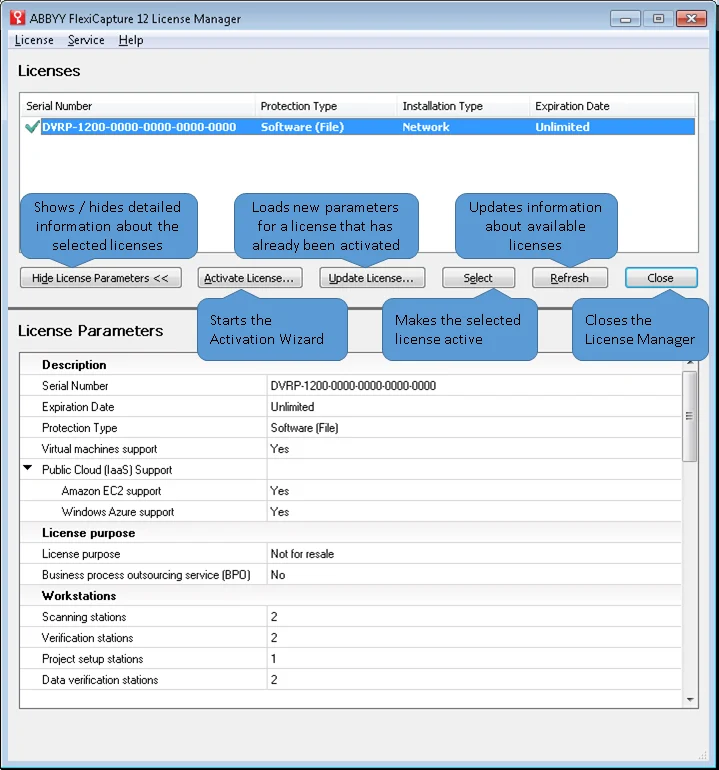
The License Manager window is split into two parts:
* **Licenses** contains a list of installed licenses.
* **License Parameters** displays the parameters of the selected license.
 Important license details, such as the expiration date and the number of remaining pages, are displayed on the **Summary** page of the Administration and Monitoring Console if the Processing Server is running. If it is not, the message "**Data could not be accessed**" is displayed instead. License parameters can only be viewed by the Administrator.
To make licenses easier to monitor, you can set up automatic Email notifications about the statuses of licenses to be sent to specific users. To do this, open the Administration and Monitoring Console, click **Settings → Email notifications** and specify the notification settings. For details, see the online help of the Administration and Monitoring Console.
Important license details, such as the expiration date and the number of remaining pages, are displayed on the **Summary** page of the Administration and Monitoring Console if the Processing Server is running. If it is not, the message "**Data could not be accessed**" is displayed instead. License parameters can only be viewed by the Administrator.
To make licenses easier to monitor, you can set up automatic Email notifications about the statuses of licenses to be sent to specific users. To do this, open the Administration and Monitoring Console, click **Settings → Email notifications** and specify the notification settings. For details, see the online help of the Administration and Monitoring Console.