> ## Documentation Index
> Fetch the complete documentation index at: https://docs.abbyy.com/llms.txt
> Use this file to discover all available pages before exploring further.
# Processing Station
> Processing Stations run unattended in ABBYY FlexiCapture, importing images, recognizing documents, and exporting data; view tasks in the station monitor.
Processing Stations run in unattended mode and handle the following tasks:
* Loading images from Hot Folders
* Applying Document Definitions and recognizing documents
* Exporting data to predefined storage locations
The Processing Stations receive tasks from the Processing Server.
## View the current tasks
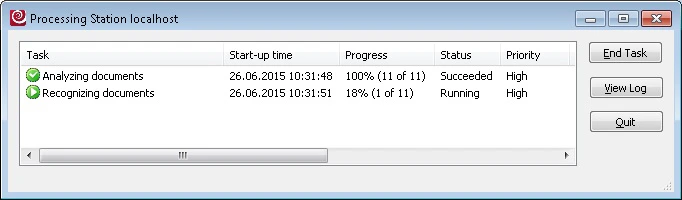
1. Launch the Processing Station Monitor by selecting **Start → All Programs → ABBYY FlexiCapture 12 Stations → Processing Station**. A **Connect to Station** dialog box opens.
2. Locate the Processing Server:
* **Network host** — the name of the computer on which the Processing Server is installed (if the Processing Server and the Processing Station are on different computers).
* **Local host** — if the Processing Server and the Processing Station are on the same computer.
To start a Processing Station, open the Processing Server Monitor, select the station, and start it — select **Start** from the **Actions** menu or the station's shortcut menu, or click the corresponding toolbar button. The station runs as a service.
All the active tasks are displayed in the **Tasks** column. The following information is available for each task: start time, progress, status, priority, station, and creator. The tasks can be sorted by clicking the name of the column.