> ## Documentation Index
> Fetch the complete documentation index at: https://docs.abbyy.com/llms.txt
> Use this file to discover all available pages before exploring further.
# ImportFromFlexiCaptureExample
> Walk through the ImportFromFlexiCaptureExample sample task, which runs the Import logic to fetch processed batch results and report the Document Definition.
The ImportFromFlexiCaptureExample sample task includes the following actions:
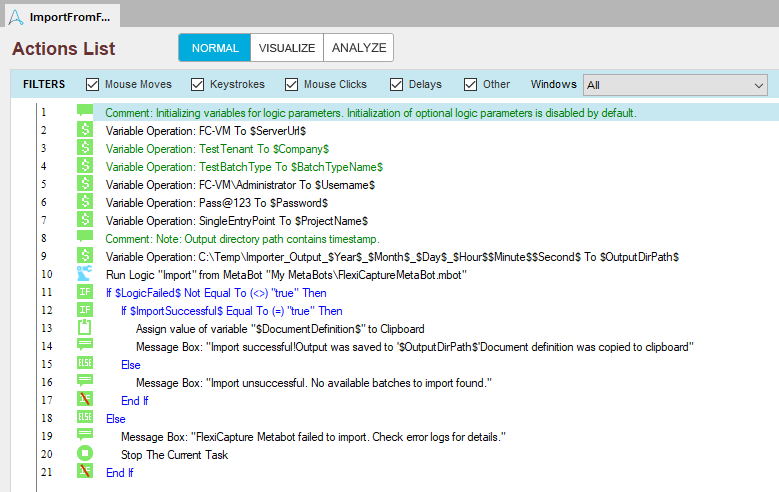 The actions at the start of this sample task set the values of the variables. Next, the Import logic is run and the input parameters are passed using the variables. The LogicFailed variable will be assigned a value indicating whether any errors occurred when running the logic (*true* means that an error occurred and you should check the MetaBot error log; *false* means that the logic was executed successfully without any errors). The ImportSuccessful variable will be *true* if a suitable batch has been found and *false* if no suitable batch has been found. The DocumentDefinition variable will contain the name of the matching Document Definition if import was a success.
If the import succeeds, a message will be displayed saying that the processing results have been successfully saved and the name of the matching Document Definition will be copied to the Clipboard. Otherwise, a failure message will be displayed.
To process errors of the Import logic, the program will check the LogicFailed output parameter, whose value is saved to the LogicFailed variable.
The actions at the start of this sample task set the values of the variables. Next, the Import logic is run and the input parameters are passed using the variables. The LogicFailed variable will be assigned a value indicating whether any errors occurred when running the logic (*true* means that an error occurred and you should check the MetaBot error log; *false* means that the logic was executed successfully without any errors). The ImportSuccessful variable will be *true* if a suitable batch has been found and *false* if no suitable batch has been found. The DocumentDefinition variable will contain the name of the matching Document Definition if import was a success.
If the import succeeds, a message will be displayed saying that the processing results have been successfully saved and the name of the matching Document Definition will be copied to the Clipboard. Otherwise, a failure message will be displayed.
To process errors of the Import logic, the program will check the LogicFailed output parameter, whose value is saved to the LogicFailed variable.