> ## Documentation Index
> Fetch the complete documentation index at: https://docs.abbyy.com/llms.txt
> Use this file to discover all available pages before exploring further.
# Installation
> Install the ABBYY FlexiCapture Connector for Automation Anywhere by copying FlexiCaptureMetaBot.mbot and the sample tasks to the MetaBots and Tasks folders.
ABBYY FlexiCapture Connector for Automation Anywhere is distributed as a self-extracting RAR archive that includes a MetaBot file and sample tasks. To install the FlexiCapture MetaBot, copy the **FlexiCaptureMetaBot.mbot** file into this folder: %Userprofile%\Documents\Automation Anywhere Files\Automation Anywhere\My MetaBots. The FlexiCapture MetaBot will appear in the list of available MetaBots in the Task Editor:
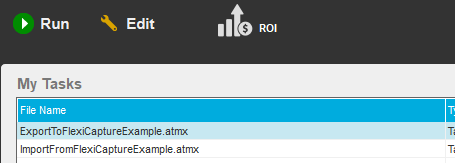
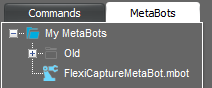 To install the [sample tasks](/flexi-capture/connectors/aa-tasks-examples), copy the **ExportToFlexiCaptureExample.atmx** and **ImportFromFlexiCaptureExample.atmx** files into this folder: %Userprofile%\Documents\Automation Anywhere Files\Automation Anywhere\My Tasks. The task will appear in the **My Tasks** list in the main window of the Automation Anywhere Enterprise Client:
 If, when installing the Automation Anywhere Client, you chose to place the runtime files folder in the **Program Data** folder, be sure to replace %Userprofile%\Documents with %ProgramData% in all the paths in this guide.