> ## Documentation Index
> Fetch the complete documentation index at: https://docs.abbyy.com/llms.txt
> Use this file to discover all available pages before exploring further.
# Configuring the export of data from ABBYY FlexiCapture to Appian
> Set up data export from ABBYY FlexiCapture to Appian by adding connector assemblies, creating an export profile, and mapping fields in your Document Definition.
In FC, documents are processed within projects. FC will identify the type of each document and apply the appropriate Document Definition that has been prepared specifically for that type. Each Document Definition includes one or more export profiles to be used for exporting document images and data.
Before setting up the connector, please make sure that you have the following software installed:
* ABBYY FlexiCapture *(Appian 12)* 12 *(Appian 11)* 11 Project Setup Station (required if you are using ABBYY FlexiCapture Distributed Edition).
or
* Administrator Station (if you are using ABBYY FlexiCapture Standalone Edition).
You will also need access rights to Appian.
*(Appian 12)* If you are using ABBYY FlexiCapture Cloud, you will additionally need the Project Setup Station desktop application in order to configure your project. To open a project uploaded to ABBYY FlexiCapture Cloud, open the Project Setup Station, open the **File** menu, and click **Open Project from Server…**. In the dialog box that open, specify the address of the FC server, specify the name of your company in the **Tenant name** field, select the **Use server authentication** option, and enter your credentials. Next, click **Test Connection** to check that you have entered the correct data. Finally, click **OK** to open the project.
*(Appian 12)*
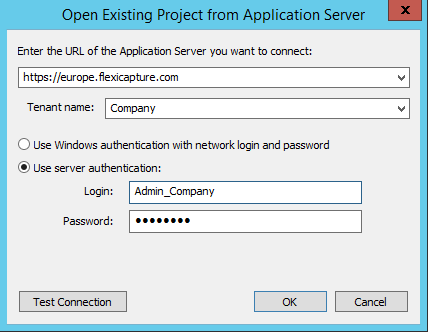 *(Appian 12)* The steps described above can also be used to upload a project from a local folder.
To set up export of data from ABBYY FlexiCapture to Appian, complete the following steps:
* [Add the assemblies](/flexi-capture/connectors/appian/appian-connect-libraries) of the ABBYY FlexiCapture Connector for Appian to your ABBYY FlexiCapture Document Definition.
* [Create an export profile](/flexi-capture/connectors/appian/appian-export-profile) in your Document Definition.
* *(Appian 12)* [Specify export settings and map fields](/flexi-capture/connectors/appian/appian-fields-config).
*(Appian 12)* The steps described above can also be used to upload a project from a local folder.
To set up export of data from ABBYY FlexiCapture to Appian, complete the following steps:
* [Add the assemblies](/flexi-capture/connectors/appian/appian-connect-libraries) of the ABBYY FlexiCapture Connector for Appian to your ABBYY FlexiCapture Document Definition.
* [Create an export profile](/flexi-capture/connectors/appian/appian-export-profile) in your Document Definition.
* *(Appian 12)* [Specify export settings and map fields](/flexi-capture/connectors/appian/appian-fields-config).