> ## Documentation Index
> Fetch the complete documentation index at: https://docs.abbyy.com/llms.txt
> Use this file to discover all available pages before exploring further.
# Creating a workflow for a folder
> Build a Laserfiche folder workflow as a business process using the Find Entries and For Each Entry activities to pass repository documents to FlexiCapture.
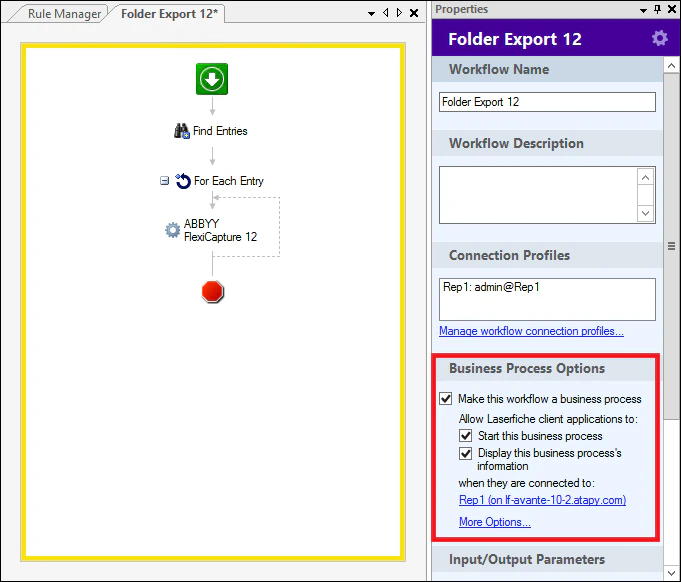
To add a workflow to a repository as a business process, select the following options in the **Business Process Options** property:
* **Make this workflow a business process**.
* **Start this business process**.
* **Display this business process’s information**.
Next, select the repository where you want to add the workflow.
To add an activity to the business process, simply select it in the **Toolbox** pane and drag it onto the **Workflow** tab. In the **Workflow** properties on the right, you can change its **Name** and **Description**. In the **Connection Profiles** property, you can add connections to repositories.
 ## Find Entries
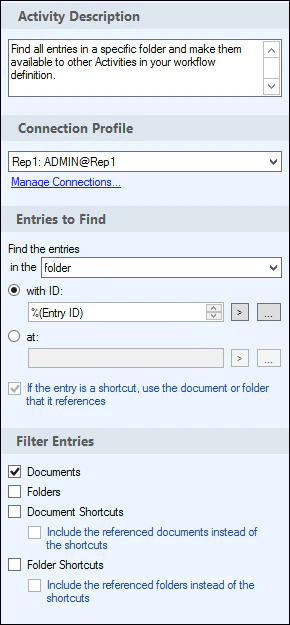
This activity finds Entries based on user-defined parameters and passes them to the next activity in the workflow.
**Entries to Find** – Defines how Entries should be found. In this particular case, documents will be taken from the folders with the **Entry ID** token. The token will be replaced with ID of the input folder.
**Filter Entries** – This filter selects what types of **Entries** to pass to the next activity (documents, folders or both).
For more detailed information, please refer to Online Help.
## Find Entries
This activity finds Entries based on user-defined parameters and passes them to the next activity in the workflow.
**Entries to Find** – Defines how Entries should be found. In this particular case, documents will be taken from the folders with the **Entry ID** token. The token will be replaced with ID of the input folder.
**Filter Entries** – This filter selects what types of **Entries** to pass to the next activity (documents, folders or both).
For more detailed information, please refer to Online Help.
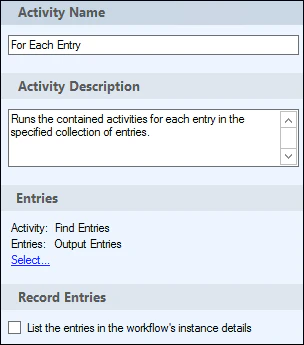
 ## For Each Entry
This activity starts iterating through the **Entries** received. Each **Entry** will go through the activities contained in the body of the iteration cycle.
**Entries** – the data source. In this particular case, **Entries** are received from the **Find Entries** activity.
For more detailed information, please refer to Online Help.
## For Each Entry
This activity starts iterating through the **Entries** received. Each **Entry** will go through the activities contained in the body of the iteration cycle.
**Entries** – the data source. In this particular case, **Entries** are received from the **Find Entries** activity.
For more detailed information, please refer to Online Help.