> ## Documentation Index
> Fetch the complete documentation index at: https://docs.abbyy.com/llms.txt
> Use this file to discover all available pages before exploring further.
# Configuring M-Files metadata structure
> Set up the M-Files metadata structure in M-Files Admin, creating classes, property definitions, and LineItems object types that match your FlexiCapture fields.
To map FC document definition fields to M-Files property definitions, you must first configure metadata structure in M-Files Admin on your M-Files server.
To configure metadata structure for the main document, please do the following:
1. In built-in **Document** object type (or your custom object type) create a class for the main document (i.e. *Invoice*). It will represent the type of documents you will work with.
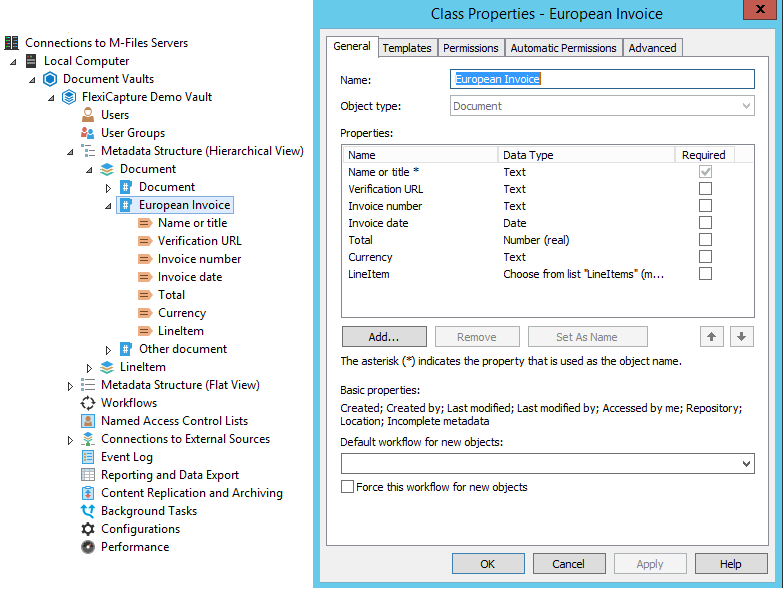 2. In the class properties create and add property definitions that will represent metadata fields. One of these fields should be a **Set as name** field that will be used for setting the document's name.
3. If you are not using the built-in Set as name property "**Name or title**", you should select the **Allow searching for objects by this property** option in the **General** tab.
To configure metadata structure for LineItems, please do the following:
1. Create an object type that will represent one line in LineItems. When you create this object type, a property definition with the same name will be created automatically, allowing you to link objects of this type to the main document object.\
**Important!** The object type you create for LineItems must have only one class. This class will be used to represent LineItems data. You must add property definitions into this class, each corresponding to a table column in the ABBYY FlexiCapture Document Definition.
2. In the class properties create and add property definitions that will represent metadata fields. One of these fields should be a **Set as name** field that will be used for setting the document's name.
3. If you are not using the built-in Set as name property "**Name or title**", you should select the **Allow searching for objects by this property** option in the **General** tab.
To configure metadata structure for LineItems, please do the following:
1. Create an object type that will represent one line in LineItems. When you create this object type, a property definition with the same name will be created automatically, allowing you to link objects of this type to the main document object.\
**Important!** The object type you create for LineItems must have only one class. This class will be used to represent LineItems data. You must add property definitions into this class, each corresponding to a table column in the ABBYY FlexiCapture Document Definition.
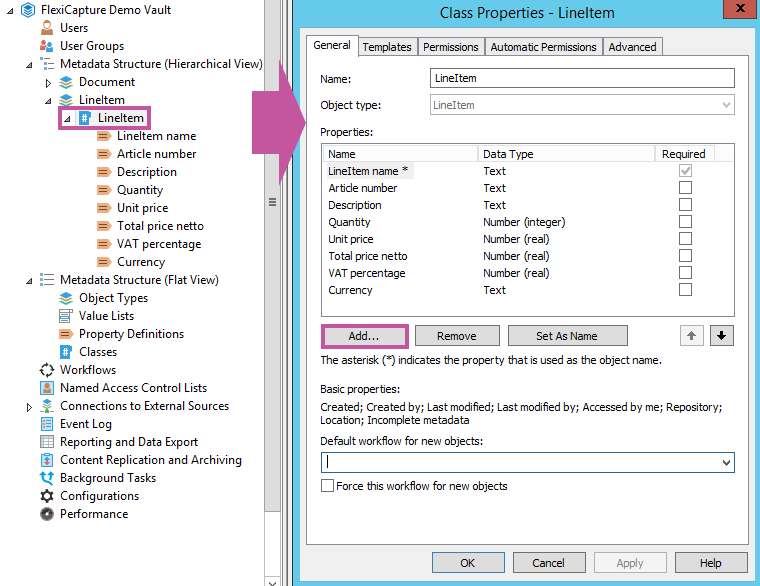 To name objects in this class, select a property definition on the template that must always be filled in. Alternatively, you can create a property definition with an automatic value and define it as the name of the objects (on the **Automatic Values** tab of the **Property Definition** dialog box, select **Set As Name**). For a more clear representation of the data, you can use the **Simple concatenating of properties** option for the **Automatic** value by adding the required properties of the class, created for LineItems, to the placeholders.
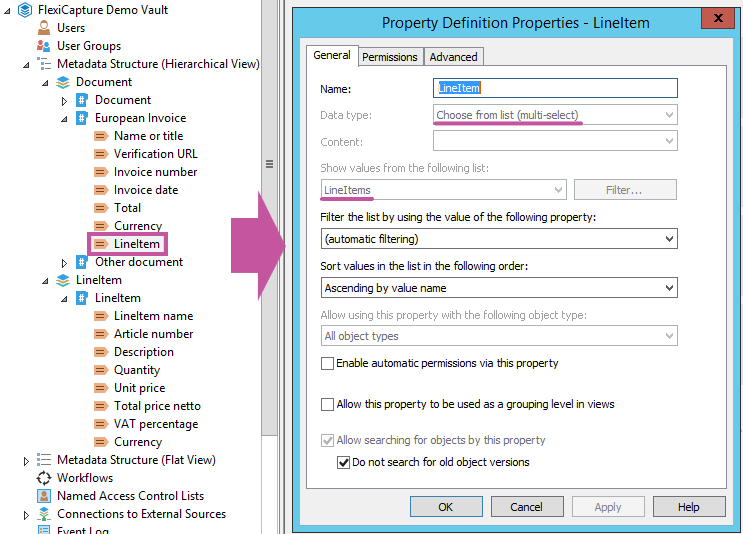
2. In the class created for the main document, create a property definition of the **Choose from list (multi-select)** data type, which will link one **Invoice** object to multiple **Line Item** objects (this property definition must show values from the list of **LineItem** object types).\
**Note:** You can use the property definition that was created automatically when you added the **LineItem** object type.
To name objects in this class, select a property definition on the template that must always be filled in. Alternatively, you can create a property definition with an automatic value and define it as the name of the objects (on the **Automatic Values** tab of the **Property Definition** dialog box, select **Set As Name**). For a more clear representation of the data, you can use the **Simple concatenating of properties** option for the **Automatic** value by adding the required properties of the class, created for LineItems, to the placeholders.
2. In the class created for the main document, create a property definition of the **Choose from list (multi-select)** data type, which will link one **Invoice** object to multiple **Line Item** objects (this property definition must show values from the list of **LineItem** object types).\
**Note:** You can use the property definition that was created automatically when you added the **LineItem** object type.
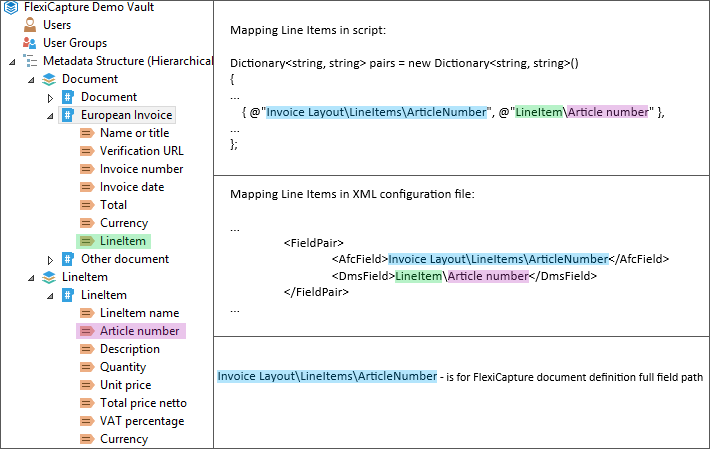
 When mapping Line Items in script or in the XML file, please specify the property definition for **LineItems** name in the main document and property definition in the class for Line Items in the following format:
 When mapping the FC document definition fields to the M-Files property definitions, make sure that data type of each FC document definition field is identical in nature to its chosen M-Files counterpart. Recommended correspondences are listed in the table below:
| **Field data types in ABBYY FlexiCapture** | **Property definition data types in M-Files** |
| ------------------------------------------ | --------------------------------------------- |
| Address | Text |
| Amount of Money | Number (real) or Text |
| Checkmark | Boolean (yes/no) |
| Code | Text |
| Date | Date |
| Name | Text |
| Number | Number (real), Number (integer), or Text |
| Text | Text or Text (multi-line) |
| Time | Time |
When mapping the FC document definition fields to the M-Files property definitions, make sure that data type of each FC document definition field is identical in nature to its chosen M-Files counterpart. Recommended correspondences are listed in the table below:
| **Field data types in ABBYY FlexiCapture** | **Property definition data types in M-Files** |
| ------------------------------------------ | --------------------------------------------- |
| Address | Text |
| Amount of Money | Number (real) or Text |
| Checkmark | Boolean (yes/no) |
| Code | Text |
| Date | Date |
| Name | Text |
| Number | Number (real), Number (integer), or Text |
| Text | Text or Text (multi-line) |
| Time | Time |