> ## Documentation Index
> Fetch the complete documentation index at: https://docs.abbyy.com/llms.txt
> Use this file to discover all available pages before exploring further.
# Creating a set of data transforms in Pega
> Build a Pega data transform that copies captured field values from the FlexiCapture JSON structure into your case properties using Dev Studio.
A [data transform](https://community.pega.com/knowledgebase/articles/data-transforms-models) copies data from the data structure to the properties of a case.
To create a new data transform:
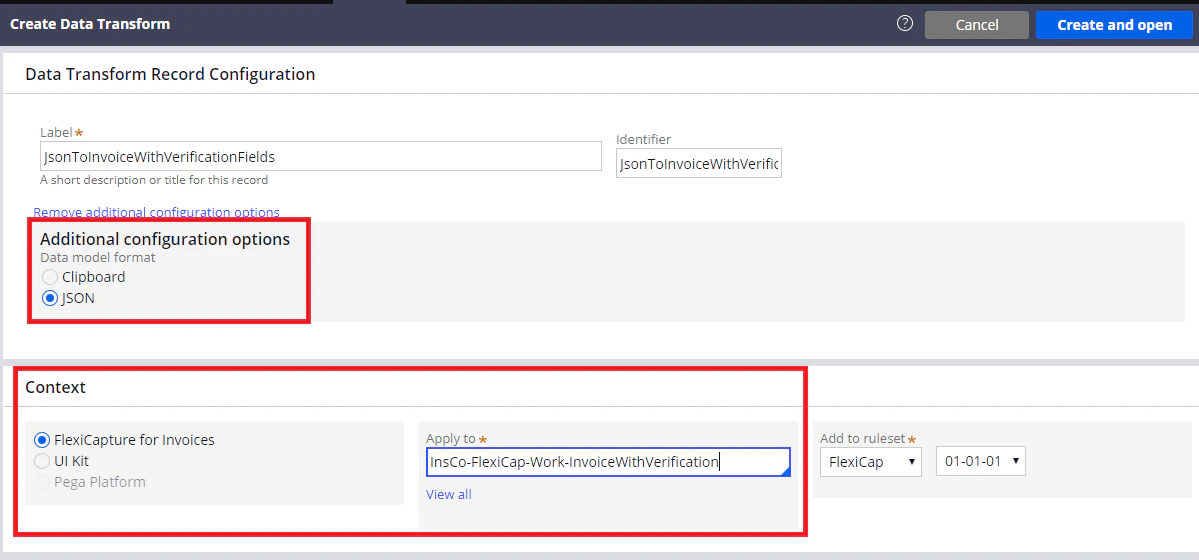
1. In **Dev Studio**, click **Records → Data Model → Data Transform →** **Create**.
2. In the dialog box that opens, fill in the **Label** and **Identifier** fields.
3. In the **Additional configuration options** section, select **JSON**.
4. In the **Apply to** field, replace "Rule-Obj-Activity" with the full name of the case.
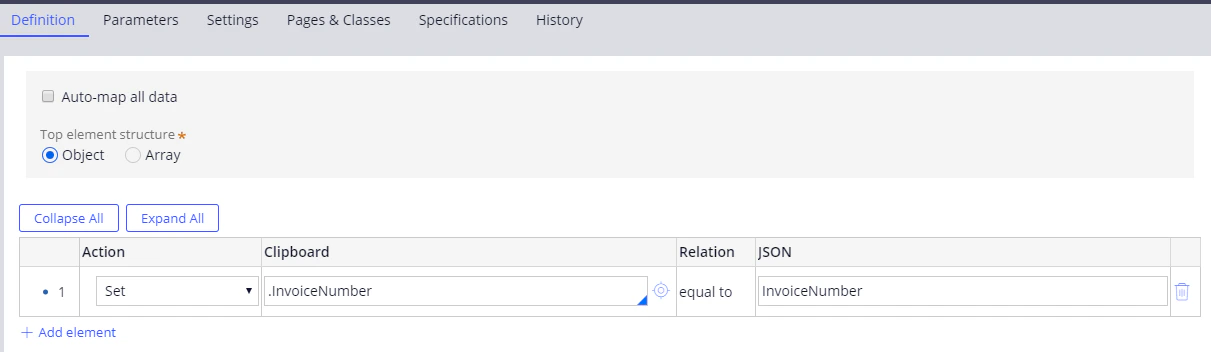
 5. Click **Create and open**. In the dialog box that opens, click **Definition** and connect the case fields to the data that will be received from FC when document processing has finished.