> ## Documentation Index
> Fetch the complete documentation index at: https://docs.abbyy.com/llms.txt
> Use this file to discover all available pages before exploring further.
# FetchingCapturedData
> Set up the FetchingCapturedData Pega activity for a single-document case to call FlexiCapture for the captured JSON and apply the data transform.
For more information about creating activities, see [Creating a Pega activity](/flexi-capture/connectors/pega/pega-activity-create).
## Pages & Classes
| **Page name** | **Class** |
| ------------- | --------- |
| Case | Work- |
## Parameters
| **Name** | **Data type** | **Required** |
| ------------- | ------------- | ------------ |
| CaseId | String | Yes |
| jsonData | String | No |
| executionMode | String | No |
## Steps
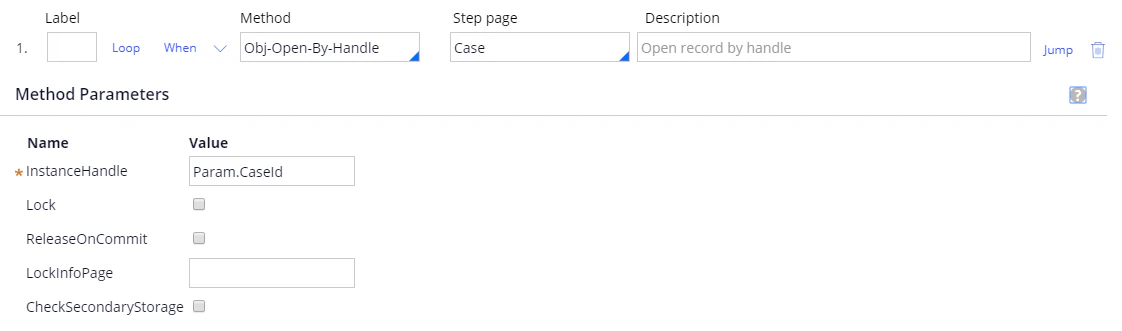
Step 1:
**Method**: Obj-Open-By-Handle.
**Step page**: Case.
**InstanceHandle**: Param.CaseId.
 Step 2:
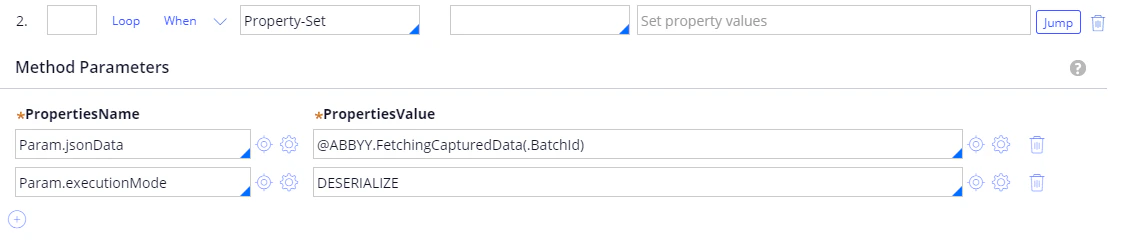
**Method**: Property-Set.
| **PropertiesName** | **PropertiesValue** |
| ------------------- | ------------------------------------- |
| Param.jsonData | @ABBYY.FetchingCapturedData(.BatchId) |
| Param.executionMode | DESERIALIZE |
For more information, see [FetchingCapturedData](/flexi-capture/connectors/pega/pega-func-one-doc#fetchingcaptureddata).
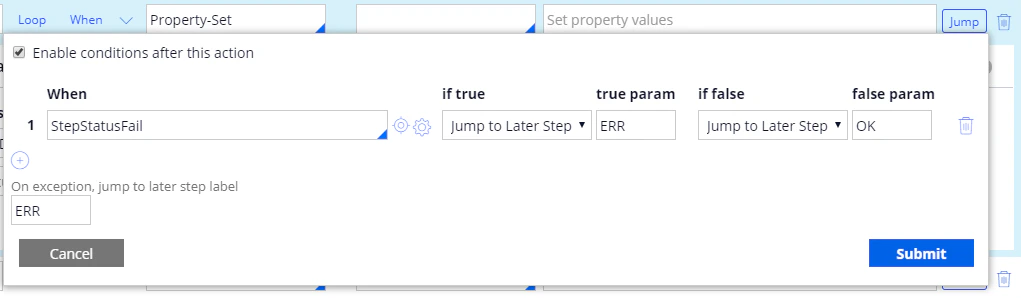
**Jump**:
| **When** | **if true** | **true param** | **if false** | **false param** |
| -------------- | ------------------ | -------------- | ------------------ | --------------- |
| StepStatusFail | Jump to Later Step | ERR | Jump to Later Step | OK |
**On exception, jump to later step label**: ERR.
Step 2:
**Method**: Property-Set.
| **PropertiesName** | **PropertiesValue** |
| ------------------- | ------------------------------------- |
| Param.jsonData | @ABBYY.FetchingCapturedData(.BatchId) |
| Param.executionMode | DESERIALIZE |
For more information, see [FetchingCapturedData](/flexi-capture/connectors/pega/pega-func-one-doc#fetchingcaptureddata).
**Jump**:
| **When** | **if true** | **true param** | **if false** | **false param** |
| -------------- | ------------------ | -------------- | ------------------ | --------------- |
| StepStatusFail | Jump to Later Step | ERR | Jump to Later Step | OK |
**On exception, jump to later step label**: ERR.
 Step 3:
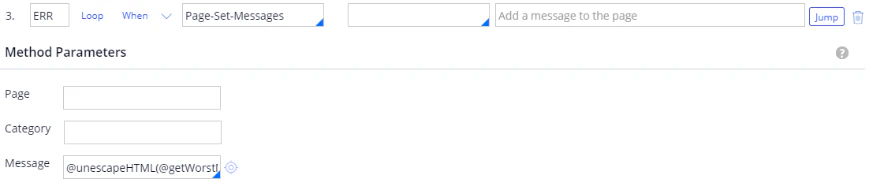
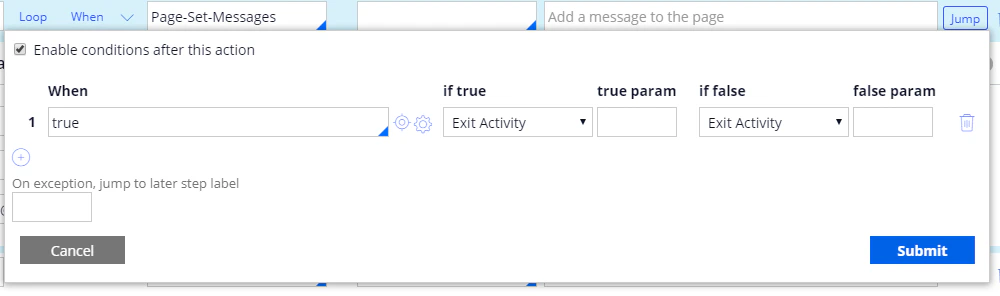
**Label**: ERR.
**Method**: Page-Set-Messages.
**Message**: @unescapeHTML(@getWorstMessageName(tools)).
**Jump**:
| **When** | **if true** | **true param** | **if false** | **false param** |
| -------- | ------------- | -------------- | ------------ | --------------- |
| true | Exit Activity | | | |
For more information, see [unescapeHTML](/flexi-capture/connectors/pega/pega-func-other).
Step 3:
**Label**: ERR.
**Method**: Page-Set-Messages.
**Message**: @unescapeHTML(@getWorstMessageName(tools)).
**Jump**:
| **When** | **if true** | **true param** | **if false** | **false param** |
| -------- | ------------- | -------------- | ------------ | --------------- |
| true | Exit Activity | | | |
For more information, see [unescapeHTML](/flexi-capture/connectors/pega/pega-func-other).
 Step 4:
**Label**: OK.
**Method**: Apply-DataTransform.
**DataTransform**: JsonToInvoiceWithVerificationFields.
**PassParameterPage**: true.
Step 4:
**Label**: OK.
**Method**: Apply-DataTransform.
**DataTransform**: JsonToInvoiceWithVerificationFields.
**PassParameterPage**: true.
 For more information about creating data transforms, see [Creating a data transform for a single-document processing case](/flexi-capture/connectors/pega/pega-dt-one-doc).