> ## Documentation Index
> Fetch the complete documentation index at: https://docs.abbyy.com/llms.txt
> Use this file to discover all available pages before exploring further.

# Creating HTML fragments

> Create the HTML fragments that render the multi-document case interface in Pega, including the Invoice, Banking, Contract, Letter, and Price default fragments.

HTML fragments draw parts of the user interface used for a multi-document processing case.

To create a new fragment, do the following:

1. In **Dev Studio,** click **Records → Technical → HTML Fragment** **→** **Create**.

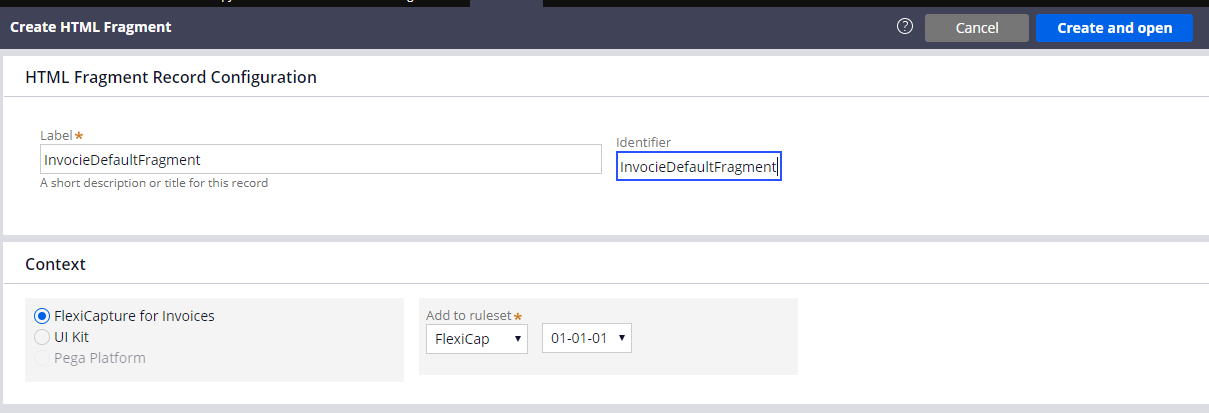
2. In the **Label** and **Identifier** fields, enter the following value: *InvoiceDefaultFragment*.
   <Frame>
     <img src="https://mintcdn.com/abbyy/KEmWsO92hkr7eybZ/images/flexi-capture/connectors/Pega102.png?fit=max&auto=format&n=KEmWsO92hkr7eybZ&q=85&s=298ae9e148f2397191bae099ea38d2e6" alt="Screenshot of the Pega Create HTML Fragment form with InvocieDefaultFragment entered in the Label and Identifier fields and FlexiCapture for Invoices selected as the application context." width="1209" height="413" data-path="images/flexi-capture/connectors/Pega102.png" />
   </Frame>

3. Click **Create and open**.

4. In the **HTML Source** field, enter the code of your fragment. The code to be used for each of the fragments is provided below.

<Note>
  The code of all the fragments can also be found in the connector installation folder at *%Installation Path%\Connector for FlexiCapture as a Service with verification\Samples\Code examples\Configure UI\Multi-document\HTML fragments*.
</Note>

## InvoiceDefaultFragment

```
<head>
    <meta charset="utf-8" />
        <style>
          * {
            box-sizing: border-box;
          }
          .value {
            color: black; 
          }
          .name{
            color: grey;
          }
          .invoicecolumn {
            float: left;
            width: 50%;
            padding: 10px;
            height: 130px; 
          }
          .row:after {
            content: "";
            display: table;
            clear: both;
          }
        </style>
</head>
<h1>
  Invoice <br> <hr>
</h1>
<div class="row">
  <div class="invoicecolumn">
    <p> <span class="name"> Invoice Number </span> <br> <span class="value"> ---- </span> </p>
    <p> <span class="name"> Invoice Date </span> <br> <span class="value"> ---- </span> </p>
  </div>
  <div class="invoicecolumn">
    <p> <span class="name"> Address </span> <br> <span class="value"> ---- </span> </p>
  </div>
</div>
<h4>Invoice Table</h4> 
<table style="width:100%">
  <tr>
    <th>Reference</th>
    <th>Designation</th> 
    <th>Quantity</th>
    <th>Order Number</th>
    <th>Unit Price</th> 
    <th>Total</th>
  </tr>
</table>
<p> <span class="name"> Total </span> <br> <span class="value"> ---- </span> </p>
<p> <span class="name"> Company </span> <br> <span class="value"> ---- </span> </p>
<br>
```

## BankingDefaultFragment

```
<h1>
  Banking <br> <hr>
</h1>
<div class="row">
  <div class="bankingcolumn">
    <p> <span class="name"> Full Name </span> <br> <span class="value"> ---- </span> </p>
    <p> <span class="name"> City </span> <br> <span class="value"> ---- </span> </p>
    <p> <span class="name"> Birth Date </span> <br> <span class="value"> ---- </span> </p>
    <p> <span class="name"> SSN </span> <br> <span class="value"> ---- </span> </p>
  </div>
  <div class="bankingcolumn">
    <p> <span class="name"> Home Phone </span> <br> <span class="value"> ---- </span> </p>
    <p> <span class="name"> Work Phone </span> <br> <span class="value"> ---- </span> </p>
    <p> <span class="name"> Employer Name </span> <br> <span class="value"> ---- </span> </p>
  </div>
</div>
<h4>Address</h4> 
<table style="width:100%">
  <tr>
    <th>Address type</th>
    <th>Country</th> 
    <th>ZIP</th>
    <th>State</th>
    <th>Street</th> 
    <th>City</th>
  </tr>
</table>
<br>
```

## ContractDefaultFragment

```
<h1>
  Contract <br> <hr>
</h1>
<p> <span class="name"> Contract Number </span> <br> <span class="value"> ---- </span> </p>
<p> <span class="name"> Contract Date </span> <br> <span class="value"> ---- </span> </p>
<br>
```

## LetterDefaultFragment

```
<h1>
  Letter <br> <hr>
</h1>
<p> <span class="name"> Letter Date </span> <br> <span class="value"> ---- </span> </p>
<p> <span class="name"> Letter From </span> <br> <span class="value"> ---- </span> </p>
<p> <span class="name"> Letter To </span> <br> <span class="value"> ---- </span> </p>
<br>
```

## PriceDefaultFragment

```
<h1>
  Price <br> <hr>
</h1>
<p> <span class="name"> Company </span> <br> <span class="value"> ---- </span> </p>
<h4>Price Table</h4> 
<table style="width:100%">
  <tr>
    <th>Designation</th>
    <th>Unit Price</th> 
  </tr>
</table>
```
