> ## Documentation Index
> Fetch the complete documentation index at: https://docs.abbyy.com/llms.txt
> Use this file to discover all available pages before exploring further.
# Creating activity steps
> Build the steps and substeps for the Pega CaptureData activity that open the case attachment, call the FlexiCapture library, and apply the JSON Data Transform.
Next, you need to create steps for the *CaptureData* activity.
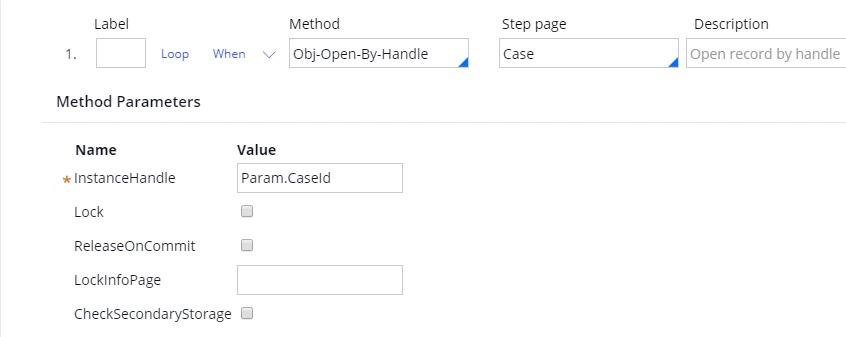
1. On the **Steps** tab, create a new step and for this step: in the **Method** field, select *Obj-Open-By-Handle*; in the **Step page** field, select *Case*; and in the **InstanceHandle** field, type *Param.CaseId.*
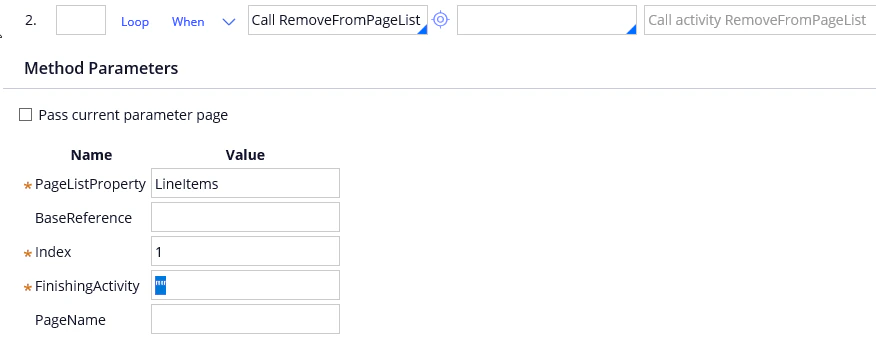
 2. Create a second step and for this step: in the **Method** field, select *Call RemoveFromPageList;* in the **PageListProperty** field, type *LineItems;* in the **Index** field, type **1** (i.e. the index of an empty string that Pega creates by default); and in the **FinishingActivity** field, type *""* (i.e. an empty string).
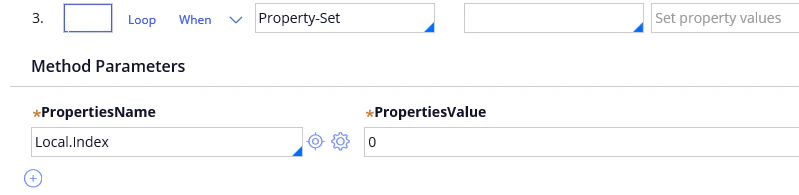
 3. Create a third step and for this step: in the **Method** field, select *Property-Set;* in the **PropertiesName** field, select *Local.Index;* and in the **PropertiesValue** field, type *0*.
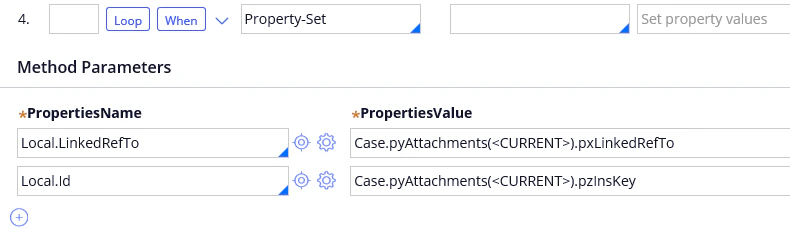
 4. Create a fourth step that will get file identifiers and information about files. For this step, select *Property-Set* in the **Method** field and create the following parameters: *Local.LinkedRefTo* and *Local.Id*.
| **PropertiesName** | **PropertiesValue** |
| ------------------ | -------------------------------------------- |
| Local.LinkedRefTo | Case.pyAttachments(\).pxLinkedRefTo |
| Local.Id | Case.pyAttachments(\).pzInsKey |
4. Create a fourth step that will get file identifiers and information about files. For this step, select *Property-Set* in the **Method** field and create the following parameters: *Local.LinkedRefTo* and *Local.Id*.
| **PropertiesName** | **PropertiesValue** |
| ------------------ | -------------------------------------------- |
| Local.LinkedRefTo | Case.pyAttachments(\).pxLinkedRefTo |
| Local.Id | Case.pyAttachments(\).pzInsKey |
 5. Add the following loop to step 4: *For each element in value list – Case.pyAttachments*.
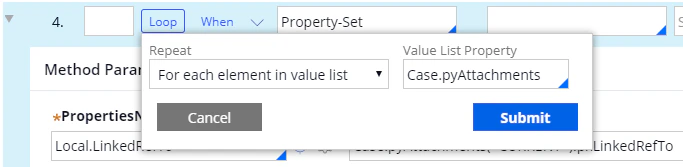 6. Add a *When* condition to step 4 and set this condition to *Local.Index==0.* This will cause the activity to process only the first attachment.
| **When** | **if true** | **if false** |
| -------------- | -------------- | ------------ |
| Local.Index==0 | Continue Whens | Skip Step |
6. Add a *When* condition to step 4 and set this condition to *Local.Index==0.* This will cause the activity to process only the first attachment.
| **When** | **if true** | **if false** |
| -------------- | -------------- | ------------ |
| Local.Index==0 | Continue Whens | Skip Step |
 7. Create six substeps related to step 4 (to create a substep, create a new step and drag into step 4).
* For the first substep: in the **Method** field, select *Obj-Open-By-Handle*; in the **Step page** field, select *Attachment*; and in the **InstanceHandle** field, type *Local.LinkedRefTo.*
7. Create six substeps related to step 4 (to create a substep, create a new step and drag into step 4).
* For the first substep: in the **Method** field, select *Obj-Open-By-Handle*; in the **Step page** field, select *Attachment*; and in the **InstanceHandle** field, type *Local.LinkedRefTo.*
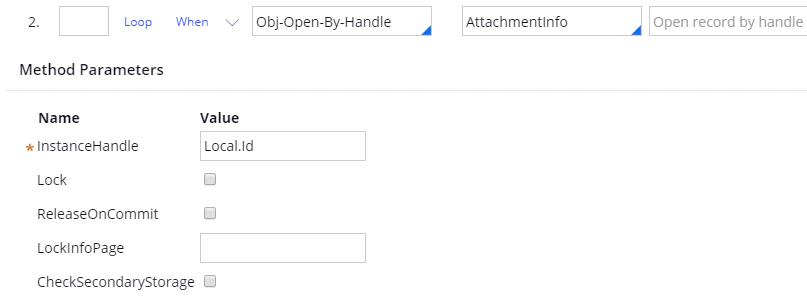
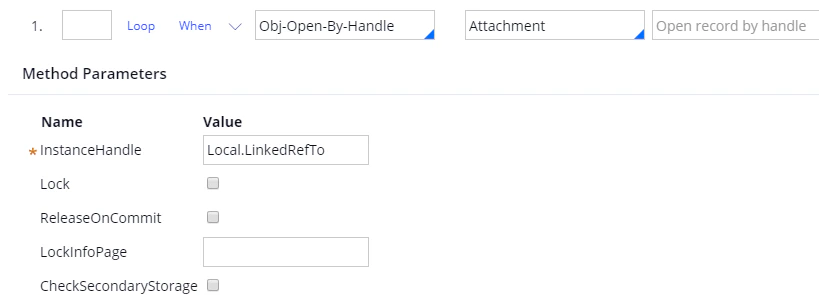 * For the second substep: in the **Method** field, select *Obj-Open-By-Handle*; in the **Step page** field, select *AttachmentInfo*; and in the **InstanceHandle** field, type *Local.Id*.
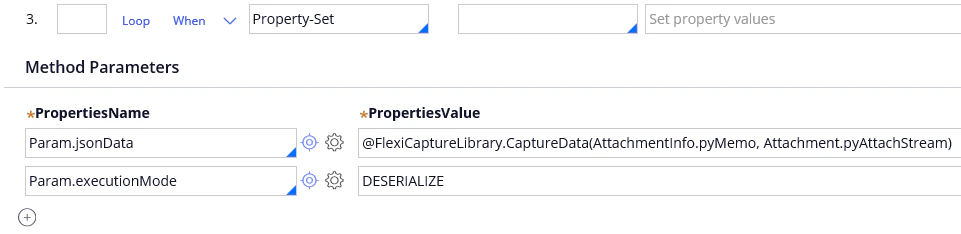
 * For the third substep, select *Property-Set* in the **Method** field and create the following parameter for this method: *Param.jsonData – @FlexiCaptureLlibrary.CaptureData(AttachmentInfo.pyMemo, Attachment.pyAttachStream)* (after the "@" character, specify the name of the library described in the [Installation](/flexi-capture/connectors/pega/pega-installation-2#java) section; after the dot, specify the name of the function). Additionally, create a parameter named *Param.executionMode – DESERIALIZE*.
 Next, click the **Jump** button and add a *StepStatusFail* parameter for error handling.
| **When** | **if true** | **true param** | **if false** | **false param** | **On exception, jump to later step label** |
| -------------- | ------------------ | -------------- | ------------------ | --------------- | ------------------------------------------ |
| StepStatusFail | Jump to Later Step | ERR | Jump to Later Step | OK | ERR |
Next, click the **Jump** button and add a *StepStatusFail* parameter for error handling.
| **When** | **if true** | **true param** | **if false** | **false param** | **On exception, jump to later step label** |
| -------------- | ------------------ | -------------- | ------------------ | --------------- | ------------------------------------------ |
| StepStatusFail | Jump to Later Step | ERR | Jump to Later Step | OK | ERR |
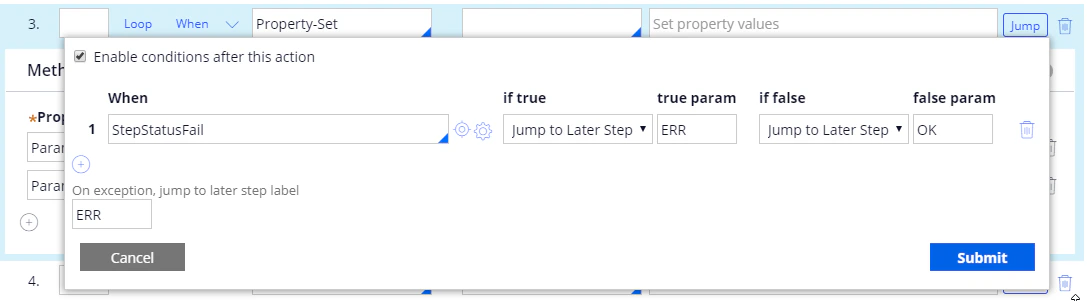 Click **Submit**.
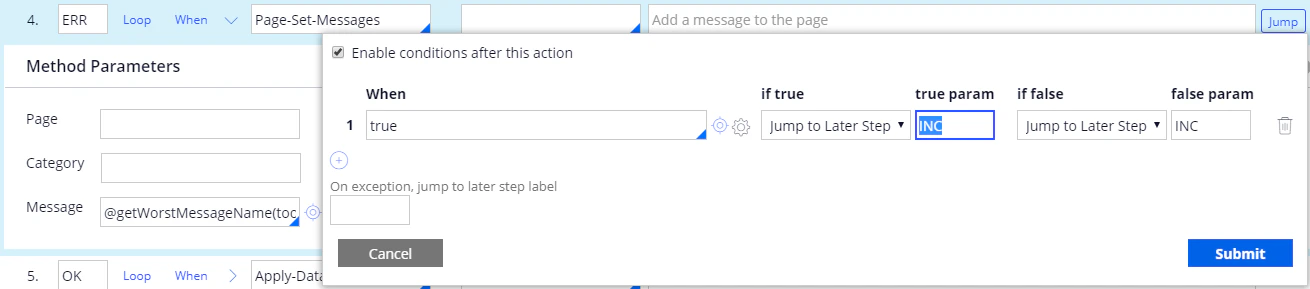
* For the fourth substep, select *Page-Set-Messages* in the **Method** field and specify the following parameter for this method: *Message – @getWorstMessageName(tools).* Mark this substep as *ERR*. Next, you need to prevent the activity from performing any subsequent steps if an error occurs. To do this, click the **Jump** button and add the following parameters:
| **When** | **if true** | **true param** | **if false** | **false param** |
| -------- | ------------------ | -------------- | ------------------ | --------------- |
| true | Jump to Later Step | INC | Jump to Later Step | INC |
Click **Submit**.
* For the fourth substep, select *Page-Set-Messages* in the **Method** field and specify the following parameter for this method: *Message – @getWorstMessageName(tools).* Mark this substep as *ERR*. Next, you need to prevent the activity from performing any subsequent steps if an error occurs. To do this, click the **Jump** button and add the following parameters:
| **When** | **if true** | **true param** | **if false** | **false param** |
| -------- | ------------------ | -------------- | ------------------ | --------------- |
| true | Jump to Later Step | INC | Jump to Later Step | INC |
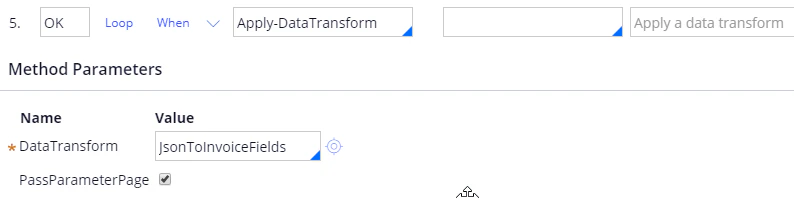
 * For the fifth substep select *Apply-DataTransform* in the **Method** field and specify the following parameter for this method: *DataTransform – JsonToInvoiceFields*. Mark this substep as *OK* and select the *PassParameterPage* option.
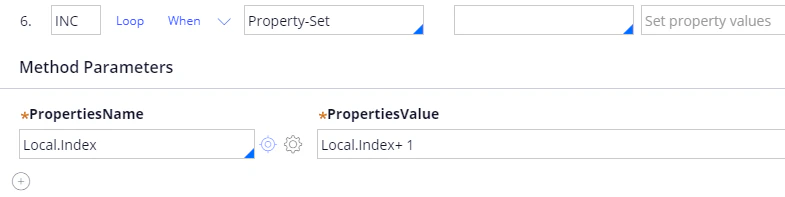
 * For the sixth substep, select *Property-Set* in the **Method** field, create a *Local.Index* parameter for this method, and set this parameter to *Local.Index+ 1*. Mark this substep as *INC*.
 At this point, your list of steps and substeps should look as follows:
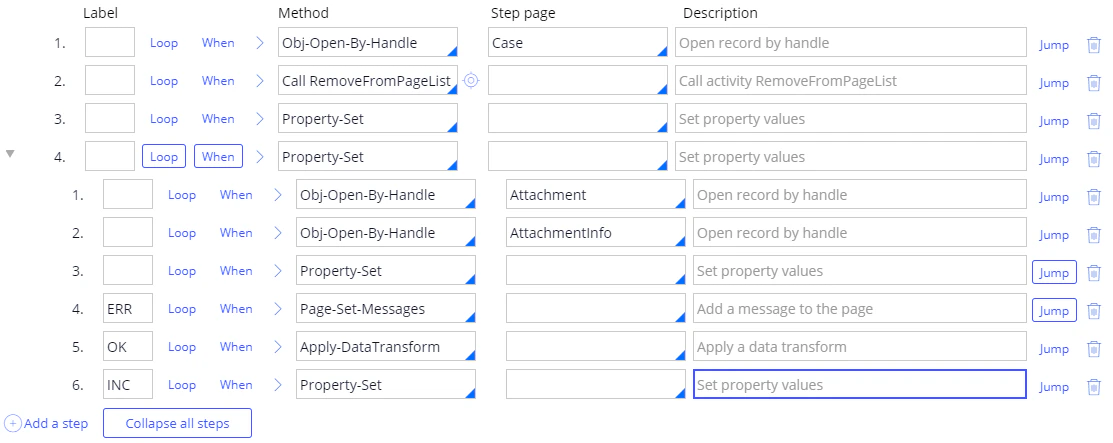 8. Click **Save**.
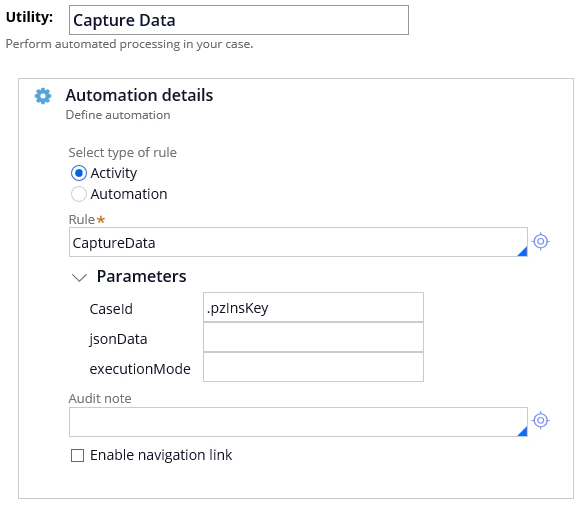
9. Open the properties of the **Utility** item, select *CaptureData* in the **Rule** field, and set the **CaseId** parameter to *.pzInsKey.*
8. Click **Save**.
9. Open the properties of the **Utility** item, select *CaptureData* in the **Rule** field, and set the **CaseId** parameter to *.pzInsKey.*
 10. Save your changes.