> ## Documentation Index
> Fetch the complete documentation index at: https://docs.abbyy.com/llms.txt
> Use this file to discover all available pages before exploring further.
# Installing the Abbyy.Activities.UiPath.FlexiCaptureActivities activity package
> Place the FlexiCapture NuGet packages in a Robot or Orchestrator activity feed and add them as process dependencies in UiPath Studio.
## Installing an activity package for working with an existing UiPath process
All UiPath processes consist of various activities. When a process is launched by a Robot or opened in UiPath Studio, a search is carried out in the available activity feeds for the relevant activities, which are then downloaded.
To open a sample ABBYY FlexiCapture 12 Processor process, place the **A.FlexiCapture.WebApi.Client.nupkg** and **Abbyy.Activities.UiPath.FlexiCaptureActivities.nupkg** packages in a Robot-accessible Activity Feed. To do this:
* Place them in the **%LocalAppData%\UiPath\app-xx.x.x\Packages** folder if you are using UiPath Community Edition (where xx.x.x denotes the UiPath version number).
* Place them in the **C:\Program Files (x86)\UiPath\Studio\Packages** folder if you are using UiPath Enterprise Edition.
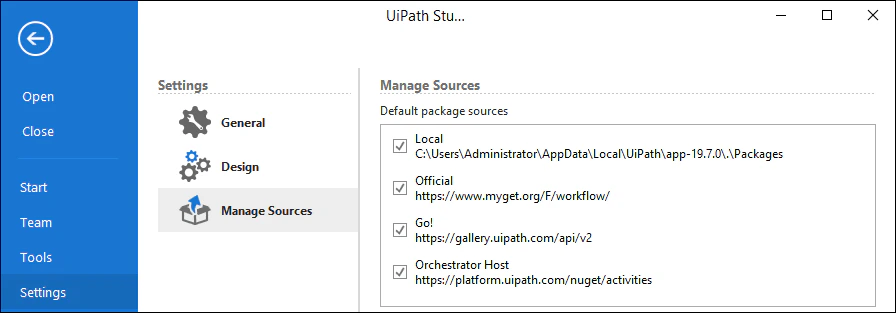
To find out the path to the Robot's local feed, open UiPath Studio and open the **Settings** tab. Then, select **Local** in **Manage Sources**.
 To decrease the time needed to update a package for all Robots, place it in the Orchestrator's Activity Feed (in this case, the packages will become available for all Robots connected to Orchestrator). To do this:
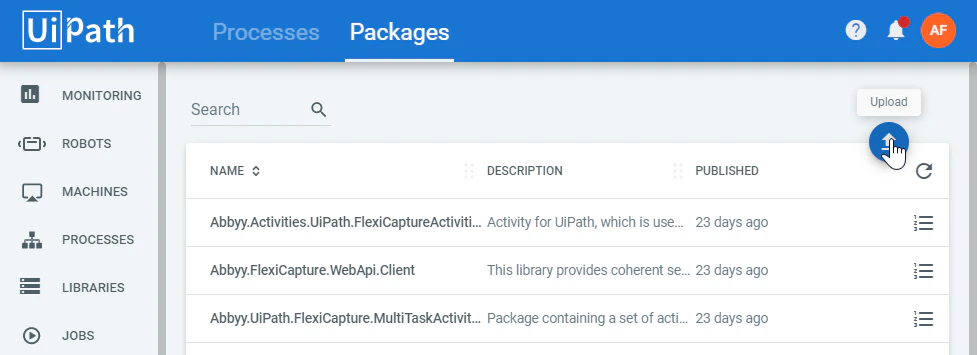
* If you are using UiPath Community Edition, go to the cloud Orchestrator and select **Processes →** **Packages**. Then click **Upload** a upload the **Abbyy.FlexiCapture.WebApi.Client.nupkg** and **Abbyy.Activities.UiPath.FlexiCaptureActivities.nupkg** packages one after another.
To decrease the time needed to update a package for all Robots, place it in the Orchestrator's Activity Feed (in this case, the packages will become available for all Robots connected to Orchestrator). To do this:
* If you are using UiPath Community Edition, go to the cloud Orchestrator and select **Processes →** **Packages**. Then click **Upload** a upload the **Abbyy.FlexiCapture.WebApi.Client.nupkg** and **Abbyy.Activities.UiPath.FlexiCaptureActivities.nupkg** packages one after another.
 * If you are using UiPath Enterprise Edition, copy the packages to the Orchestrator's Activity Feed (by default, it is located in **C:\Program Files (x86)\UiPath\Orchestrator\NuGetPackages\Activities** on a machine that has Orchestrator installed) or download the packages on the **Libraries** tab in the Orchestrator web application.
For more information about Activities Feeds, see [UiPath documentation](https://robot.uipath.com/docs/about-the-activities-feed).
## Adding an activity package to a new process
To use the **Capture Data** activity in a new process or add it to an existing one, you need to include the **Abbyy.Activities.UiPath.FlexiCaptureActivities.nupkg** activity package in the dependencies of the process. To do this:
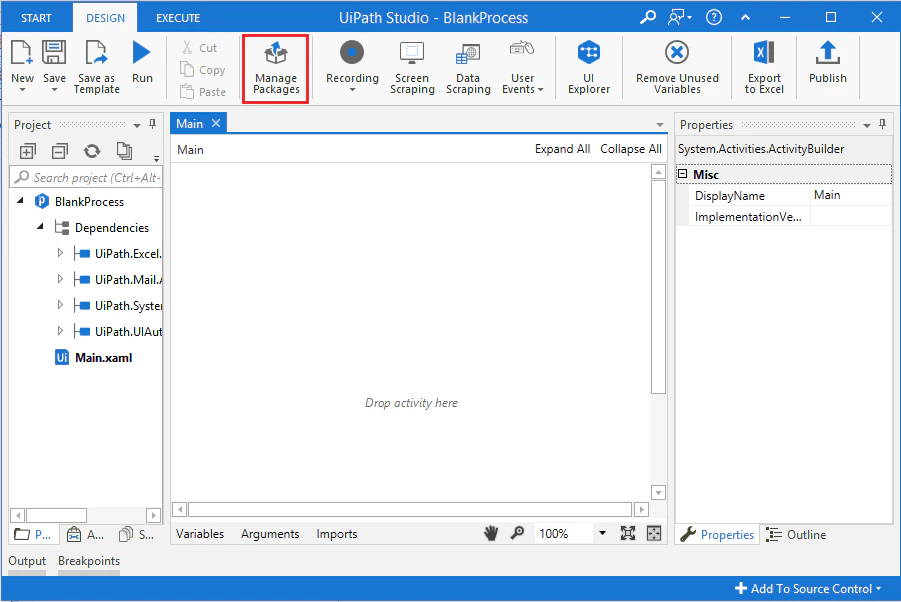
1. Open an existing process in UiPath Studio and click **Manage Packages**.
* If you are using UiPath Enterprise Edition, copy the packages to the Orchestrator's Activity Feed (by default, it is located in **C:\Program Files (x86)\UiPath\Orchestrator\NuGetPackages\Activities** on a machine that has Orchestrator installed) or download the packages on the **Libraries** tab in the Orchestrator web application.
For more information about Activities Feeds, see [UiPath documentation](https://robot.uipath.com/docs/about-the-activities-feed).
## Adding an activity package to a new process
To use the **Capture Data** activity in a new process or add it to an existing one, you need to include the **Abbyy.Activities.UiPath.FlexiCaptureActivities.nupkg** activity package in the dependencies of the process. To do this:
1. Open an existing process in UiPath Studio and click **Manage Packages**.
 2. Select **Settings** and find the local **Source** in the **Default package sources** list.
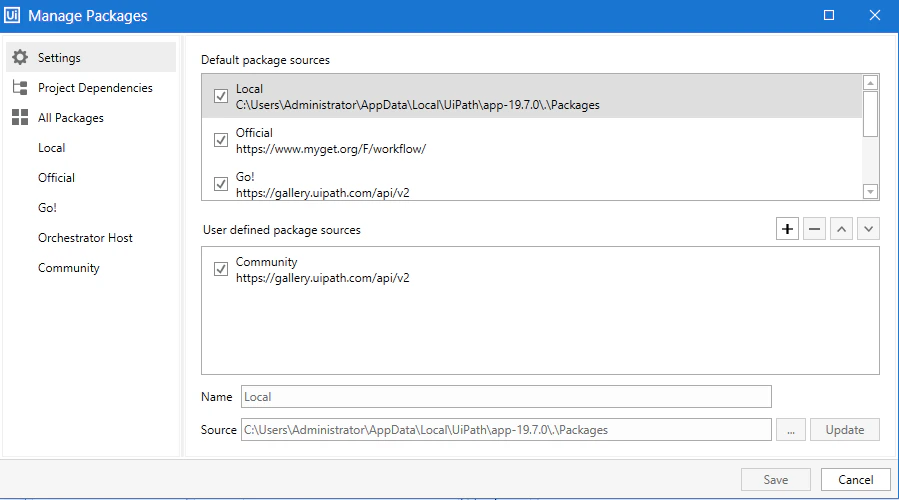 3. Copy the **Abbyy.FlexiCapture.WebApi.Client.nupkg** and **Abbyy.Activities.UiPath.FlexiCaptureActivities.nupkg** packages to the folder, the path to which is specified in **Default local package source**. Alternatively, place these packages in any other available source from the list.
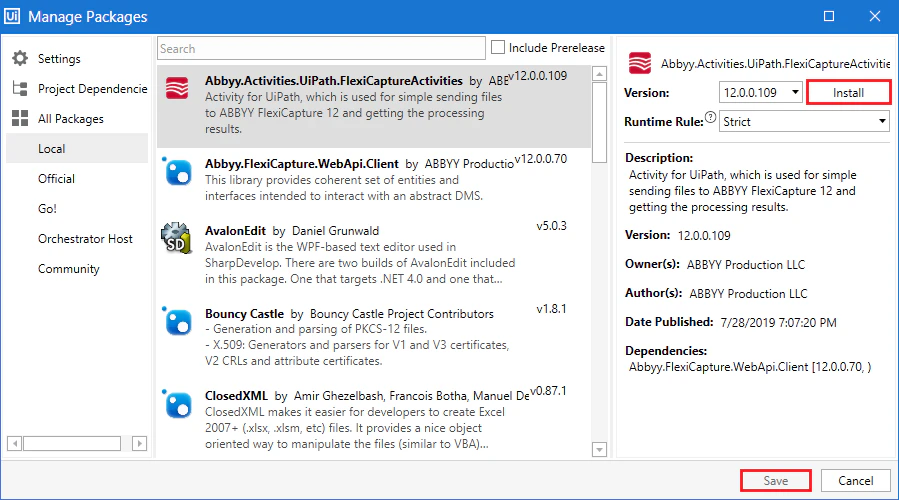
4. Go to **Manage Packages** and navigate to **All packages → Local**. Then, select **Abbyy.Activities.UiPath.FlexiCaptureActivities** in the activity list.
5. Click **Install**, and then click **Save**.
3. Copy the **Abbyy.FlexiCapture.WebApi.Client.nupkg** and **Abbyy.Activities.UiPath.FlexiCaptureActivities.nupkg** packages to the folder, the path to which is specified in **Default local package source**. Alternatively, place these packages in any other available source from the list.
4. Go to **Manage Packages** and navigate to **All packages → Local**. Then, select **Abbyy.Activities.UiPath.FlexiCaptureActivities** in the activity list.
5. Click **Install**, and then click **Save**.
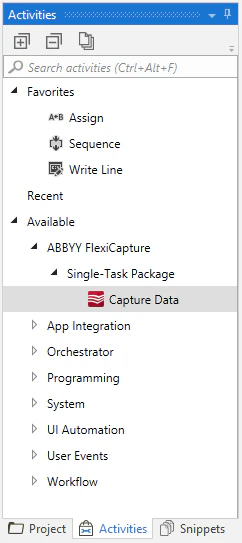
 After that, the **Capture Data** activity will appear in the available activities list: