> ## Documentation Index
> Fetch the complete documentation index at: https://docs.abbyy.com/llms.txt
> Use this file to discover all available pages before exploring further.
# Configuring ABBYY FlexiCapture project workflow
> Select the right ABBYY FlexiCapture workflow for WinActor on the Workflow tab: an Unattended schema for hands-off processing or Advanced with verification.
To configure a project workflow in ABBYY FlexiCapture:
1. On the Project Setup Station, open a project, click **Project → Project Properties...**, and make sure that the **Export root path** on the **General** tab is empty.
2. Open the **Workflow** tab. Depending on your usage scenario, select the appropriate workflow type.
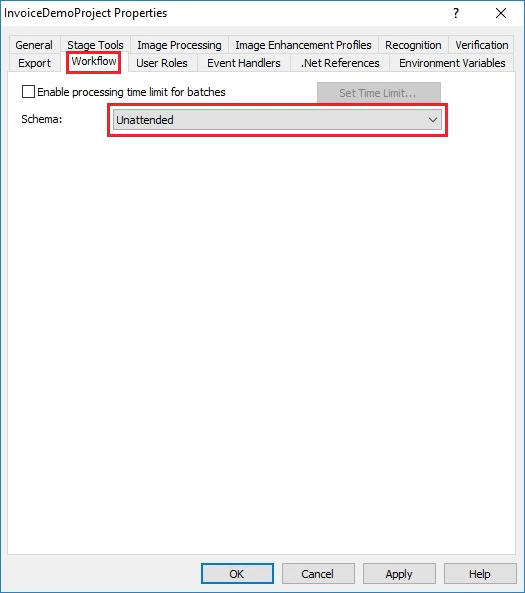
* If you intend to process documents in unattended mode, select **Unattended** from the Schema drop-down list and click **OK**.
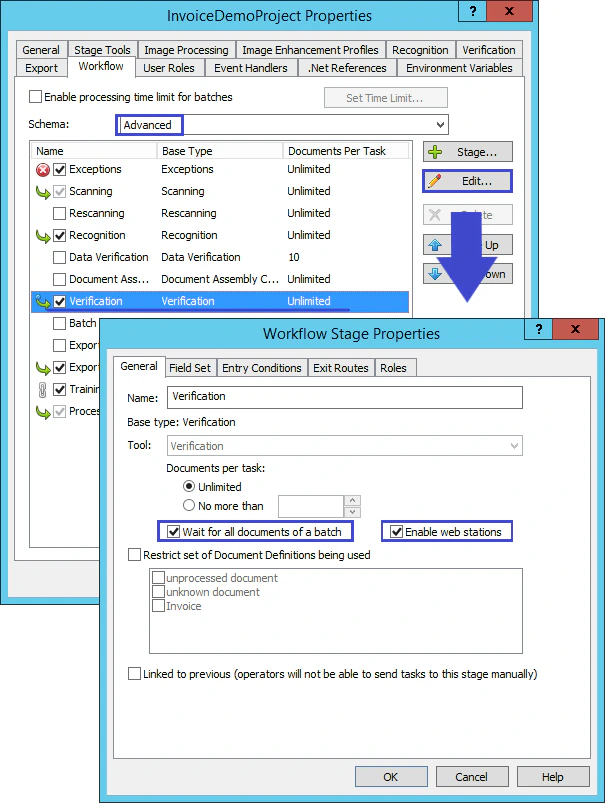
 * If you need recognition results to be verified prior to export, select **Advanced** from the **Schema** drop-down list. Next, select **Verification** and click the **Edit…** button. In the **Workflow Stage Properties** dialog box, select **Wait for all documents of a batch** and **Enable web stations** and click **OK**.