> ## Documentation Index
> Fetch the complete documentation index at: https://docs.abbyy.com/llms.txt
> Use this file to discover all available pages before exploring further.
# Installation
> Install the ABBYY FlexiCapture Connector for WinActor by registering the dynamic libraries with RegAsm and deploying the ABBYY_FlexiCapture_12 UMS5 scenarios.
To install the connector, you need to install the dynamic libraries and deploy the scenarios supplied in the installation package.
To be able to install the connector, you must have Windows administrator privileges.
The connector can only be installed on a machine that has WinActor Office Robot installed.
To install the dynamic libraries, complete the following steps:
1. Run the **ABBYY\_FlexiCapture\_Connector\_for\_WinActor.exe** file in order to unpack the distribution package.
2. Open the command prompt on your computer as administrator. Use the *change directory* command to navigate to the **Bin** folder containing the dynamic libraries (its default location is C:\Program Files (x86)\ABBYY FlexiCapture Connector for WinActor\Bin):
```
cd "C:\Program Files (x86)\ABBYY FlexiCapture Connector for WinActor\Bin"
```
3. Type in the following command to register the library:
```
%SystemRoot%\Microsoft.NET\Framework\v4.0.30319\RegAsm.exe Abbyy.WinActor.FlexiCapture.Scenarios.dll /codebase
```
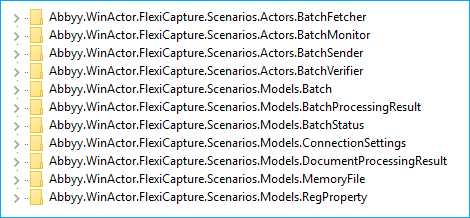
If registration is successful, you will see the following message in the command prompt: "Types registered successfully." Also, the following keys will be added to the HKEY\_LOCAL\_MACHINE\SOFTWARE\Classes registry key:
 To deploy the scenarios, complete the following steps:
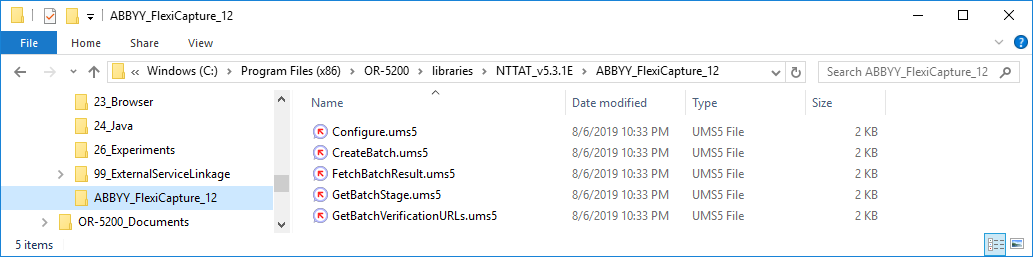
1. In the folder containing the WinActor libraries (its default location is C:\Program Files (x86)\OR-5200\libraries\NTTAT\_v5.3.1E), create a separate folder for the FC custom libraries and name it **ABBYY\_FlexiCapture\_12**.
2. Copy the following UMS5 files from the **ABBYY\_FlexiCapture\_12 user libraries** folder in the distribution package:
* Configure.ums5
* CreateBatch.ums5
* FetchBatchResult.ums5
* GetBatchStage.ums5
* GetBatchVerificationURLs.ums5
To deploy the scenarios, complete the following steps:
1. In the folder containing the WinActor libraries (its default location is C:\Program Files (x86)\OR-5200\libraries\NTTAT\_v5.3.1E), create a separate folder for the FC custom libraries and name it **ABBYY\_FlexiCapture\_12**.
2. Copy the following UMS5 files from the **ABBYY\_FlexiCapture\_12 user libraries** folder in the distribution package:
* Configure.ums5
* CreateBatch.ums5
* FetchBatchResult.ums5
* GetBatchStage.ums5
* GetBatchVerificationURLs.ums5
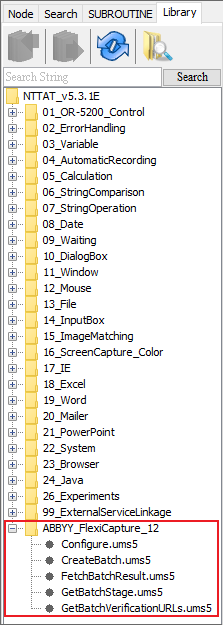
 3. Open the **Flowchart** window, click the **Library** tab, and then click the **Update Library** button. The **ABBYY\_FlexiCapture\_12** libraries should now appear in the library tree.
 This concludes the installation process.
If you want to delete the connector:
1. Open the command prompt on your computer. Use the *change directory* command to navigate to the **Bin** folder containing the dynamic libraries (its default location is C:\Program Files (x86)\ABBYY FlexiCapture Connector for WinActor\Bin):
```
cd "C:\Program Files (x86)\ABBYY FlexiCapture Connector for WinActor\Bin"
```
2. Type in the following command to unregister the library:
```
%SystemRoot%\Microsoft.NET\Framework\v4.0.30319\RegAsm.exe Abbyy.WinActor.FlexiCapture.Scenarios.dll /u
```
If unregistration is successful, you will see the following message in the command prompt: "Types un-registered successfully."
3. Delete the **ABBYY FlexiCapture Connector for WinActor** folder from the folder into which the connector distribution package was unpacked.
4. Delete the **ABBYY\_FlexiCapture\_12** folder from the folder containing the WinActor Office Robot libraries (its default location is C:\Program Files (x86)\OR-5200\libraries\NTTAT\_v5.3.1E).
This concludes the installation process.
If you want to delete the connector:
1. Open the command prompt on your computer. Use the *change directory* command to navigate to the **Bin** folder containing the dynamic libraries (its default location is C:\Program Files (x86)\ABBYY FlexiCapture Connector for WinActor\Bin):
```
cd "C:\Program Files (x86)\ABBYY FlexiCapture Connector for WinActor\Bin"
```
2. Type in the following command to unregister the library:
```
%SystemRoot%\Microsoft.NET\Framework\v4.0.30319\RegAsm.exe Abbyy.WinActor.FlexiCapture.Scenarios.dll /u
```
If unregistration is successful, you will see the following message in the command prompt: "Types un-registered successfully."
3. Delete the **ABBYY FlexiCapture Connector for WinActor** folder from the folder into which the connector distribution package was unpacked.
4. Delete the **ABBYY\_FlexiCapture\_12** folder from the folder containing the WinActor Office Robot libraries (its default location is C:\Program Files (x86)\OR-5200\libraries\NTTAT\_v5.3.1E).