> ## Documentation Index
> Fetch the complete documentation index at: https://docs.abbyy.com/llms.txt
> Use this file to discover all available pages before exploring further.
# Troubleshooting
> Troubleshoot the WinActor UsageExample scenario by enabling logging in the Abbyy.FlexiCapture.WebApi.Client.dll library and sending the log to ABBYY support.
If you encounter an error when running the **UsageExample** scenario but there are no entries for the error in the WinActor OR-5200 log, use a script to enable logging by the **Abbyy.FlexiCapture.WebApi.Client.dll** library:
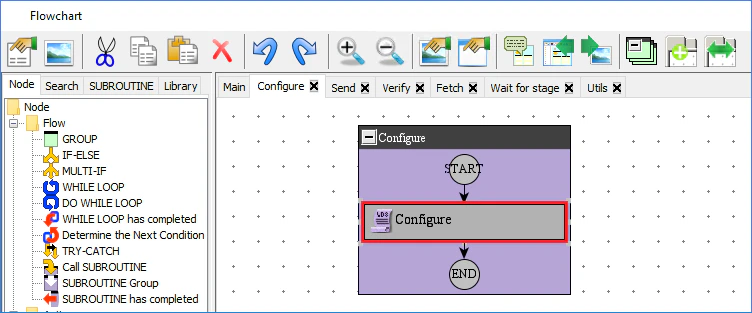
1. Double-click the **Configure** user library in the workspace of the **Flowchart** window.
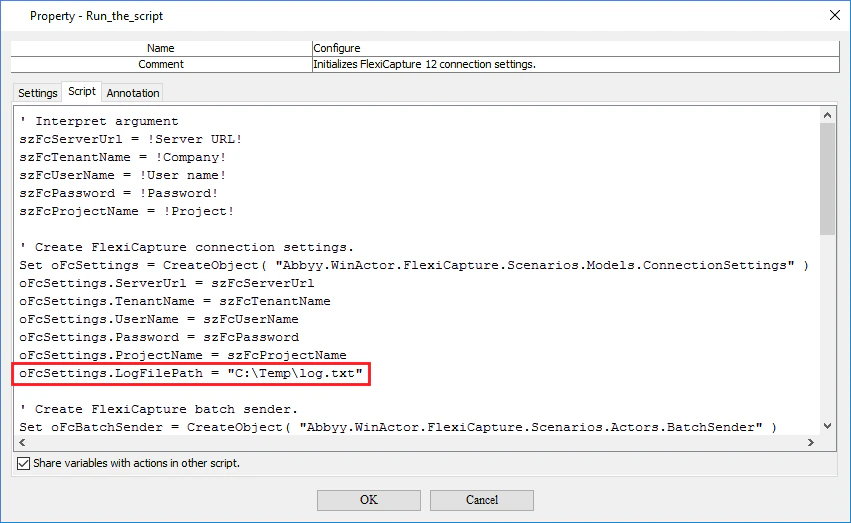
 2. In the **Property - Run the script** window, click the **Script** tab and add the following string to the "Create FlexiCapture connection settings" section of the script:
```
oFcSettings.LogFilePath = "C:\Temp\log.txt"
```
2. In the **Property - Run the script** window, click the **Script** tab and add the following string to the "Create FlexiCapture connection settings" section of the script:
```
oFcSettings.LogFilePath = "C:\Temp\log.txt"
```
 3. Click **OK** to save the changes.
4. Click **Run** to run the scenario. After you run the scenario, a log file will be created here: C:\Temp\log.txt. You can change the location of the log file if necessary.
5. Send the log file to [ABBYY technical support](https://www.abbyy.com/en-us/support/contacts).
3. Click **OK** to save the changes.
4. Click **Run** to run the scenario. After you run the scenario, a log file will be created here: C:\Temp\log.txt. You can change the location of the log file if necessary.
5. Send the log file to [ABBYY technical support](https://www.abbyy.com/en-us/support/contacts).