> ## Documentation Index
> Fetch the complete documentation index at: https://docs.abbyy.com/llms.txt
> Use this file to discover all available pages before exploring further.
# Trade-off between precision and recall
> Balance precision and recall in ABBYY FlexiCapture classification: how each metric is calculated and when to choose High precision or High recall settings.
Cases where a classifier fails to classify a document correctly fall into two categories:
1. The classifier assigns the wrong class to a document, for example, a class A page is classified as class B.
2. The classifier fails to assign any class to a document.
These two categories of error characterize the quality of document classification and are usually measured as *precision* and *recall*.
* **Precision** is calculated by dividing the number of documents that were correctly assigned a particular class by the total number of documents that were assigned that class.
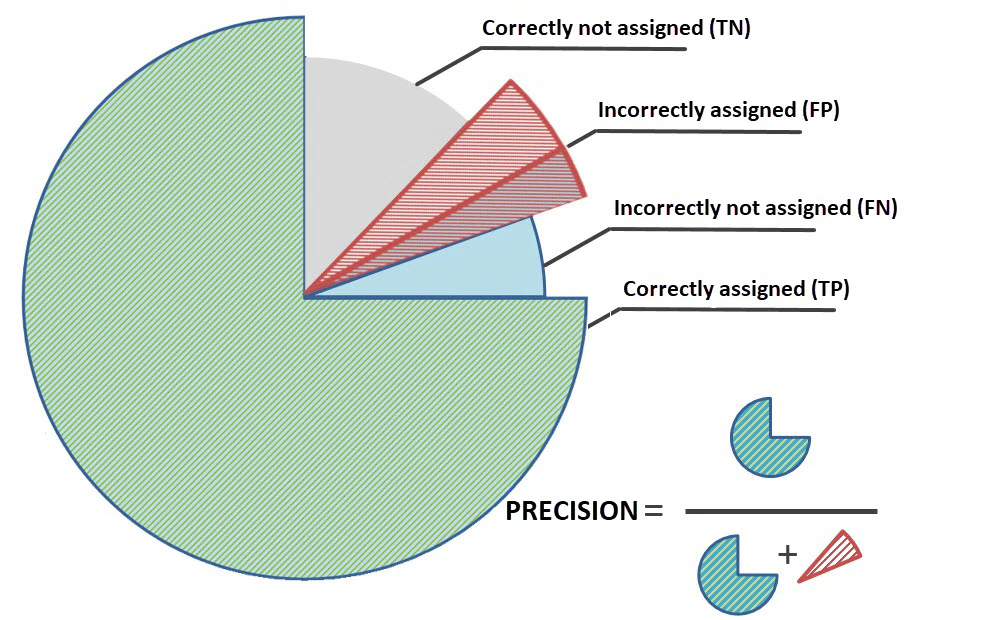 * **Recall** is calculated by dividing the number of documents that were correctly assigned a particular class by the total number of documents of that class.
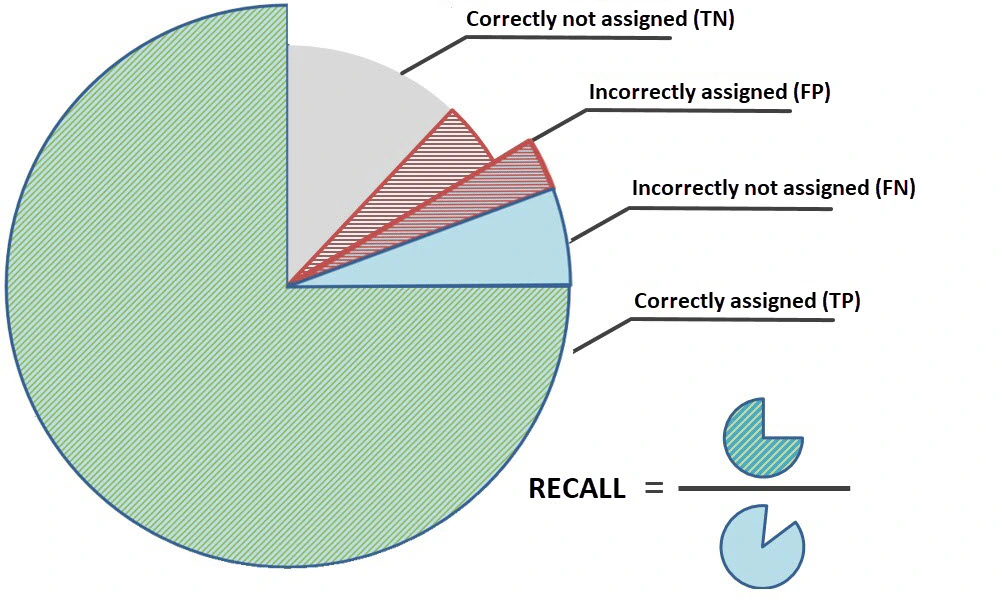 You can adjust classification settings to prioritize recall or precision.
## Prioritize precision
Use the **High precision** setting if the number of documents assigned to the wrong class must be as low as possible (and if it is acceptable for some of the documents to remain unclassified).
Example
A company needs to classify invoices and contracts so that they can be sent to departments responsible for handling each class of document.
If ABBYY FlexiCapture classifies an invoice incorrectly, that invoice will not make it to the right department and will not be paid. If ABBYY FlexiCapture does not classify the invoice at all, the invoice can be classified manually and sent to the right department.
In this example, it is important to detect the class of a document as precisely as possible.
## Prioritize recall
Use the **High recall** setting if the number of documents that are not assigned to any class must be as low as possible (and if it is acceptable to have some of the documents assigned to the wrong class).
Example
A company needs to identify and process a certain class of loan documents in a pile of various other loan documents.
If ABBYY FlexiCapture fails to assign a class to a relevant document, that document will not be processed.
The company can prevent the processing of documents that were assigned the wrong class by applying a FlexiLayout, by using validation rules, or by correcting the error manually.
In this example, it is important to recall as many relevant documents as possible.
By default, the **Recall and precision balance** is set to **balanced**.
You can adjust classification settings to prioritize recall or precision.
## Prioritize precision
Use the **High precision** setting if the number of documents assigned to the wrong class must be as low as possible (and if it is acceptable for some of the documents to remain unclassified).
Example
A company needs to classify invoices and contracts so that they can be sent to departments responsible for handling each class of document.
If ABBYY FlexiCapture classifies an invoice incorrectly, that invoice will not make it to the right department and will not be paid. If ABBYY FlexiCapture does not classify the invoice at all, the invoice can be classified manually and sent to the right department.
In this example, it is important to detect the class of a document as precisely as possible.
## Prioritize recall
Use the **High recall** setting if the number of documents that are not assigned to any class must be as low as possible (and if it is acceptable to have some of the documents assigned to the wrong class).
Example
A company needs to identify and process a certain class of loan documents in a pile of various other loan documents.
If ABBYY FlexiCapture fails to assign a class to a relevant document, that document will not be processed.
The company can prevent the processing of documents that were assigned the wrong class by applying a FlexiLayout, by using validation rules, or by correcting the error manually.
In this example, it is important to recall as many relevant documents as possible.
By default, the **Recall and precision balance** is set to **balanced**.