> ## Documentation Index
> Fetch the complete documentation index at: https://docs.abbyy.com/llms.txt
> Use this file to discover all available pages before exploring further.
# Batch window
> Manage image batches in the Batch window of ABBYY FlexiLayout Studio: create and edit batches, move pages, filter columns, and review matching results.
The **Batch** window contains a table of images collected for creating or fine-tuning a FlexiLayout. Its columns show information about the operations performed on each image.
## Work with multiple batches
The same FlexiLayout/Classifier is used for all the images in all the batches in the project.
ABBYY FlexiLayout Studio lets you work with multiple batches within one project. This lets you put images from different sources into groups and work with each group separately.
By default, every new project contains one batch. You can add, remove, and edit batches, provided that there remains at least one batch in the project.
### Create or edit a batch
To create a new batch or edit an existing one, open the **Batches** dialog box in one of the following ways:
* Click **Batches...** on the **Batch** menu.
* Click the **Batches** button in the **Batch** pane.
The **Batches** dialog box lists all existing batches with the following information about each one:
| Column | Description |
| --------------- | -------------------------------------------------------------------------------------------------------------------------------- |
| **Name** | The name of the batch. |
| **Path** | The name of the folder that contains information about the batch (the full path to this folder appears in the batch properties). |
| **Comment** | User comments. |
| **Total Pages** | The number of pages in the batch. |
| **Created** | The date and time when the batch was created. |
| **Modified** | The date and time of the last change to the batch. |
### Batch properties
To open the properties dialog box of a batch, click the **Edit** button.
The **General** tab contains the following information:
| Field | Description |
| ------------------- | --------------------------------------------------------------------------------------------------------------- |
| **Name** | The name of the batch. |
| **Comment** | User comments. |
| **Batch path** | Full path to the folder that contains all information about the batch. You can copy this path to the Clipboard. |
| **Pre-recognition** | The batch's [pre-recognition parameters](/flexi-capture/fls/batch/prerecognition-param). |
By default, project settings are applied to all the batches in the project.
Batches can also have [named parameters](/flexi-capture/fls/settings/named-param), which you can create and edit on the **Named parameters** tab of the properties dialog of a batch.
### Switch between batches and move pages
You can switch between batches in one of the following ways:
* Use the drop-down list in the **Batch** pane.
* Select a batch in the **Batches** dialog box.
You can also move images from one batch to another in one of the following ways:
* Right-click an image and select **Move Pages to Batch...** on the shortcut menu.
* Click **Move Selected Pages to Another Batch** on the **Batch** menu.
## Shortcut menu commands for FlexiLayouts
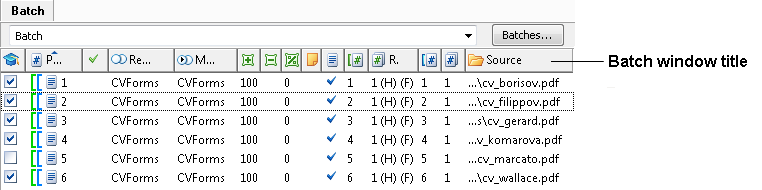 Right-click the window title (**Batch**) to open a shortcut menu for adjusting the width of table columns and for showing or hiding columns.
The menu provides these commands:
| Command | Description |
| ------------------------- | --------------------------------------------------------------------------------------------------------------------------------------------------------------------------------------------------------------------------------------------------------------------------------------------------------------------------------------------------------------------------------------------------------------------------------------------------------------------------------------------------------------------------------------------------------------------------------------------------------------------------------------------------------------------------------------------------------------------------------------------------------------------------------------------------------------------------------------------------------------------------------------------------------------------------------------------------------------------------------------------------------------------------------------------------------------------------------------------------------------------------------------------------------------------------------------------------------------------------------------------------------------------------------------------------------------------------------------------------------------------------------------------------------------------------------------------------------------------------------------------------------------------------------------------------------------------------------------------------------------------------- |
| **Fit Column Width** | Fits the width of the column to the longest field. |
| **Fit All Columns Width** | Fits the width of each column to the width of the longest field it contains. |
| **Set Filter** | Filters pages by column values. The column used as the filtering criterion is marked with
Right-click the window title (**Batch**) to open a shortcut menu for adjusting the width of table columns and for showing or hiding columns.
The menu provides these commands:
| Command | Description |
| ------------------------- | --------------------------------------------------------------------------------------------------------------------------------------------------------------------------------------------------------------------------------------------------------------------------------------------------------------------------------------------------------------------------------------------------------------------------------------------------------------------------------------------------------------------------------------------------------------------------------------------------------------------------------------------------------------------------------------------------------------------------------------------------------------------------------------------------------------------------------------------------------------------------------------------------------------------------------------------------------------------------------------------------------------------------------------------------------------------------------------------------------------------------------------------------------------------------------------------------------------------------------------------------------------------------------------------------------------------------------------------------------------------------------------------------------------------------------------------------------------------------------------------------------------------------------------------------------------------------------------------------------------------------- |
| **Fit Column Width** | Fits the width of the column to the longest field. |
| **Fit All Columns Width** | Fits the width of each column to the width of the longest field it contains. |
| **Set Filter** | Filters pages by column values. The column used as the filtering criterion is marked with  . |
Not all columns can be used for filtering. Filtering is available for **Analyzed**, **Reference Alternative**, **Matched Alternative**, **Reference Document Number**, **Reference Sequence Number**, **Matched Document Number**, **Matched Sequence Number**, and **Source**. When several values or columns serve as filtering criteria, pages that do not satisfy at least one criterion are hidden.
To reset a filter, right-click the column name and select **Reset filter** on the shortcut menu.
The shortcut menu also displays all the available properties of the pages in the batch as columns:
| Column | Description |
| ----------------------------- | ------------------------------------------------------------------------------------------------------------------------------------------------------------------------------------------------------------------------------------------------------------------------------------------------------------------------------------------------------------------------------------------------ |
| **Use for Training** | Indicates whether the page is used for training. |
| **Page No.** | Shows the page number. |
| **Analyzed** | Indicates whether a [FlexiLayout](/flexi-capture/fls/settings/analyze) has been applied to the page. |
| **Reference Alternative** | Shows the reference FlexiLayout alternative. |
| **Matched Alternative** | Shows the name of the FlexiLayout applied to the page. |
| **Excess Areas** | Shows the ratio (in percent) of the total area of blocks that were found when the FlexiLayout was applied but are not present in the reference layout to the total area of all blocks in the reference layout. |
| **Missing Areas** | Shows the ratio (in percent) of the total area of reference layout blocks that were not found on the image when the FlexiLayout was applied to the total area of all blocks in the reference layout. |
| **Match Quality** | The ratio (in percent) of all fields for which the applied region matches the reference region by more than 90%; this is a measure of how well the FlexiLayout matches the page. For text blocks, the percentage is calculated based on the number of correctly found characters. For all other fields, the percentage is calculated based on the area of the corresponding recognition objects. |
| **Comment** | Shows the comment added for the image. |
| **Pre-recognized** | Indicates whether [pre-recognition](/flexi-capture/fls/batch/prerecognition) was performed. |
| **Has source PDF** | Indicates whether the text layer should be used. |
| **Reference Document Number** | Shows the number of the document to which the page must be assigned according to the [reference document assembly](/flexi-capture/fls/settings/etalon-assembling). |
| **Reference Sequence Number** | Shows the number of the page in the document that must be assigned to it based on the [reference document assembly](/flexi-capture/fls/settings/etalon-assembling). The number is followed by (H) if a **Header** element must occur on the page, or (F) if a **Footer** element must occur on the page. |
| **Matched Document Number** | Shows the number of the document to which the page was assigned when the FlexiLayout was applied. |
| **Matched Sequence Number** | Shows the number that was assigned to the page when the FlexiLayout was applied. The number is followed by (H) if a **Header** element was found on the page and (F) if a **Footer** element was found on the page. |
| **Source** | Shows the path to the image source file. |
| **Training Layout State** | Indicates how well the document matches the FlexiLayout, making it easier to find pages that were not completely marked up, for example when the document contains a different set of fields and reference elements. This column is available in training mode only and displays the state of pages from training sets only. |
The **Training Layout State** column can show the following states:
| Icon | State | Description |
| ------------------------------------------------------------------------------------------------------------------------------------------------------------------------------------------------------------------------------------------ | --------------------------------- | -------------------------------------------------------------------------------------------------------------------- |
|
. |
Not all columns can be used for filtering. Filtering is available for **Analyzed**, **Reference Alternative**, **Matched Alternative**, **Reference Document Number**, **Reference Sequence Number**, **Matched Document Number**, **Matched Sequence Number**, and **Source**. When several values or columns serve as filtering criteria, pages that do not satisfy at least one criterion are hidden.
To reset a filter, right-click the column name and select **Reset filter** on the shortcut menu.
The shortcut menu also displays all the available properties of the pages in the batch as columns:
| Column | Description |
| ----------------------------- | ------------------------------------------------------------------------------------------------------------------------------------------------------------------------------------------------------------------------------------------------------------------------------------------------------------------------------------------------------------------------------------------------ |
| **Use for Training** | Indicates whether the page is used for training. |
| **Page No.** | Shows the page number. |
| **Analyzed** | Indicates whether a [FlexiLayout](/flexi-capture/fls/settings/analyze) has been applied to the page. |
| **Reference Alternative** | Shows the reference FlexiLayout alternative. |
| **Matched Alternative** | Shows the name of the FlexiLayout applied to the page. |
| **Excess Areas** | Shows the ratio (in percent) of the total area of blocks that were found when the FlexiLayout was applied but are not present in the reference layout to the total area of all blocks in the reference layout. |
| **Missing Areas** | Shows the ratio (in percent) of the total area of reference layout blocks that were not found on the image when the FlexiLayout was applied to the total area of all blocks in the reference layout. |
| **Match Quality** | The ratio (in percent) of all fields for which the applied region matches the reference region by more than 90%; this is a measure of how well the FlexiLayout matches the page. For text blocks, the percentage is calculated based on the number of correctly found characters. For all other fields, the percentage is calculated based on the area of the corresponding recognition objects. |
| **Comment** | Shows the comment added for the image. |
| **Pre-recognized** | Indicates whether [pre-recognition](/flexi-capture/fls/batch/prerecognition) was performed. |
| **Has source PDF** | Indicates whether the text layer should be used. |
| **Reference Document Number** | Shows the number of the document to which the page must be assigned according to the [reference document assembly](/flexi-capture/fls/settings/etalon-assembling). |
| **Reference Sequence Number** | Shows the number of the page in the document that must be assigned to it based on the [reference document assembly](/flexi-capture/fls/settings/etalon-assembling). The number is followed by (H) if a **Header** element must occur on the page, or (F) if a **Footer** element must occur on the page. |
| **Matched Document Number** | Shows the number of the document to which the page was assigned when the FlexiLayout was applied. |
| **Matched Sequence Number** | Shows the number that was assigned to the page when the FlexiLayout was applied. The number is followed by (H) if a **Header** element was found on the page and (F) if a **Footer** element was found on the page. |
| **Source** | Shows the path to the image source file. |
| **Training Layout State** | Indicates how well the document matches the FlexiLayout, making it easier to find pages that were not completely marked up, for example when the document contains a different set of fields and reference elements. This column is available in training mode only and displays the state of pages from training sets only. |
The **Training Layout State** column can show the following states:
| Icon | State | Description |
| ------------------------------------------------------------------------------------------------------------------------------------------------------------------------------------------------------------------------------------------ | --------------------------------- | -------------------------------------------------------------------------------------------------------------------- |
|  | **No elements marked** | No fields or reference elements are marked on the page. |
|
| **No elements marked** | No fields or reference elements are marked on the page. |
|  | **Has unmarked elements** | The page contains unmarked fields or reference elements; some unmarked elements have not been classified as missing. |
|
| **Has unmarked elements** | The page contains unmarked fields or reference elements; some unmarked elements have not been classified as missing. |
|  | **Has unmarked required element** | A required element has not been marked on the page. |
|
| **Has unmarked required element** | A required element has not been marked on the page. |
|  | **All elements marked** | All elements have been marked; unmarked elements have been classified as missing. |
|
| **All elements marked** | All elements have been marked; unmarked elements have been classified as missing. |
|  | **No reference class set** | No reference class has been specified for a training page. |
## Shortcut menu commands for the classifier
| **No reference class set** | No reference class has been specified for a training page. |
## Shortcut menu commands for the classifier
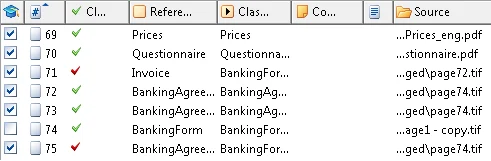 For a classifier, the **Batch** window shortcut menu provides these commands:
| Command | Description |
| ------------------------- | --------------------------------------------------------------------------------------------------------------------------------------------------------------------------------------------------------------------------------------------------------------------------------------------------------------------------------------------------------------------------------------------------------------------------------------------------------------------------------------------------------------------------------------------------------------------------------------------------------------------------------------------------------------------------------------------------------------------------------------------------------------------------------------------------------------------------------------------------------------------------------------------------------------------------------------------------------------------------------------------------------------------------------------------------------------------------------------------------------------------------------------------------------------------------------------------------------------------------------------------------------------------------------------------------------------------------------------------------------------------------------------------------------------------------------------------------------------------------------------------------------------------------------------------------------------------------------------------------------------------------- |
| **Fit Column Width** | Fits the width of the column to the longest field. |
| **Fit All Columns Width** | Fits the width of every column to the width of the longest field it contains. |
| **Set Filter** | Filters pages by column values. The column used as the filtering criterion is marked with . |
Not all columns can be used for filtering. Filtering is available for **Classification Fidelity**, **Reference Class**, **Classification Result**, and **Source**. When several values or columns serve as filtering criteria, pages that do not satisfy at least one criterion are hidden.
To reset a filter, right-click the column name and select **Reset filter** on the shortcut menu.
The shortcut menu also displays the following page properties as columns:
| Column | Description |
| --------------------------- | ------------------------------------------------------------------------------------------------------------------------ |
| **Use for Training** | Indicates whether the page is used for training. |
| **Page No.** | Shows the page number. |
| **Classification Fidelity** | Indicates whether the value in the **Classification Result** column matches the value in the **Reference Class** column. |
| **Reference Class** | Shows the reference classification result. |
| **Classification Result** | Shows the classification result (text string). |
| **Comment** | Shows the comment added for the image. |
| **Pre-recognized** | Indicates whether [pre-recognition](/flexi-capture/fls/batch/prerecognition) was performed. |
| **Source** | Shows the path to the image's source file. |
## Column width and visibility
To show or hide a column, click its name in the shortcut menu. A flag appears next to the names of visible columns. The **Batch** window must contain at least one visible column, and the last visible column cannot be hidden.
You can also change the width and location of a column with the mouse. To change the width, drag the column's edge until the column is the width you want. If you change a column's width to 0, the column becomes hidden.
The contents of the shortcut menu can differ depending on the context. For example, if the **Allow multipage documents** parameter in the FlexiLayout properties is set to `false`, the commands related to multipage documents are not available on the shortcut menu. If a project has only one alternative, the **Match Selected Alternative** item is not available on the shortcut menu.
## Tooltips in the Batch window
A tooltip is a small window that appears when you position the mouse pointer over an interface element and briefly describes it. A tooltip can change depending on context. For example, the tooltip for the
For a classifier, the **Batch** window shortcut menu provides these commands:
| Command | Description |
| ------------------------- | --------------------------------------------------------------------------------------------------------------------------------------------------------------------------------------------------------------------------------------------------------------------------------------------------------------------------------------------------------------------------------------------------------------------------------------------------------------------------------------------------------------------------------------------------------------------------------------------------------------------------------------------------------------------------------------------------------------------------------------------------------------------------------------------------------------------------------------------------------------------------------------------------------------------------------------------------------------------------------------------------------------------------------------------------------------------------------------------------------------------------------------------------------------------------------------------------------------------------------------------------------------------------------------------------------------------------------------------------------------------------------------------------------------------------------------------------------------------------------------------------------------------------------------------------------------------------------------------------------------------------- |
| **Fit Column Width** | Fits the width of the column to the longest field. |
| **Fit All Columns Width** | Fits the width of every column to the width of the longest field it contains. |
| **Set Filter** | Filters pages by column values. The column used as the filtering criterion is marked with . |
Not all columns can be used for filtering. Filtering is available for **Classification Fidelity**, **Reference Class**, **Classification Result**, and **Source**. When several values or columns serve as filtering criteria, pages that do not satisfy at least one criterion are hidden.
To reset a filter, right-click the column name and select **Reset filter** on the shortcut menu.
The shortcut menu also displays the following page properties as columns:
| Column | Description |
| --------------------------- | ------------------------------------------------------------------------------------------------------------------------ |
| **Use for Training** | Indicates whether the page is used for training. |
| **Page No.** | Shows the page number. |
| **Classification Fidelity** | Indicates whether the value in the **Classification Result** column matches the value in the **Reference Class** column. |
| **Reference Class** | Shows the reference classification result. |
| **Classification Result** | Shows the classification result (text string). |
| **Comment** | Shows the comment added for the image. |
| **Pre-recognized** | Indicates whether [pre-recognition](/flexi-capture/fls/batch/prerecognition) was performed. |
| **Source** | Shows the path to the image's source file. |
## Column width and visibility
To show or hide a column, click its name in the shortcut menu. A flag appears next to the names of visible columns. The **Batch** window must contain at least one visible column, and the last visible column cannot be hidden.
You can also change the width and location of a column with the mouse. To change the width, drag the column's edge until the column is the width you want. If you change a column's width to 0, the column becomes hidden.
The contents of the shortcut menu can differ depending on the context. For example, if the **Allow multipage documents** parameter in the FlexiLayout properties is set to `false`, the commands related to multipage documents are not available on the shortcut menu. If a project has only one alternative, the **Match Selected Alternative** item is not available on the shortcut menu.
## Tooltips in the Batch window
A tooltip is a small window that appears when you position the mouse pointer over an interface element and briefly describes it. A tooltip can change depending on context. For example, the tooltip for the  icon in the **Analyzed** column can be either `Matching assembling differs from etalon` or `Matched with no reference alternative`, depending on the state of the page.
## Related topics
* [Shortcut menu commands](/flexi-capture/fls/interface/local-menu)
icon in the **Analyzed** column can be either `Matching assembling differs from etalon` or `Matched with no reference alternative`, depending on the state of the page.
## Related topics
* [Shortcut menu commands](/flexi-capture/fls/interface/local-menu)