> ## Documentation Index
> Fetch the complete documentation index at: https://docs.abbyy.com/llms.txt
> Use this file to discover all available pages before exploring further.
# Classifier window
> See how the Classifier window displays created classes and the classification tree, where each node is a stage you can move or copy in FlexiLayout Studio.
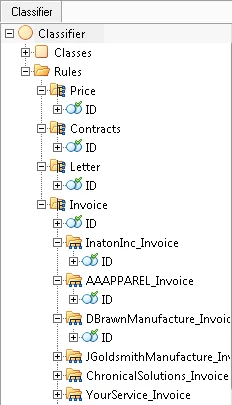 The **Classifier** window displays the list of created classes (the **Classes** group) and the classification structure as a tree-like diagram. The root folder of the tree represents the entire classifier.
## Classification tree structure
Each node in the tree corresponds to a classification stage. A node contains a group identifier element (named **Id** by default) and nested nodes. The nesting depth is not limited.
## Move and copy classification stages
You can rearrange stages directly in the tree using one of the following actions:
* **Move** a stage by dragging and dropping it.
* **Copy** a stage by holding **Ctrl** while you drag and drop it.
## Related topics
* [Classification](/flexi-capture/fls/classification)
The **Classifier** window displays the list of created classes (the **Classes** group) and the classification structure as a tree-like diagram. The root folder of the tree represents the entire classifier.
## Classification tree structure
Each node in the tree corresponds to a classification stage. A node contains a group identifier element (named **Id** by default) and nested nodes. The nesting depth is not limited.
## Move and copy classification stages
You can rearrange stages directly in the tree using one of the following actions:
* **Move** a stage by dragging and dropping it.
* **Copy** a stage by holding **Ctrl** while you drag and drop it.
## Related topics
* [Classification](/flexi-capture/fls/classification)