> ## Documentation Index
> Fetch the complete documentation index at: https://docs.abbyy.com/llms.txt
> Use this file to discover all available pages before exploring further.
# FlexiLayout window
> Navigate the FlexiLayout window tree of Blocks and SearchElements branches, and move or copy elements and blocks by dragging in ABBYY FlexiLayout Studio.
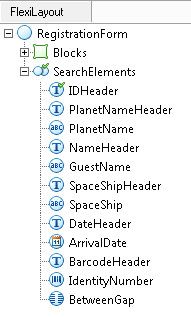
The **FlexiLayout window** displays the tree diagram of the current FlexiLayout.
 ## FlexiLayout tree branches
The tree has the following branches:
* **Blocks** – Contains the [blocks](/flexi-capture/fls/template/blocks) of the FlexiLayout.
* **SearchElements** – Contains the [elements](/flexi-capture/fls/template/elements). A tree can contain several **SearchElements** branches, each corresponding to a layout alternative.
Blocks and elements can be grouped together, forming new nesting levels.
## Move and copy elements and blocks
You can move and copy elements and blocks in the tree:
* To move an element or block, drag it to a new location.
* To copy an element or block, hold **Ctrl** while dragging it.
## FlexiLayout tree branches
The tree has the following branches:
* **Blocks** – Contains the [blocks](/flexi-capture/fls/template/blocks) of the FlexiLayout.
* **SearchElements** – Contains the [elements](/flexi-capture/fls/template/elements). A tree can contain several **SearchElements** branches, each corresponding to a layout alternative.
Blocks and elements can be grouped together, forming new nesting levels.
## Move and copy elements and blocks
You can move and copy elements and blocks in the tree:
* To move an element or block, drag it to a new location.
* To copy an element or block, hold **Ctrl** while dragging it.