> ## Documentation Index
> Fetch the complete documentation index at: https://docs.abbyy.com/llms.txt
> Use this file to discover all available pages before exploring further.
# Toolbars
> Reference for FlexiLayout Studio toolbars: Standard, Extracted Objects, Block-Drawing Tools, Layout, and Image Tools buttons with their functions.
ABBYY FlexiLayout Studio provides five toolbars for working with projects, extracted objects, blocks, layouts, and images.
## Standard toolbar
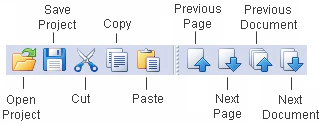
The **Standard** toolbar contains buttons that correspond to standard commands such as creating, opening, and saving FlexiLayouts.
 | Button | Description |
| --------------------- | --------------------------------------------------------------------------------------------------------------------------------------------------------------------------------------------------------------------------------------------------------------------------------------- |
| **Open** | Opens the **Open Project** dialog box, where you can select a project file to open. |
| **Save** | Saves the current project. |
| **Cut** | Deletes the selection and places it on the Clipboard. |
| **Copy** | Copies the selection (text in the **Properties** window, blocks in the **Image** window, pages in the **Batch** window, [blocks](/flexi-capture/fls/template/blocks-region) or [elements](/flexi-capture/fls/template/elements-simple) in the **FlexiLayout** window) to the Clipboard. |
| **Paste** | Pastes the selection from the Clipboard. |
| **Previous Page** | Opens the previous page in the project. |
| **Next Page** | Opens the next page in the project. |
| **Previous Document** | Opens the previous document in the project. |
| **Next Document** | Opens the next document in the project. |
## Extracted Objects toolbar
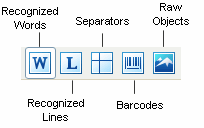
The **Extracted Objects** toolbar contains buttons that show or hide the objects detected during pre-recognition.
| Button | Description |
| --------------------- | --------------------------------------------------------------------------------------------------------------------------------------------------------------------------------------------------------------------------------------------------------------------------------------- |
| **Open** | Opens the **Open Project** dialog box, where you can select a project file to open. |
| **Save** | Saves the current project. |
| **Cut** | Deletes the selection and places it on the Clipboard. |
| **Copy** | Copies the selection (text in the **Properties** window, blocks in the **Image** window, pages in the **Batch** window, [blocks](/flexi-capture/fls/template/blocks-region) or [elements](/flexi-capture/fls/template/elements-simple) in the **FlexiLayout** window) to the Clipboard. |
| **Paste** | Pastes the selection from the Clipboard. |
| **Previous Page** | Opens the previous page in the project. |
| **Next Page** | Opens the next page in the project. |
| **Previous Document** | Opens the previous document in the project. |
| **Next Document** | Opens the next document in the project. |
## Extracted Objects toolbar
The **Extracted Objects** toolbar contains buttons that show or hide the objects detected during pre-recognition.
 | Button | Description |
| -------------------- | -------------------------------------------------------------------------------------- |
| **Recognized Words** | Displays only the objects classified as Text during pre-recognition. |
| **Recognized Lines** | Displays only the objects classified as Recognized Lines during pre-recognition. |
| **Separators** | Displays only the objects classified as Separators during pre-recognition. |
| **Barcodes** | Displays only the objects classified as Barcodes during pre-recognition. |
| **Raw Objects** | Displays only the objects that the program managed to classify during pre-recognition. |
## Block-Drawing Tools toolbar
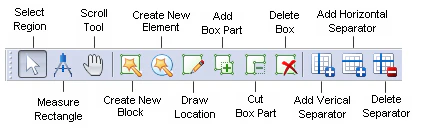
The **Block-Drawing Tools** toolbar contains buttons that let you edit the reference layout.
| Button | Description |
| -------------------- | -------------------------------------------------------------------------------------- |
| **Recognized Words** | Displays only the objects classified as Text during pre-recognition. |
| **Recognized Lines** | Displays only the objects classified as Recognized Lines during pre-recognition. |
| **Separators** | Displays only the objects classified as Separators during pre-recognition. |
| **Barcodes** | Displays only the objects classified as Barcodes during pre-recognition. |
| **Raw Objects** | Displays only the objects that the program managed to classify during pre-recognition. |
## Block-Drawing Tools toolbar
The **Block-Drawing Tools** toolbar contains buttons that let you edit the reference layout.
 | Button | Description |
| ---------------------------- | --------------------------------------------------------------------------------------------------------------------------------------------------------------------------------------------------------------------------------------------------------------------------------------------------------------------------------------------------------------------------------------------------------------------------------------------------------------------------------------------------------------------------------------------------------------------------------------------------------------------------------------------------------------------------------------------------------------------------------------------------------------------------------------------------------------------------------------------------------------------------------------------------------------- |
| **Select Region** | Selects a region on the image and moves the selected block.
| Button | Description |
| ---------------------------- | --------------------------------------------------------------------------------------------------------------------------------------------------------------------------------------------------------------------------------------------------------------------------------------------------------------------------------------------------------------------------------------------------------------------------------------------------------------------------------------------------------------------------------------------------------------------------------------------------------------------------------------------------------------------------------------------------------------------------------------------------------------------------------------------------------------------------------------------------------------------------------------------------------------- |
| **Select Region** | Selects a region on the image and moves the selected block.
Sometimes a block may be too small to be moved, because its borders are very close together and pointing at any of them activates the "change size" mode. Hold down **Ctrl** to move such blocks. |
| **Measure Rectangle** | Detects the coordinates and sizes of objects on the image and copies them to the Clipboard.
To measure an object on the current image, activate the **Measure Tool** and select the rectangular area to be measured: right-click one corner of the area, drag the mouse diagonally into the opposite corner, and release the mouse. The **Measure Tool** dialog box displays the coordinates and the width and height of the measured object in the user-defined [units of measurement](/flexi-capture/fls/template/units).
If you select **Automatically copy results to Clipboard** in the **Measure Tool** dialog box, the coordinates of the rectangle are copied to the Clipboard so that you can easily paste them, for example, on the **Search Constraints** tab in the **Properties** dialog box of any element to define its [search area](/flexi-capture/fls/template/search-constraints). |
| **Scroll Tool** | Scrolls the image in the **Image** window. |
| **Create Element** | Creates a new block or element and lets you specify its properties based on the pre-recognized image. |
| **Draw Location** | Draws an area on the image corresponding to the selected block or element. |
| **Add Block Part** | Adds a rectangular area to the selected area. |
| **Cut Block Part** | Cuts a rectangular area from the selected area. |
| **Delete Box** | Deletes a block or element from the image. |
| **Add Vertical Separator** | Adds a vertical separator to the selected **Table** block. |
| **Add Horizontal Separator** | Adds a horizontal separator to the selected **Table** block. |
| **Delete Separator** | Deletes a separator from the selected **Table** block. |
The **Draw Location**, **Add Block Part**, **Cut Block Part**, **Delete Box**, **Add Vertical Separator**, **Add Horizontal Separator**, and **Delete Separator** buttons are available only in Reference layout mode and Training Mode.
## Layout toolbar
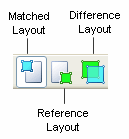
The **Layout** toolbar contains buttons that display the test images in different modes.
 | Button | Description |
| --------------------- | ---------------------------------------------------------------------------------------------------------------------------------- |
| **Matched layout** | Displays the image in Matched layout mode. Use the arrow to the right to select the objects to display: blocks, elements, or both. |
| **Reference layout** | Displays the image in Reference layout mode. |
| **Difference layout** | Displays the image in Difference layout mode. |
## Image Tools toolbar
The **Image Tools** toolbar contains buttons that correspond to standard commands such as rotating and scaling the selected images.
| Button | Description |
| --------------------- | ---------------------------------------------------------------------------------------------------------------------------------- |
| **Matched layout** | Displays the image in Matched layout mode. Use the arrow to the right to select the objects to display: blocks, elements, or both. |
| **Reference layout** | Displays the image in Reference layout mode. |
| **Difference layout** | Displays the image in Difference layout mode. |
## Image Tools toolbar
The **Image Tools** toolbar contains buttons that correspond to standard commands such as rotating and scaling the selected images.
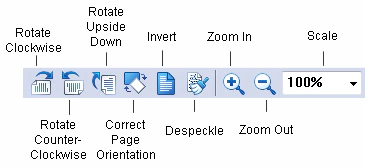 | Button | Description |
| ---------------------------- | -------------------------------------------------------------------------------------------------------------------------------------------------------------------------------------------------------------------------------------------------------------------------------------------------------- |
| **Rotate Clockwise** | Rotates the image 90° clockwise. |
| **Rotate Counter-Clockwise** | Rotates the image 90° counter-clockwise. |
| **Rotate Upside Down** | Rotates the image 180°. |
| **Correct Page Orientation** | Automatically corrects the orientation of pages. The correct orientation is selected automatically based on the selected [pre-recognition language](/flexi-capture/fls/batch/prerecognition-param) and the settings in the [Options dialog box](/flexi-capture/fls/batch/options) (**Tools → Options**). |
| **Invert** | Inverts the image (turns black into white and vice versa). |
| **Despeckle** | Removes excess dots from the image. |
| **Zoom In** | Makes the image twice as large. |
| **Zoom Out** | Makes the image half as large. |
| **Scale** | Scales the image. |
When you perform image operations, all pre-recognition and FlexiLayout matching results are deleted. When you rotate or flip images, the Reference Layout is also deleted.
| Button | Description |
| ---------------------------- | -------------------------------------------------------------------------------------------------------------------------------------------------------------------------------------------------------------------------------------------------------------------------------------------------------- |
| **Rotate Clockwise** | Rotates the image 90° clockwise. |
| **Rotate Counter-Clockwise** | Rotates the image 90° counter-clockwise. |
| **Rotate Upside Down** | Rotates the image 180°. |
| **Correct Page Orientation** | Automatically corrects the orientation of pages. The correct orientation is selected automatically based on the selected [pre-recognition language](/flexi-capture/fls/batch/prerecognition-param) and the settings in the [Options dialog box](/flexi-capture/fls/batch/options) (**Tools → Options**). |
| **Invert** | Inverts the image (turns black into white and vice versa). |
| **Despeckle** | Removes excess dots from the image. |
| **Zoom In** | Makes the image twice as large. |
| **Zoom Out** | Makes the image half as large. |
| **Scale** | Scales the image. |
When you perform image operations, all pre-recognition and FlexiLayout matching results are deleted. When you rotate or flip images, the Reference Layout is also deleted.