> ## Documentation Index
> Fetch the complete documentation index at: https://docs.abbyy.com/llms.txt
> Use this file to discover all available pages before exploring further.
# Hypotheses for all types of elements
> Common hypothesis properties for all FlexiLayout elements: IsNull, Region, FuzzyRect, boundaries, and page methods, with a worked null-hypothesis example.
A hypothesis for an element can be either found or not found. A found hypothesis is typically formulated on the basis of one or several image objects or their fragments (an exception is the **White Gap** element that can contain no image objects at all).
## Hypothesis regions and boundaries
A found hypothesis for a simple element is always a continuous region. Hypotheses for **White Gap**, **Separator**, and **Barcode** elements are always single rectangles.
If a hypothesis is formulated on the basis of a set of detected image objects, for example, a hypothesis for a **Paragraph** element, the region of the hypothesis is built on the basis of the array of rectangles of the detected objects. The region created in this way can be obtained by the `Region` method of the hypothesis.
When displaying the region of the hypothesis on the image, or when creating a block on the basis of the hypothesis, the boundaries of the region do not exactly follow the boundaries of each rectangle. Instead, the boundaries of the search area are smoothed out for better visualization. A region created in this way can be obtained using the `SimplifiedRegion` method of the hypothesis.
The `Region` and `SimplifiedRegion` methods can be used either in the **Advanced pre-search relations** field on the **Advanced** tab (when describing the search area of the element), or in the **Region expression** field when describing the properties of the block and using the already found elements.
If a hypothesis is not found, it coincides with the fuzzy rectangle of its search area. When displaying a non-found hypothesis on the image, FlexiLayout Studio draws the external rectangle of the fuzzy rectangle.
The `Left`, `top`, `Right`, and `Bottom` boundaries of any hypothesis are ranges. For each found hypothesis, the range degenerates to a point, that is, `Left.Start = Left.End`, `top.Start = top.End`, and so on. For a non-found hypothesis, the ranges of the boundaries coincide with the ranges of its search area.
## Hypothesis access in FlexiLayout code
Accessing generated hypotheses and their properties in the code of the corresponding dialog boxes of blocks and elements provides additional tools for setting up the FlexiLayout. Element hypotheses can be accessed by the names of the elements. To access a hypothesis for the current element in the [Advanced post-search relations](/flexi-capture/fls/template/advanced-post-search) field, you can use only the name of the property.
Hypotheses and their properties are accessed in read-only mode. Hypotheses for elements can be accessed in the [Advanced pre-search relations](/flexi-capture/fls/template/advanced-pre-search) and **Advanced post-search relations** fields on the **Advanced** tab of the element's **Properties** dialog box as well as in the [Region expression](/flexi-capture/fls/template/search-constraints) field in the block's **Properties** dialog box.
In **Advanced pre-search relations**, you can access the generated hypotheses (and their properties) for all the elements located above the current element in the FlexiLayout tree. In **Advanced post-search relations**, you can access the generated hypotheses for the elements located above the current element in the FlexiLayout tree and the hypothesis for the current element itself.
In **Region expression**, you can access the hypotheses (and their properties) for all the elements.
## Properties of hypotheses for all element types
The following table lists the properties of hypotheses for all types of element.
| Property | Description |
| ------------------------------------------- | -------------------------------------------------------------------------------------------------------------------------------------------------------------------------------------------------------------------------------------------------------------------------------------------------------------------------------------------------------------------- |
| `Logic IsNull()` | Whether this is a null hypothesis (if the element has not been detected, the `IsNull` property of the hypothesis is `True`). |
| `Logic IsFound()` | Whether the hypothesis is not null (if the element has not been detected, the `IsFound` property of the hypothesis is `False`). Equivalent to `not IsNull`. |
| `XInterval Left()` | The left boundary of the hypothesis, horizontal range in global coordinates. |
| `YInterval top()` | The top boundary of the hypothesis, vertical range in global coordinates. |
| `XInterval Right()` | The right boundary of the hypothesis, horizontal range in global coordinates. |
| `YInterval Bottom()` | The bottom boundary of the hypothesis, vertical range in global coordinates. |
| `XInterval XCenter()` | The X-coordinate of the center of the hypotheses, horizontal range in global coordinates. |
| `YInterval YCenter()` | The Y-coordinate of the center of the hypotheses, vertical range in global coordinates. |
| `DistInterval Width()` | The width of the hypothesis in global coordinates, range of distances. |
| `DistInterval Height()` | The height of the hypothesis in global coordinates, range of distances. |
| `FuzzyRect FuzzyRect()` | Fuzzy rectangle of the hypothesis in global coordinates. |
| `Rect Rect()` | The rectangle circumscribing the hypothesis in global coordinates. Coincides with the external rectangle of the fuzzy rectangle. |
| `Region Region()` | The region of the hypothesis in global coordinates. The method is not supported for **Group** elements. |
| `Region SimplifiedRegion()` | The region of the hypothesis in global coordinates simplified for better visual representation. The method is not supported for **Group** elements. |
| `ImageObjectSet Set()` | The image objects that are part of the hypothesis. |
| `ImageObjectSet ExcludeSet()` | The image objects that are in the region excluded from the search area by methods of type `Exclude`. |
| `RectArray Rects()` | The array of the rectangles included in the hypothesis. For most elements, it coincides with the array of the rectangles enclosing detected objects. For **White Gap** and **Region** elements, no objects are available. |
| `Int HypothesesCount()` | The number of hypotheses that can be formulated for the element in the search area.
**Important!** The function can only be used if the maximum and minimum numbers of pages in the document are set to 1, that is, the detected document has only one page. If you use this function for a multi-page document, matching a FlexiLayout returns an error. |
| `PageInterval Pages()` | The range of pages where the hypothesis is to be found. |
| `PageArea PageAreaGlobal( Int PageNumber )` | Returns the part of the hypothesis located on the given page in global coordinates. |
| `PageArea PageAreaLocal( Int PageNumber )` | Returns the part of the hypothesis located on the given page in the local coordinates of the page. |
## Example: check for a null hypothesis before accessing properties
Before you access the properties of a hypothesis for a simple or **Group** element, make sure that the hypothesis to be accessed is not a null hypothesis (call its `IsNull` property). Accessing a property of a null hypothesis (which corresponds to a non-detected element) causes an error.
Consider an example that uses the project from Sample 1 that can be found on the program CD-ROM.
Suppose there is an identifier on your document in the form of a barcode and you want your FlexiLayout to match only those documents on which the value of the barcode is `1556897142240`.
In the **Advanced post-search relations** section of the element that describes the properties and search constraints of the barcode (element `IdentityNumber` in Sample 1), write the following code:
```text theme={null}
if value != "1556897142240" then Quality: 0;
```
Click **Apply** or **Check**. The compiler does not detect any syntax errors. It looks as if the code is OK. However, if you try matching the FlexiLayout with any page from Sample 1, the following error message appears: `Error in element “MainGroup.IdentityNumber”, Advanced relations section: Attempt to access undefined hypothesis MainGroup.IdentityNumber`.
The cause of the error is as follows. FlexiLayout Studio finds a hypothesis for the barcode element. Then it compares the value of the barcode with the value specified in the code. If the values are different, the `Quality: 0;` code resets the value of the hypothesis to 0.
Then a null hypothesis is generated for this element, for which FlexiLayout Studio also checks the condition `value != "1556897142240"`. Since accessing the value of a null hypothesis is not allowed (it does not have this property), FlexiLayout Studio issues an error message "...undefined hypothesis...".
Therefore, adjust the code as follows:
```text theme={null}
if not IsNull then {
if value != "1556897142240" then Quality: 0;
}
```
The preceding code works only for a required element.
For an optional element, adjust the code as follows:
```text theme={null}
if not IsNull then {
if value != "1556897142240" then Quality: 0;
}
else {Quality: 0;}
```
Otherwise, only the quality of the real hypothesis is reset to 0. This causes FlexiLayout Studio to generate a null hypothesis, for which the `if not IsNull` condition is not executed.
Therefore, the quality of the final (null) hypothesis remains the same as was specified in the properties of the element (0.97 if the default value was kept) and FlexiLayout Studio continues matching the FlexiLayout, even without the given element.
If you add `else {Quality: 0;}` to the code, the statement is executed for all hypotheses (including the null hypothesis) and the matching of the FlexiLayout stops, because the complete chain of hypotheses is also reset to 0 at this element.
## Region() and SimplifiedRegion() methods compared
The methods `Region Region()` and `Region SimplifiedRegion()` both return the region of an element, but the method `Region Region()` returns the exact region:
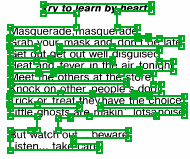 The method `Region SimplifiedRegion()` returns the rectangle created based on the boundary coordinates: