> ## Documentation Index
> Fetch the complete documentation index at: https://docs.abbyy.com/llms.txt
> Use this file to discover all available pages before exploring further.
# Named Entity
> Named Entity elements use NLP to extract people, company names, places, and addresses in a FlexiLayout; requires the separately installed NLP module.
**Named Entity** is a FlexiLayout element that contains a description of the information to extract from a field or field group using NLP. This information can be names of people and companies, as well as places and addresses.
The NLP module is not included in a standard FlexiCapture installation and needs to be installed separately. It also requires a license of a specific type.
In the element tree, **Named Entity** is represented by the  icon.
## Named Entity element properties for the target object
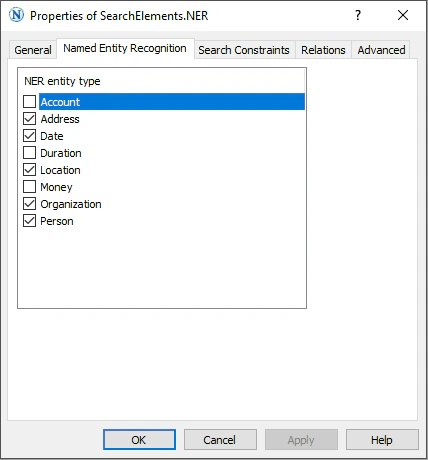
You specify the target object type on the **Named Entity Recognition** tab of the element's **Properties** dialog box.
To open the **Properties** dialog box, right-click the element in the **FlexiLayout** window and select **Properties...** on the shortcut menu.
icon.
## Named Entity element properties for the target object
You specify the target object type on the **Named Entity Recognition** tab of the element's **Properties** dialog box.
To open the **Properties** dialog box, right-click the element in the **FlexiLayout** window and select **Properties...** on the shortcut menu.
 ## Show extracted named entities on the image
To display the extracted named entities on the document image, follow these steps:
Select **FlexiLayout** > **Properties...**, or press **Alt**+**Enter**.
On the **General** tab, select **Advanced Pre-recognition Properties...**.
On the **Advanced** tab, in the **Extract named entities** section, select the **Extract named entities** option.
Click **OK**.
## Related topics
* [Create, copy, and delete elements](/flexi-capture/fls/template/elements-simple)
* [An overview of element properties](/flexi-capture/fls/template/elements-properties)
* [Search area](/flexi-capture/fls/template/search-constraints)
* [Additional search constraints](/flexi-capture/fls/template/advanced-constraints)
## Show extracted named entities on the image
To display the extracted named entities on the document image, follow these steps:
Select **FlexiLayout** > **Properties...**, or press **Alt**+**Enter**.
On the **General** tab, select **Advanced Pre-recognition Properties...**.
On the **Advanced** tab, in the **Extract named entities** section, select the **Extract named entities** option.
Click **OK**.
## Related topics
* [Create, copy, and delete elements](/flexi-capture/fls/template/elements-simple)
* [An overview of element properties](/flexi-capture/fls/template/elements-properties)
* [Search area](/flexi-capture/fls/template/search-constraints)
* [Additional search constraints](/flexi-capture/fls/template/advanced-constraints)