> ## Documentation Index
> Fetch the complete documentation index at: https://docs.abbyy.com/llms.txt
> Use this file to discover all available pages before exploring further.
# Named parameters
> Named parameters help debug FlexiLayouts: create them on the FlexiLayout properties tab, pass values down to batches and pages, and call them from scripts.
Named parameters help you debug FlexiLayouts. Their values are checked when the FlexiLayout is applied.
## Create a named parameter
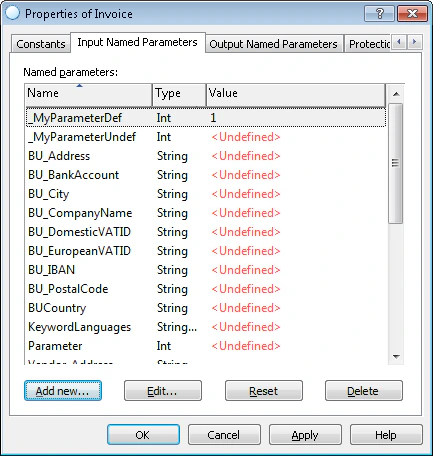 ## Named parameter properties
Each named parameter has the following properties.
| Property | Description |
| --------- | ---------------------------------------------------------------------------------------------------------------------------------------------------------- |
| **Name** | Cannot be changed after it is specified. |
| **Type** | One of three types: **String**, **StringArray**, or **Int**. Cannot be changed after it is specified. |
| **Value** | Can be changed for individual batches and pages. If the value is not specified in the FlexiLayout, it appears as **\** in the **Value** column. |
## How named parameters are inherited
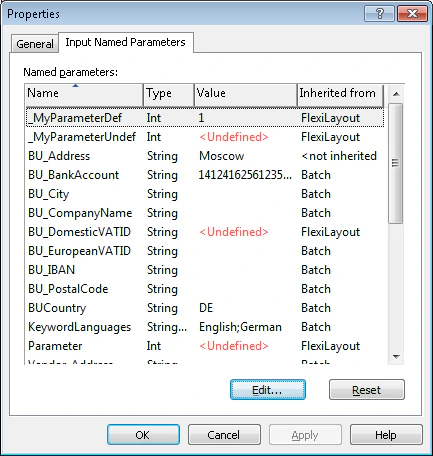
The FlexiLayout's named parameters are inherited by its batches, and a batch's named parameters are inherited by its pages. The **Inherited from** column on the **Named parameters** tab of a batch or page properties dialog box shows where each named parameter was inherited from.
## Named parameter properties
Each named parameter has the following properties.
| Property | Description |
| --------- | ---------------------------------------------------------------------------------------------------------------------------------------------------------- |
| **Name** | Cannot be changed after it is specified. |
| **Type** | One of three types: **String**, **StringArray**, or **Int**. Cannot be changed after it is specified. |
| **Value** | Can be changed for individual batches and pages. If the value is not specified in the FlexiLayout, it appears as **\** in the **Value** column. |
## How named parameters are inherited
The FlexiLayout's named parameters are inherited by its batches, and a batch's named parameters are inherited by its pages. The **Inherited from** column on the **Named parameters** tab of a batch or page properties dialog box shows where each named parameter was inherited from.
 You can copy named parameters that have a defined value. If the destination already contains a named parameter with the same name and type, the copied parameter's value is assigned to the destination parameter.
## Named parameter commands
The following commands are available on the **Named parameters** tab of a FlexiLayout's properties dialog box.
| Command | Description |
| --------------- | -------------------------------------------------------------------------------------------- |
| **Add new\...** | Creates a named parameter. Available for FlexiLayouts only. |
| **Edit...** | Edits a named parameter. |
| **Reset** | Resets the value of a named parameter. |
| **Delete** | Deletes a named parameter. Available for FlexiLayouts only. |
| **Copy** | Copies a named parameter. Available only on the shortcut menu of a named parameter. |
| **Paste** | Pastes the copied named parameter. Available only on the shortcut menu of a named parameter. |
## Call a named parameter from a script
To call a named parameter from a script, use one of the following [methods](/flexi-capture/fls/language/named-param-functions), depending on the parameter type.
| Method | Named parameter type |
| ------------------------------ | -------------------- |
| `GetNamedParameterString` | **String** |
| `GetNamedParameterStringArray` | **StringArray** |
| `GetNamedParameterInt` | **Int** |
## Add named parameters to elements
You can add named parameters with regions to elements by using the reference layout.
Select one or more pages, right-click them, and click **Properties...** to open their properties dialog box. The **Named parameters** tab contains a list of available named parameters. You can edit them by clicking **Edit...**, or reset their value to that of the closest parent from which they can be inherited.
Use the **Prefix to discard** box to specify a prefix to remove from the named parameter's name. For example, you can use it to remove the names of layout alternatives from the names of named parameters.
You can copy named parameters that have a defined value. If the destination already contains a named parameter with the same name and type, the copied parameter's value is assigned to the destination parameter.
## Named parameter commands
The following commands are available on the **Named parameters** tab of a FlexiLayout's properties dialog box.
| Command | Description |
| --------------- | -------------------------------------------------------------------------------------------- |
| **Add new\...** | Creates a named parameter. Available for FlexiLayouts only. |
| **Edit...** | Edits a named parameter. |
| **Reset** | Resets the value of a named parameter. |
| **Delete** | Deletes a named parameter. Available for FlexiLayouts only. |
| **Copy** | Copies a named parameter. Available only on the shortcut menu of a named parameter. |
| **Paste** | Pastes the copied named parameter. Available only on the shortcut menu of a named parameter. |
## Call a named parameter from a script
To call a named parameter from a script, use one of the following [methods](/flexi-capture/fls/language/named-param-functions), depending on the parameter type.
| Method | Named parameter type |
| ------------------------------ | -------------------- |
| `GetNamedParameterString` | **String** |
| `GetNamedParameterStringArray` | **StringArray** |
| `GetNamedParameterInt` | **Int** |
## Add named parameters to elements
You can add named parameters with regions to elements by using the reference layout.
Select one or more pages, right-click them, and click **Properties...** to open their properties dialog box. The **Named parameters** tab contains a list of available named parameters. You can edit them by clicking **Edit...**, or reset their value to that of the closest parent from which they can be inherited.
Use the **Prefix to discard** box to specify a prefix to remove from the named parameter's name. For example, you can use it to remove the names of layout alternatives from the names of named parameters.