> ## Documentation Index
> Fetch the complete documentation index at: https://docs.abbyy.com/llms.txt
> Use this file to discover all available pages before exploring further.
# Additional search constraints for a Repeating Group element
> Set additional search constraints for Repeating Group elements in FlexiLayout Studio, including MinRepetitions limits and instance access via LastFound.
The **Properties** dialog box of a **Repeating Group** element provides two tabs where you can specify additional search constraints: **Advanced** and **Advanced for All Instances**. On the **Advanced** tab, you can specify additional search constraints for individual instances of the group. On the **Advanced for All Instances** tab, you can specify additional search constraints for all the instances of the group.
## Advanced and Advanced for All Instances tabs
To open the **Properties** dialog box, in the **FlexiLayout** window, right-click the **Repeating Group** element and select **Properties...** on the shortcut menu.
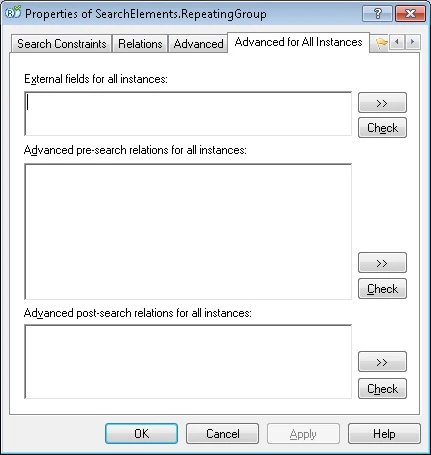 In the **External Fields for All Instances** section, you can use all the methods available for a **Group** element. For example, you can specify relations with already detected instances:
```text theme={null}
// Each subsequent instance is located below the previous instance
if SearchElements.RepeatingGroup.HasInstances then {
Below: SearchElements.RepeatingGroup.LastFound, 0 * dot;
}
```
In the **Advanced pre-search relations for all instances** section, you can use the following methods:
* **MinRepetitions**
* **MaxRepetitions**
* **PaginalMode**
* **MinRepetitionsOnPage**
* **MaxRepetitionsOnPage**
In the **Post-search relations** section, you can provide an estimate for a particular instance. In the **Post-search relations for all instances** section, you can provide an estimate for all the detected instances.
In the **Pre-search relations** section, you can use all the methods available for a **Group** element.
Sample code for the **Post-search relations** section:
```text theme={null}
// Checking the hypotheses for the subelements StaticText1 and StaticText2 in a repeating group. The last detected instance is used.
if StaticText1.Width() < 200dt and StaticText2.Width() < 200dt then Quality: 0.98;
```
Sample code for the **Post-search relations for all instances** section:
```text theme={null}
if InstancesCount() < 5 and LastFound.Pages.End <= 2 then Quality: 0.98;
```
## Access element instances
Use the following pre-defined names to access element instances:
| Name | Description |
| ------------------- | --------------------------------------------------------------- |
| **LastFound** | The last detected instance. |
| **CurrentInstance** | The current instance when searching inside a repeating element. |
| **Instance(n)** | Instance number `n`. |
| **AllInstances** | All instances. |
You can access subelements of a **Repeating Group** element even when they are located lower down in the element tree.
You can also use the following methods of the FlexiLayout language to work with element instances:
* **HasInstances** – Checks whether any instances have already been found.
* **InstancesCount** – Returns the number of detected instances.
## Search stop conditions for element instances
The search for instances stops (in the given branch) if the program encounters an empty hypothesis for a group (that is, a group that has an empty region) or if the program cannot generate any more hypotheses (there are no more hypotheses in the search area).
In Paginal mode, this rule applies to the search on one page only. When the program finishes the search on one page, it moves on to the next page.
**MinRepetitionsOnPage**, **MaxRepetitionsOnPage**, **MinRepetitions**, and **MaxRepetitions** also affect the hypothesis generation process.
You can use the following methods to change the standard hypothesis generation process:
| Goal | Condition | Where to enter it |
| ------------------------------------------------------------------------------------------------------------------------------------------------------------------------------------- | ------------------------------------------------------------------ | ---------------------------------- |
| Make the last detected instance the last one | `if SearchElements.RepeatingGroup.HasInstances and then DontFind;` | **Advanced pre-search relations** |
| Mark the last detected instance (the one you are creating the constraint for) as "bad" so that the previous instances become the last ones, when no other good instances are detected | `If then Quality: 0;` | **Advanced post-search relations** |
## Related topics
* [FlexiLayout language](/flexi-capture/fls/code/general-code)
In the **External Fields for All Instances** section, you can use all the methods available for a **Group** element. For example, you can specify relations with already detected instances:
```text theme={null}
// Each subsequent instance is located below the previous instance
if SearchElements.RepeatingGroup.HasInstances then {
Below: SearchElements.RepeatingGroup.LastFound, 0 * dot;
}
```
In the **Advanced pre-search relations for all instances** section, you can use the following methods:
* **MinRepetitions**
* **MaxRepetitions**
* **PaginalMode**
* **MinRepetitionsOnPage**
* **MaxRepetitionsOnPage**
In the **Post-search relations** section, you can provide an estimate for a particular instance. In the **Post-search relations for all instances** section, you can provide an estimate for all the detected instances.
In the **Pre-search relations** section, you can use all the methods available for a **Group** element.
Sample code for the **Post-search relations** section:
```text theme={null}
// Checking the hypotheses for the subelements StaticText1 and StaticText2 in a repeating group. The last detected instance is used.
if StaticText1.Width() < 200dt and StaticText2.Width() < 200dt then Quality: 0.98;
```
Sample code for the **Post-search relations for all instances** section:
```text theme={null}
if InstancesCount() < 5 and LastFound.Pages.End <= 2 then Quality: 0.98;
```
## Access element instances
Use the following pre-defined names to access element instances:
| Name | Description |
| ------------------- | --------------------------------------------------------------- |
| **LastFound** | The last detected instance. |
| **CurrentInstance** | The current instance when searching inside a repeating element. |
| **Instance(n)** | Instance number `n`. |
| **AllInstances** | All instances. |
You can access subelements of a **Repeating Group** element even when they are located lower down in the element tree.
You can also use the following methods of the FlexiLayout language to work with element instances:
* **HasInstances** – Checks whether any instances have already been found.
* **InstancesCount** – Returns the number of detected instances.
## Search stop conditions for element instances
The search for instances stops (in the given branch) if the program encounters an empty hypothesis for a group (that is, a group that has an empty region) or if the program cannot generate any more hypotheses (there are no more hypotheses in the search area).
In Paginal mode, this rule applies to the search on one page only. When the program finishes the search on one page, it moves on to the next page.
**MinRepetitionsOnPage**, **MaxRepetitionsOnPage**, **MinRepetitions**, and **MaxRepetitions** also affect the hypothesis generation process.
You can use the following methods to change the standard hypothesis generation process:
| Goal | Condition | Where to enter it |
| ------------------------------------------------------------------------------------------------------------------------------------------------------------------------------------- | ------------------------------------------------------------------ | ---------------------------------- |
| Make the last detected instance the last one | `if SearchElements.RepeatingGroup.HasInstances and then DontFind;` | **Advanced pre-search relations** |
| Mark the last detected instance (the one you are creating the constraint for) as "bad" so that the previous instances become the last ones, when no other good instances are detected | `If then Quality: 0;` | **Advanced post-search relations** |
## Related topics
* [FlexiLayout language](/flexi-capture/fls/code/general-code)