> ## Documentation Index
> Fetch the complete documentation index at: https://docs.abbyy.com/llms.txt
> Use this file to discover all available pages before exploring further.
# Currency
> Currency elements find monetary amounts in a FlexiLayout, matching numbers with fractional parts, currency name prefixes or suffixes, and value limits.
**Currency** is a FlexiLayout element that describes numerical values with a fractional part that has either two digits or none. By default, the program allows the `-` symbol to be substituted for the fractional part; that is, it interprets `12.-` as `12.00`.
The integer part of the number can be divided into digit groups. The default separators of the digit groups are `.`, `,`, `'`, and a space.
The number can have a prefix or a suffix (a text element preceding or following the number). The prefix must be located on the same line as the number. This format is typical for sums of money, where prefixes are the names of currencies.
**Currency** elements are marked with  in the FlexiLayout tree.
## Currency element properties
The properties of a **Currency** element are specified on the **Currency** tab of the **Properties** dialog box.
To open the **Properties** dialog box, right-click the element in the FlexiLayout tree and select **Properties...** on the shortcut menu.
in the FlexiLayout tree.
## Currency element properties
The properties of a **Currency** element are specified on the **Currency** tab of the **Properties** dialog box.
To open the **Properties** dialog box, right-click the element in the FlexiLayout tree and select **Properties...** on the shortcut menu.
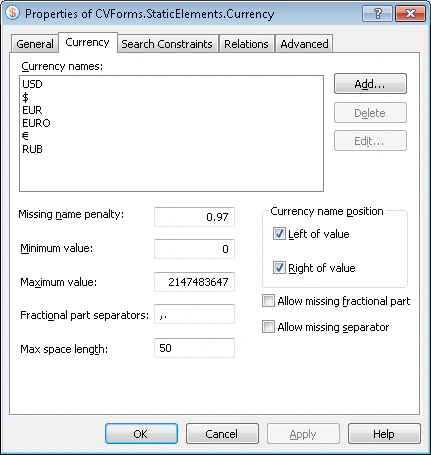 To find the numerical value of the sum, specify the following properties of the **Currency** element:
| Property | Description |
| --------------------------------- | ------------------------------------------------------------------------------------------------------------------------------------------------------------------------------------------------------------------------------------------------------------------------------------------------------------------------------------------------------------------------------ |
| **Currency names** | Contains the list of possible currency names. The name of the currency can be a word, a phrase, or a symbol such as `$` or `¥`. |
| **Missing name penalty** | Specifies a penalty coefficient (a number from 0 to 1) by which the quality of the hypothesis is multiplied if the program fails to find the specified name of the currency. |
| **Minimum value** | Sets the minimum value of the sum. |
| **Maximum value** | Sets the maximum value of the sum. |
| **Fractional part separators** | The symbols that can be used to separate the integer and fractional part of the sum. A separator can consist of only one symbol. By default, the list of allowed separators includes `,`, `.`, and a space. When you enter separator symbols, do not separate them with commas or spaces. |
| **Max space length** | Specifies the maximum allowed absolute length of the space inside the detected object. The space length is measured in the user-defined [units of measurement](/flexi-capture/fls/template/units). When looking for the text, the program adds characters to the string until the distance between neighboring characters reaches the value in the **Max space length** field. |
| **Currency name position** | The position of the currency symbol relative to the numerical value: **Left of value** or **Right of value**. |
| **Allow missing fractional part** | Specifies whether the fractional part of the number is required. If this option is selected, the program finds numbers such as `12.` and `12.-`. |
| **Allow missing separator** | Specifies whether the fractional part separator is required. If this option is selected, the program can find integers without separators. |
### Manage currency names
The **Currency names** list holds the possible names for the currency. Use one of the following actions:
* To add a name, click **Add...** and enter the currency name in the **Add Currency Name** dialog box.
* To edit a name, click **Edit...** and update the currency name in the **Edit Currency Name** dialog box.
* To delete a name, select it in the list and click **Delete**.
## Related topics
* [Create, copy, and delete elements](/flexi-capture/fls/template/elements-simple)
* [An overview of element properties](/flexi-capture/fls/template/elements-properties)
* [Search area](/flexi-capture/fls/template/search-constraints)
* [Currency](/flexi-capture/fls/language/currency-language)
To find the numerical value of the sum, specify the following properties of the **Currency** element:
| Property | Description |
| --------------------------------- | ------------------------------------------------------------------------------------------------------------------------------------------------------------------------------------------------------------------------------------------------------------------------------------------------------------------------------------------------------------------------------ |
| **Currency names** | Contains the list of possible currency names. The name of the currency can be a word, a phrase, or a symbol such as `$` or `¥`. |
| **Missing name penalty** | Specifies a penalty coefficient (a number from 0 to 1) by which the quality of the hypothesis is multiplied if the program fails to find the specified name of the currency. |
| **Minimum value** | Sets the minimum value of the sum. |
| **Maximum value** | Sets the maximum value of the sum. |
| **Fractional part separators** | The symbols that can be used to separate the integer and fractional part of the sum. A separator can consist of only one symbol. By default, the list of allowed separators includes `,`, `.`, and a space. When you enter separator symbols, do not separate them with commas or spaces. |
| **Max space length** | Specifies the maximum allowed absolute length of the space inside the detected object. The space length is measured in the user-defined [units of measurement](/flexi-capture/fls/template/units). When looking for the text, the program adds characters to the string until the distance between neighboring characters reaches the value in the **Max space length** field. |
| **Currency name position** | The position of the currency symbol relative to the numerical value: **Left of value** or **Right of value**. |
| **Allow missing fractional part** | Specifies whether the fractional part of the number is required. If this option is selected, the program finds numbers such as `12.` and `12.-`. |
| **Allow missing separator** | Specifies whether the fractional part separator is required. If this option is selected, the program can find integers without separators. |
### Manage currency names
The **Currency names** list holds the possible names for the currency. Use one of the following actions:
* To add a name, click **Add...** and enter the currency name in the **Add Currency Name** dialog box.
* To edit a name, click **Edit...** and update the currency name in the **Edit Currency Name** dialog box.
* To delete a name, select it in the list and click **Delete**.
## Related topics
* [Create, copy, and delete elements](/flexi-capture/fls/template/elements-simple)
* [An overview of element properties](/flexi-capture/fls/template/elements-properties)
* [Search area](/flexi-capture/fls/template/search-constraints)
* [Currency](/flexi-capture/fls/language/currency-language)