> ## Documentation Index
> Fetch the complete documentation index at: https://docs.abbyy.com/llms.txt
> Use this file to discover all available pages before exploring further.
# Object Collection
> Object Collection elements search for sets of mixed-type objects in a FlexiLayout, such as pictures, checkmarks, punctuation marks, and inverted text.
**Object Collection** is an element of a FlexiLayout that searches for sets of [objects](/flexi-capture/fls/batch/prerecognition) of different types, each of which meets the search criteria.
**Object Collection** elements are marked with  in the FlexiLayout tree.
**Object Collection** elements are usually used to look for objects that cannot be found using other elements. For example, you can use an **Object Collection** element to look for punctuation marks that stand apart and are not marked as text objects. You can also use this element to look for non-text objects, such as pictures and checkmarks.
## Object Collection element properties
Click the **Object Collection** tab in the **Properties** dialog box to describe the corresponding object.
To open the **Properties** dialog box, right-click the element in the **FlexiLayout** tree and select **Properties...** on the shortcut menu.
in the FlexiLayout tree.
**Object Collection** elements are usually used to look for objects that cannot be found using other elements. For example, you can use an **Object Collection** element to look for punctuation marks that stand apart and are not marked as text objects. You can also use this element to look for non-text objects, such as pictures and checkmarks.
## Object Collection element properties
Click the **Object Collection** tab in the **Properties** dialog box to describe the corresponding object.
To open the **Properties** dialog box, right-click the element in the **FlexiLayout** tree and select **Properties...** on the shortcut menu.
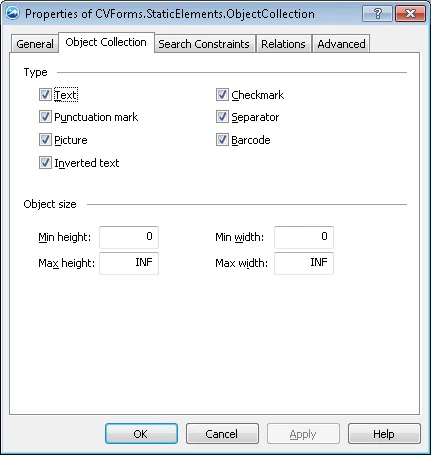 * **Type** — Specifies the type of objects to search for: **Text**, **Punctuation mark**, **Picture**, **Inverted text**, **Checkmark**, **Separator**, and **Barcode**. When you match the FlexiLayout against the images, the program detects only objects of the specified types and ignores all others.
* **Object size** — Sets the minimum and maximum widths and lengths of the objects in the user-defined [units of measurement](/flexi-capture/fls/template/units). To select values for these properties, first look at the sizes of the objects in the **Properties** window.
## Related topics
* [Create, copy, and delete elements](/flexi-capture/fls/template/elements-simple)
* [An overview of element properties](/flexi-capture/fls/template/elements-properties)
* [Search area](/flexi-capture/fls/template/search-constraints)
* [Object Collection](/flexi-capture/fls/language/object-collection-language)
* **Type** — Specifies the type of objects to search for: **Text**, **Punctuation mark**, **Picture**, **Inverted text**, **Checkmark**, **Separator**, and **Barcode**. When you match the FlexiLayout against the images, the program detects only objects of the specified types and ignores all others.
* **Object size** — Sets the minimum and maximum widths and lengths of the objects in the user-defined [units of measurement](/flexi-capture/fls/template/units). To select values for these properties, first look at the sizes of the objects in the **Properties** window.
## Related topics
* [Create, copy, and delete elements](/flexi-capture/fls/template/elements-simple)
* [An overview of element properties](/flexi-capture/fls/template/elements-properties)
* [Search area](/flexi-capture/fls/template/search-constraints)
* [Object Collection](/flexi-capture/fls/language/object-collection-language)