> ## Documentation Index
> Fetch the complete documentation index at: https://docs.abbyy.com/llms.txt
> Use this file to discover all available pages before exploring further.
# Phone
> Phone elements detect telephone numbers on document images, with properties for prefixes like Tel., digit separators, digit counts, and area code brackets.
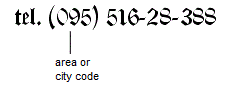
A **Phone** element describes a telephone number, which is often preceded by a prefix such as `Tel.` or `Phone` and an area or city code in brackets, as shown in the following figure. The prefix and the telephone number must be typed on the same line.
 **Phone** elements are marked with the
  icon in the **FlexiLayout** tree.
## Phone element properties
Click the **Phone** tab in the **Properties** dialog box to describe a **Phone** element.
To open the **Properties** dialog box, right-click the element in the **FlexiLayout** tree and select **Properties...** on the shortcut menu.
icon in the **FlexiLayout** tree.
## Phone element properties
Click the **Phone** tab in the **Properties** dialog box to describe a **Phone** element.
To open the **Properties** dialog box, right-click the element in the **FlexiLayout** tree and select **Properties...** on the shortcut menu.
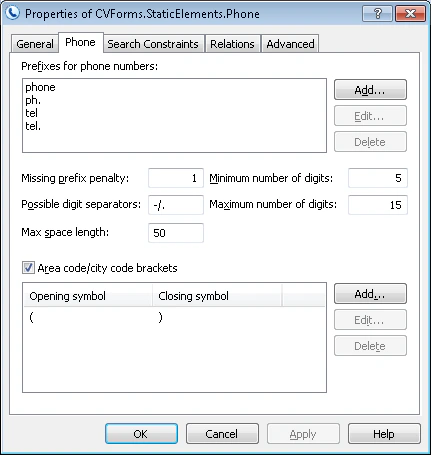 Specify the following properties to describe a phone number:
| Property | Description |
| -------------------------------- | ------------------------------------------------------------------------------------------------------------------------------------------------------------------------------------------------------------------------------------------------------------------------------------------------------------------------------------------------------------------------------ |
| **Prefixes for phone numbers** | Specifies the words or phrases that can precede the phone number. 20% of errors are allowed in a prefix (one error for every 5 characters). |
| **Missing prefix penalty** | Specifies a penalty coefficient (a number from 0 to 1) by which the quality of the hypothesis is multiplied if the prefix is not found. |
| **Possible digit separators** | Specifies the symbols that can separate digits in the phone number. A separator can consist of only one symbol. By default, the list of separators includes a space. When you enter several separators, do not separate them by commas or spaces. |
| **Minimum number of digits** | Specifies the minimum number of digits the phone number can contain. Hypotheses with fewer digits are discarded. |
| **Maximum number of digits** | Specifies the maximum number of digits the phone number can contain. Excess digits are discarded. |
| **Max space length** | Specifies the maximum allowed absolute length of the space inside the detected object. The space length is measured in the user-defined [units of measurement](/flexi-capture/fls/template/units). When looking for the text, the program adds characters to the string until the distance between neighboring characters reaches the value in the **Max space length** field. |
| **Area code/city code brackets** | Allows brackets around city and area codes. |
### Manage phone number prefixes
Manage the **Prefixes for phone numbers** list in one of the following ways:
* To add a prefix, click **Add...** and type the new prefix in the **Add Phone Prefix** dialog box.
* To edit a prefix, click **Edit...** and make the changes in the **Edit Phone Prefix** dialog box.
* To delete a prefix, select it in the list and click **Delete**.
### Manage area and city code brackets
Manage the **Area code/city code brackets** list in one of the following ways:
* To add brackets, click **Add...** and, in the **Add Phone Code Brackets** dialog box, type the opening bracket in the **Opening symbol** field and the closing bracket in the **Closing symbol** field.
* To edit brackets, click **Edit...** and change the **Opening symbol** and **Closing symbol** fields in the **Edit Phone Code Brackets** dialog box.
* To delete brackets, select them in the list and click **Delete**.
## Related topics
* [Create, copy, and delete elements](/flexi-capture/fls/template/elements-simple)
* [An overview of element properties](/flexi-capture/fls/template/elements-properties)
* [Search area](/flexi-capture/fls/template/search-constraints)
* [Phone](/flexi-capture/fls/language/phone-language)
Specify the following properties to describe a phone number:
| Property | Description |
| -------------------------------- | ------------------------------------------------------------------------------------------------------------------------------------------------------------------------------------------------------------------------------------------------------------------------------------------------------------------------------------------------------------------------------ |
| **Prefixes for phone numbers** | Specifies the words or phrases that can precede the phone number. 20% of errors are allowed in a prefix (one error for every 5 characters). |
| **Missing prefix penalty** | Specifies a penalty coefficient (a number from 0 to 1) by which the quality of the hypothesis is multiplied if the prefix is not found. |
| **Possible digit separators** | Specifies the symbols that can separate digits in the phone number. A separator can consist of only one symbol. By default, the list of separators includes a space. When you enter several separators, do not separate them by commas or spaces. |
| **Minimum number of digits** | Specifies the minimum number of digits the phone number can contain. Hypotheses with fewer digits are discarded. |
| **Maximum number of digits** | Specifies the maximum number of digits the phone number can contain. Excess digits are discarded. |
| **Max space length** | Specifies the maximum allowed absolute length of the space inside the detected object. The space length is measured in the user-defined [units of measurement](/flexi-capture/fls/template/units). When looking for the text, the program adds characters to the string until the distance between neighboring characters reaches the value in the **Max space length** field. |
| **Area code/city code brackets** | Allows brackets around city and area codes. |
### Manage phone number prefixes
Manage the **Prefixes for phone numbers** list in one of the following ways:
* To add a prefix, click **Add...** and type the new prefix in the **Add Phone Prefix** dialog box.
* To edit a prefix, click **Edit...** and make the changes in the **Edit Phone Prefix** dialog box.
* To delete a prefix, select it in the list and click **Delete**.
### Manage area and city code brackets
Manage the **Area code/city code brackets** list in one of the following ways:
* To add brackets, click **Add...** and, in the **Add Phone Code Brackets** dialog box, type the opening bracket in the **Opening symbol** field and the closing bracket in the **Closing symbol** field.
* To edit brackets, click **Edit...** and change the **Opening symbol** and **Closing symbol** fields in the **Edit Phone Code Brackets** dialog box.
* To delete brackets, select them in the list and click **Delete**.
## Related topics
* [Create, copy, and delete elements](/flexi-capture/fls/template/elements-simple)
* [An overview of element properties](/flexi-capture/fls/template/elements-properties)
* [Search area](/flexi-capture/fls/template/search-constraints)
* [Phone](/flexi-capture/fls/language/phone-language)