> ## Documentation Index
> Fetch the complete documentation index at: https://docs.abbyy.com/llms.txt
> Use this file to discover all available pages before exploring further.
# Separator
> Separator elements find vertical and horizontal separator lines, with length limits, quality penalties, and options for joining broken separators.
**Separator** is an element of a FlexiLayout that describes a vertical or horizontal separator.
**Separator** elements are marked with  in the FlexiLayout tree.
The program uses **Separator** elements to look for separators. It considers as candidates those separator objects detected during [pre-recognition](/flexi-capture/fls/batch/prerecognition) that either fit entirely within the search area of a **Separator** element or overlap the search area.
## Separator element properties
To open the **Properties** dialog box, right-click the element in the **FlexiLayout** tree and select **Properties...** on the shortcut menu.
Click the **Separator** tab to describe the corresponding object.
in the FlexiLayout tree.
The program uses **Separator** elements to look for separators. It considers as candidates those separator objects detected during [pre-recognition](/flexi-capture/fls/batch/prerecognition) that either fit entirely within the search area of a **Separator** element or overlap the search area.
## Separator element properties
To open the **Properties** dialog box, right-click the element in the **FlexiLayout** tree and select **Properties...** on the shortcut menu.
Click the **Separator** tab to describe the corresponding object.
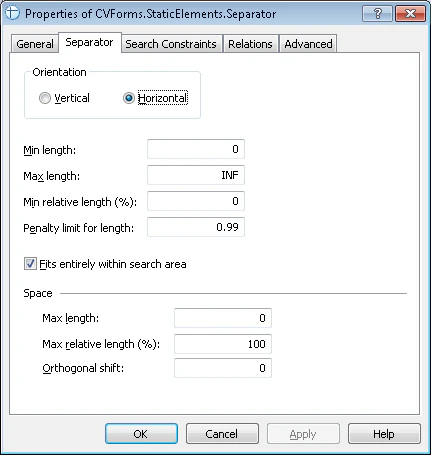 The **Separator** tab has the following properties.
| Property | Description |
| --------------------------- | -------------------------------------------------------------------------------------------------------------------------------------------------------------------------------------------------------------------------------------------------------------------------- |
| **Orientation** | Sets the orientation of a separator (vertical or horizontal). |
| **Min length** | Sets the minimum length of a separator, measured in user-defined [units of measurement](/flexi-capture/fls/template/units). Objects of smaller lengths are ignored. |
| **Max length** | Sets the maximum length of a separator, measured in user-defined [units of measurement](/flexi-capture/fls/template/units). Objects of greater lengths are ignored. |
| **Min relative length (%)** | Sets the minimum relative length of a separator. This is a number ranging from 0 to 100. The relative length of a separator is calculated as \[length of the separator]/\[length of the search area along the separator]. Objects of smaller relative lengths are ignored. |
If you specify both **Min length** and **Min relative length (%)**, the program uses the stricter criterion and ignores the other.
To estimate the length of a separator, click the corresponding object on the image and view its properties in the **Properties** window.
For example, suppose that **Min length** = 300 (1 in or 2.54 cm) and **Min relative length** = 30%. If the width of the search area is 21.0 cm (the width of an A4 sheet), the program looks for separators longer than 6.3 cm.
### Penalty limit for length
**Penalty limit for length** is the minimum coefficient by which the hypothesis quality can be multiplied as a penalty for its length.
When the program estimates the quality of a hypothesis, it can penalize the hypothesis for the length of the separator: the longer the separator object, the higher the quality of the hypothesis.
The highest quality of 1 is assigned to a separator whose length is the same as the search area. When the relative length of the separator decreases from 1 to 0, the quality of the hypothesis decreases in direct proportion from 1 to the **Penalty limit for length** value.
| Diagram | Formula |
| --------------------------------------------------------------------------------------------------------------------------------------------------------------------------------------------------------------------------------------------------------------------------------------------------------------------------------------------------------------------------------------------------------- | ---------------------------------------------------------------------------------------------------------------------------------------------------------------------------------------------------------------------------------------- |
|
The **Separator** tab has the following properties.
| Property | Description |
| --------------------------- | -------------------------------------------------------------------------------------------------------------------------------------------------------------------------------------------------------------------------------------------------------------------------- |
| **Orientation** | Sets the orientation of a separator (vertical or horizontal). |
| **Min length** | Sets the minimum length of a separator, measured in user-defined [units of measurement](/flexi-capture/fls/template/units). Objects of smaller lengths are ignored. |
| **Max length** | Sets the maximum length of a separator, measured in user-defined [units of measurement](/flexi-capture/fls/template/units). Objects of greater lengths are ignored. |
| **Min relative length (%)** | Sets the minimum relative length of a separator. This is a number ranging from 0 to 100. The relative length of a separator is calculated as \[length of the separator]/\[length of the search area along the separator]. Objects of smaller relative lengths are ignored. |
If you specify both **Min length** and **Min relative length (%)**, the program uses the stricter criterion and ignores the other.
To estimate the length of a separator, click the corresponding object on the image and view its properties in the **Properties** window.
For example, suppose that **Min length** = 300 (1 in or 2.54 cm) and **Min relative length** = 30%. If the width of the search area is 21.0 cm (the width of an A4 sheet), the program looks for separators longer than 6.3 cm.
### Penalty limit for length
**Penalty limit for length** is the minimum coefficient by which the hypothesis quality can be multiplied as a penalty for its length.
When the program estimates the quality of a hypothesis, it can penalize the hypothesis for the length of the separator: the longer the separator object, the higher the quality of the hypothesis.
The highest quality of 1 is assigned to a separator whose length is the same as the search area. When the relative length of the separator decreases from 1 to 0, the quality of the hypothesis decreases in direct proportion from 1 to the **Penalty limit for length** value.
| Diagram | Formula |
| --------------------------------------------------------------------------------------------------------------------------------------------------------------------------------------------------------------------------------------------------------------------------------------------------------------------------------------------------------------------------------------------------------- | ---------------------------------------------------------------------------------------------------------------------------------------------------------------------------------------------------------------------------------------- |
| 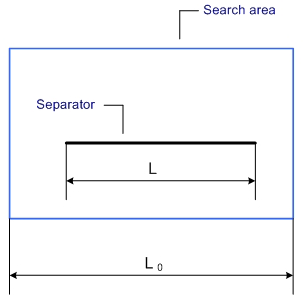 | Relative length = L/L0 |
|
| Relative length = L/L0 |
| 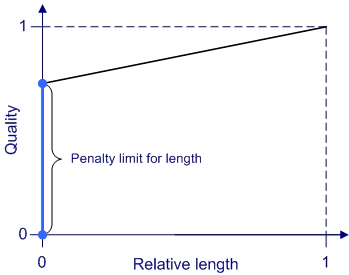 | \[Quality] = ( 1 – \[Min penalty for length] ) \* \[Relative length] + \[Penalty limit for length].
(The quality changes linearly from 1 for a relative length of 1 to \[Min penalty for length] for a relative length of 0.) |
### Fits entirely within search area
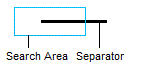
**Fits entirely within search area** specifies that the separator must fit entirely within its search area. Clear this option to find separators that overlap the search area, as shown in the following figure.
 ### Space group for disjointed separators
Sometimes separators on document images become distorted, disjointed, or skewed due to low-quality printing or scanning. During pre-recognition, this can cause the program to detect multiple separators instead of one.
### Space group for disjointed separators
Sometimes separators on document images become distorted, disjointed, or skewed due to low-quality printing or scanning. During pre-recognition, this can cause the program to detect multiple separators instead of one.
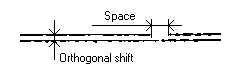 The **Space** group contains options that you can use to tell the program when to include multiple separators in one hypothesis.
| Property | Description |
| --------------------------- | ---------------------------------------------------------------------------------------------------------------------------------------------------------------------------------------------------------------------------------------------------------------- |
| **Max length** | The maximum distance between two separator objects that can be included in one hypothesis and considered to be one separator. |
| **Max relative length (%)** | The maximum relative distance between two separator objects that can be included in one hypothesis and considered to be one separator. The relative distance is calculated as follows: \[distance between separator fragments]/\[total length of the separator]. |
| **Orthogonal shift** | The maximum relative distance between two parallel separator objects (along a perpendicular line) that can be included in one hypothesis and considered to be one separator. |
If you specify both **Max length** and **Max relative length (%)**, the program uses the shorter of the two distances.
## Tips for Separator elements
Separators do not usually have fixed positions on unstructured documents. Since they are optional design elements, a designer might choose not to use them at all. For this reason, separators are rarely used as reference elements in FlexiLayouts.
The most common function of separators in documents is to separate the text from adjoining fields, so the search areas of **Separator** elements tend to be small.
If you use separators as reference elements, check whether they were detected during pre-recognition.
Once pre-recognition completes, confirm that the program can detect a separator on all test images.
Click the
The **Space** group contains options that you can use to tell the program when to include multiple separators in one hypothesis.
| Property | Description |
| --------------------------- | ---------------------------------------------------------------------------------------------------------------------------------------------------------------------------------------------------------------------------------------------------------------- |
| **Max length** | The maximum distance between two separator objects that can be included in one hypothesis and considered to be one separator. |
| **Max relative length (%)** | The maximum relative distance between two separator objects that can be included in one hypothesis and considered to be one separator. The relative distance is calculated as follows: \[distance between separator fragments]/\[total length of the separator]. |
| **Orthogonal shift** | The maximum relative distance between two parallel separator objects (along a perpendicular line) that can be included in one hypothesis and considered to be one separator. |
If you specify both **Max length** and **Max relative length (%)**, the program uses the shorter of the two distances.
## Tips for Separator elements
Separators do not usually have fixed positions on unstructured documents. Since they are optional design elements, a designer might choose not to use them at all. For this reason, separators are rarely used as reference elements in FlexiLayouts.
The most common function of separators in documents is to separate the text from adjoining fields, so the search areas of **Separator** elements tend to be small.
If you use separators as reference elements, check whether they were detected during pre-recognition.
Once pre-recognition completes, confirm that the program can detect a separator on all test images.
Click the  button on the toolbar.
Look through all of the test images and check the location of the separators.
This check is especially important if the separators are thin, because in this case their detection depends on image quality and the scanning settings.
When creating **Separator** elements, pay attention to the number of hypotheses you can end up with in the separator's search area. Avoid situations where multiple separator objects fall in the same search area and the FlexiLayout has a group containing several **Separator** elements.
In this case, the program can generate an abnormally large number of hypotheses when applying the FlexiLayout. A hypothesis can be generated for every object, and the program tries every combination of possible hypotheses.
If possible, minimize the number of hypotheses for **Separator** elements by limiting their search area.
## Related topics
* [Create, copy, and delete elements](/flexi-capture/fls/template/elements-simple)
* [An overview of element properties](/flexi-capture/fls/template/elements-properties)
* [Search area](/flexi-capture/fls/template/search-constraints)
* [Additional search constraints](/flexi-capture/fls/template/advanced-constraints)
button on the toolbar.
Look through all of the test images and check the location of the separators.
This check is especially important if the separators are thin, because in this case their detection depends on image quality and the scanning settings.
When creating **Separator** elements, pay attention to the number of hypotheses you can end up with in the separator's search area. Avoid situations where multiple separator objects fall in the same search area and the FlexiLayout has a group containing several **Separator** elements.
In this case, the program can generate an abnormally large number of hypotheses when applying the FlexiLayout. A hypothesis can be generated for every object, and the program tries every combination of possible hypotheses.
If possible, minimize the number of hypotheses for **Separator** elements by limiting their search area.
## Related topics
* [Create, copy, and delete elements](/flexi-capture/fls/template/elements-simple)
* [An overview of element properties](/flexi-capture/fls/template/elements-properties)
* [Search area](/flexi-capture/fls/template/search-constraints)
* [Additional search constraints](/flexi-capture/fls/template/advanced-constraints)