> ## Documentation Index
> Fetch the complete documentation index at: https://docs.abbyy.com/llms.txt
> Use this file to discover all available pages before exploring further.
# Simplify a FlexiLayout with an auxiliary element and a null hypothesis
> Simplify bulky FlexiLayout code with an auxiliary dummy element whose null hypothesis marks when shared search constraints are met across several elements.
Use this method when you need to check the same bulky search constraints for several elements. The idea is that the constraints are checked and the calculations are performed only once, in an auxiliary element.
Depending on the result of checking the constraints, the given element is either searched for or not, so the found or unfound hypothesis is a marker signaling whether the constraints are met.
## How the dummy element signals that the constraints are met
This auxiliary element is created so that it can always detect something on the images, provided the `DontFind()` function (that is, "stop the search") is not activated. The number of hypotheses should not be too large, to avoid overextending the tree of hypotheses and increasing the FlexiLayout matching time.
To achieve this, you can use, for instance, elements of the **Object Collection** or **Paragraph** types. These elements always generate a single hypothesis that includes all the objects of the specified type from the search area.
The **Advanced pre-search relations** section of the dummy element contains the set of conditions to check for some of the elements located below the dummy element in the project tree. If all the conditions are met, the `DontFind()` function is called for the dummy element.
In this case, a null hypothesis will be generated for the dummy element, and it will serve as a marker that all the conditions have been met when FlexiLayout Studio starts searching for other elements. This tells it to run only the `IsNull` check of the dummy element instead of checking the same bulky constraints for several elements.
This method helps to make the code more descriptive. Additionally, if you need to edit the constraints, you can do this only in the description of the dummy element. It lowers the chances of logical and syntactical errors when duplicating the code.
Future versions of the product are planned to support the creation of variables in the area of subelements of groups. The results of checking the constraints will then be stored in the values of different variables.
The current method is a temporary solution (workaround) that helps to simplify the code in the Advanced sections in the present version of FlexiLayout Studio.
## The two invoice layouts in the sample project
The project `1.fsp` (folder `%public%\ABBYY\FlexiCapture\12.0\Samples\FLS\Tips and Tricks\Auxiliary element`) shows how this method works.
On these images, the goal is to find the following fields: "Invoice number", "Invoice date", "Company name", and "Company address".
Assume that invoices of two different types have to be processed:
* The fields "Company name" and "Company address" are above the field "Invoice number".
* The fields "Company name" and "Company address" are below the field "Invoice number".
As you can see from the images, the fields "Company name" and "Company address" do not have names, which prevents using the standard procedure of looking for a data field by relying on its name.
However, there is a certain pattern: when the date field is located to the right of the invoice number, the company name and address are located below the field "Invoice number" (pages 1 and 3). If the date field is below the invoice number field, the company details are above the field "Invoice number" (pages 2 and 4).
Taking this pattern into account, it is best to search for the location of the fields "Invoice number" and "Invoice date" first, and then detect the other fields by relying on these two, specifying their mutual locations.
## Search for the date field with two sets of constraints
The project contains a **Group** element **InvoiceGroup** with the elements **InvoiceHeader**, **InvoiceNum**, and **DateHeader**, and a **Group** element **DateGroup**. These subelements are required to detect field names and the fields "Invoice number" and "Invoice date".
For more information on the methods of date search, see [Date search after high or low-quality recognition](/flexi-capture/fls/tips-tricks/date2). This section only describes the constraints for the date search in the current project.
As you can see, the date fields on the images do not always have names.
So, when searching for a date field, you need to specify two sets of constraints: for cases when the name has been detected and for cases when the name has not been detected (a special case would be if the name is present on the page but has not been detected, for example, because of noise).
```text theme={null}
if not DateHeader.IsNull then
{ RightOf: DateHeader.Rect.Right;
Below: DateHeader.Rect.Top - 30dt;
Above: DateHeader.Rect.Bottom + 30dt;
}
else
{ RectArray ar;
Let ar1 = Rect (InvoiceNum.Rect.Right, InvoiceNum.Rect.Top-30dt, PageRect.Right, InvoiceNum.Rect.Bottom + 30dt);
Let ar2 = Rect (InvoiceHeader.Rect.Left, InvoiceHeader.Rect.Bottom, InvoiceHeader.Rect.Right + 300dt, InvoiceHeader.Rect.Bottom + 150dt);
ar = RectArray (ar1);
ar.Add (ar2);
RestrictSearchArea (ar);
}
```
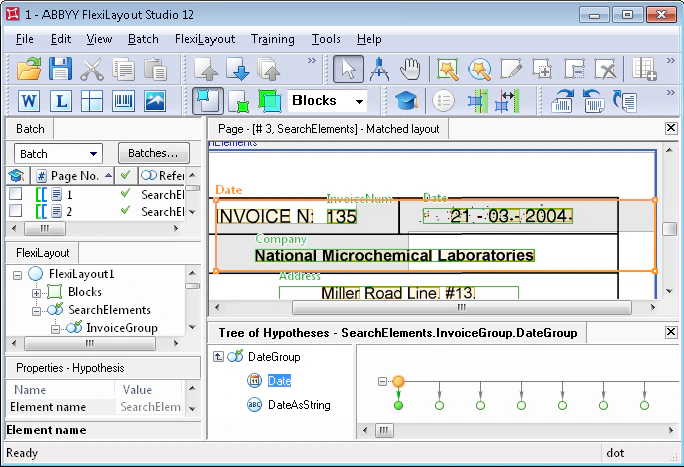
If the name of the date field is detected (the constraint `if not DateHeader.IsNull` is checked), then the search will be performed relative to the name of the date field: to the right of the name, on the same horizontal level, with some margin of error for vertical displacement:
```text theme={null}
{ RightOf: DateHeader.Rect.Right;
Below: DateHeader.Rect.Top - 30dt;
Above: DateHeader.Rect.Bottom + 30dt;
}
```
Otherwise, the search area is divided into two rectangles: one to the right of the invoice number, on the same level as the invoice number, and one below the invoice field.
For the sake of simplicity, assume that the images are of good quality and the field "Invoice number" and its name are always detected.
In a real-life situation, before calling the properties of these elements, you must run their `IsNull` check, because if the elements are not detected, further search will be performed relative to the search areas of the corresponding elements.
 ### Penalize date hypotheses far from the invoice fields
The **Advanced post-search relations** section of the **Date** element contains the following code:
```text theme={null}
if (DateHeader.IsNull) and (not IsNull) then
{if (not InvoiceHeader.IsNull) then
{ FuzzyQuality: Rect.Left - InvoiceHeader.Rect.Right, {0, 0, 0, 50000}*dt;
FuzzyQuality: Rect.Top - InvoiceHeader.Rect.Bottom, {-50000, 0, 0, 50000}*dt;
}
if (not InvoiceNum.IsNull) then
{ FuzzyQuality: Rect.Left - InvoiceNum.Rect.Right, {0, 0, 0, 50000}*dt;
FuzzyQuality: Rect.Top - InvoiceNum.Rect.Bottom, {-50000, 0, 0, 50000}*dt;
}
}
```
This code influences the quality of the date hypothesis depending on its distance from the name of the invoice field and from the field "Invoice number" itself if the name of the date field is not detected.
The longer the distance to the specified fields, the greater the penalty will be for the corresponding hypotheses, that is, the date field nearest to the field "Invoice number" is searched for.
For more information on the use of these functions, see [Search for elements with Nearest and FuzzyQuality](/flexi-capture/fls/tips-tricks/date9).
### Search constraints for the DateAsString element
Identical search constraints are specified for the **DateAsString** element, but its **Advanced post-search relations** section adds one more line to the code shown earlier:
```text theme={null}
FuzzyQuality: 600dt - Width, {0, 0, 0, 50000}*dt;
```
This line is needed during date search, so that a hypothesis with a longer string of alphabet characters is preferred over a shorter one.
Additionally, the **Search Constraints** tab of the **DateAsString** element specifies that, when searching for the date as a string of characters, the region of the **InvoiceNum** element must be excluded.
This is because, for the sake of simplicity, the search constraints specified in the **Advanced pre-search relations** section of the **Date** element are not duplicated for the **DateAsString** element. Instead, the search area is specified as `RestrictSearchArea (Date.Rect);`.
This tells FlexiLayout Studio to search for the object of the **DateAsString** element in the area of the fuzzy rectangle of the **Date** element. The search area of the **Date** element can be represented as an array of rectangles.
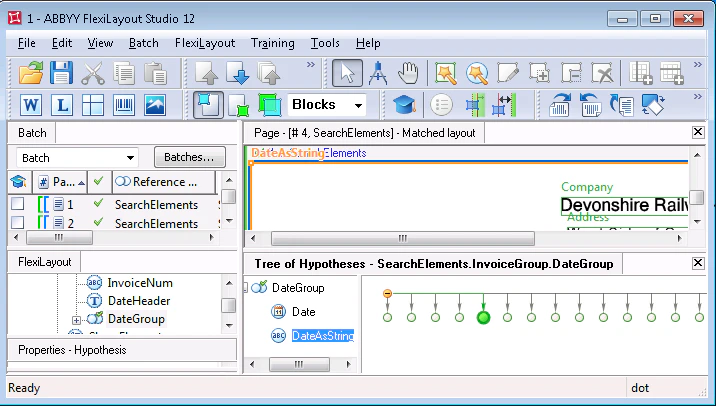
When a null hypothesis is generated for the **Date** element, the rectangle enclosing the search area is taken as a rectangle (`Rect`) of the current element. As you can see in the following image, it also encloses the field "Invoice number" described by the **InvoiceNum** element.
Under some conditions (for instance, when the date field is very noisy), a situation may occur when, instead of the date field, the **DateAsString** element will detect the field of the invoice number, as characters (including digits) specified for this element do not have any format restrictions.
### Penalize date hypotheses far from the invoice fields
The **Advanced post-search relations** section of the **Date** element contains the following code:
```text theme={null}
if (DateHeader.IsNull) and (not IsNull) then
{if (not InvoiceHeader.IsNull) then
{ FuzzyQuality: Rect.Left - InvoiceHeader.Rect.Right, {0, 0, 0, 50000}*dt;
FuzzyQuality: Rect.Top - InvoiceHeader.Rect.Bottom, {-50000, 0, 0, 50000}*dt;
}
if (not InvoiceNum.IsNull) then
{ FuzzyQuality: Rect.Left - InvoiceNum.Rect.Right, {0, 0, 0, 50000}*dt;
FuzzyQuality: Rect.Top - InvoiceNum.Rect.Bottom, {-50000, 0, 0, 50000}*dt;
}
}
```
This code influences the quality of the date hypothesis depending on its distance from the name of the invoice field and from the field "Invoice number" itself if the name of the date field is not detected.
The longer the distance to the specified fields, the greater the penalty will be for the corresponding hypotheses, that is, the date field nearest to the field "Invoice number" is searched for.
For more information on the use of these functions, see [Search for elements with Nearest and FuzzyQuality](/flexi-capture/fls/tips-tricks/date9).
### Search constraints for the DateAsString element
Identical search constraints are specified for the **DateAsString** element, but its **Advanced post-search relations** section adds one more line to the code shown earlier:
```text theme={null}
FuzzyQuality: 600dt - Width, {0, 0, 0, 50000}*dt;
```
This line is needed during date search, so that a hypothesis with a longer string of alphabet characters is preferred over a shorter one.
Additionally, the **Search Constraints** tab of the **DateAsString** element specifies that, when searching for the date as a string of characters, the region of the **InvoiceNum** element must be excluded.
This is because, for the sake of simplicity, the search constraints specified in the **Advanced pre-search relations** section of the **Date** element are not duplicated for the **DateAsString** element. Instead, the search area is specified as `RestrictSearchArea (Date.Rect);`.
This tells FlexiLayout Studio to search for the object of the **DateAsString** element in the area of the fuzzy rectangle of the **Date** element. The search area of the **Date** element can be represented as an array of rectangles.
When a null hypothesis is generated for the **Date** element, the rectangle enclosing the search area is taken as a rectangle (`Rect`) of the current element. As you can see in the following image, it also encloses the field "Invoice number" described by the **InvoiceNum** element.
Under some conditions (for instance, when the date field is very noisy), a situation may occur when, instead of the date field, the **DateAsString** element will detect the field of the invoice number, as characters (including digits) specified for this element do not have any format restrictions.
 ## Check the field arrangement with the ShamElement auxiliary element
After the elements required to search for the fields "Invoice number" and "Invoice date" have been described, the next step is the search for the fields "Company name" and "Company address".
The project uses a **Paragraph** element named **ShamElement**. This element serves as an auxiliary element and is used exclusively to check the mutual location of the fields "Invoice number" and "Invoice date".
The **Advanced pre-search relations** section of the auxiliary element contains the following code:
```text theme={null}
Let Date1 = InvoiceGroup.DateGroup.Date;
Let Date2 = InvoiceGroup.DateGroup.DateAsString;
Let DateGroup = InvoiceGroup.DateGroup;
Let InvoiceHeader = InvoiceGroup.InvoiceHeader;
Let InvoiceNumber = InvoiceGroup.InvoiceNum;
if ((not InvoiceHeader.IsNull) or (not InvoiceNumber.IsNull)) and
(
((Date1.IsNull == FALSE) and ((max (InvoiceHeader.Rect.YCenter - Date1.Rect.YCenter, Date1.Rect.YCenter - InvoiceHeader.Rect.YCenter ) < 30dt) or (max (InvoiceNumber.Rect.YCenter - Date1.Rect.YCenter, Date1.Rect.YCenter - InvoiceNumber.Rect.YCenter ) < 30dt)) and ((Date1.Rect.Left - InvoiceHeader.Rect.Right > 100dt) or (Date1.Rect.Left - InvoiceNumber.Rect.Right > 50dt)))
or
((Date2.IsNull == FALSE) and ((max (InvoiceHeader.Rect.YCenter - Date2.Rect.YCenter, Date2.Rect.YCenter - InvoiceHeader.Rect.YCenter ) < 30dt) or (max (InvoiceNumber.Rect.YCenter - Date2.Rect.YCenter, Date2.Rect.YCenter - InvoiceNumber.Rect.YCenter ) < 30dt)) and ((Date2.Rect.Left - InvoiceHeader.Rect.Right > 100dt) or (Date2.Rect.Left - InvoiceNumber.Rect.Right > 50dt)))
)
then
{ Dontfind(); }
else
{ Below: PageRect.Top; }
```
Despite the simplicity of the constraints checked by this code, the code itself is rather bulky.
The idea is that if the date field detected by means of one of the **Date** or **DateAsString** elements is located to the right of the invoice number field but on the same level (with a vertical tolerance of 30 dt), FlexiLayout Studio is told that a null hypothesis must be generated for the auxiliary element.
In the other cases, the **ShamElement** element will be looked for below the top edge of the page. Since the auxiliary element is a **Paragraph** element without any additional search constraints, it will enclose all text objects on the page, and a single hypothesis will be generated.
Nearly all the constraints to be checked are intuitively clear, so only the most complicated of them are described here.
```text theme={null}
max (InvoiceHeader.Rect.YCenter - Date1.Rect.YCenter, Date1.Rect.YCenter - InvoiceHeader.Rect.YCenter ) < 30dt
```
This part of the code checks that the date field (in this case, if it is detected by the **Date** element) is located on the same horizontal level as the element of the name of the field "Invoice number". The date may be slightly higher or lower than the name (because of the possible errors during scanning or document filling).
The maximum difference is specified as 30 dt. The mutual vertical location of the fields "Invoice date" and "Invoice number" is checked by the same method.
```text theme={null}
Date1.Rect.Left - InvoiceHeader.Rect.Right > 100dt
```
This line checks that the date field is located to the right of the name of the field "Invoice number" (the coordinate of the left boundary of the date is greater than that of the right boundary of the name).
A tolerance of 100dt is specified because the invoice number itself must be between the name and the date. The date field is located to the right of the field "Invoice number".
All the conditions of the check are then duplicated for the **DateAsString** element.
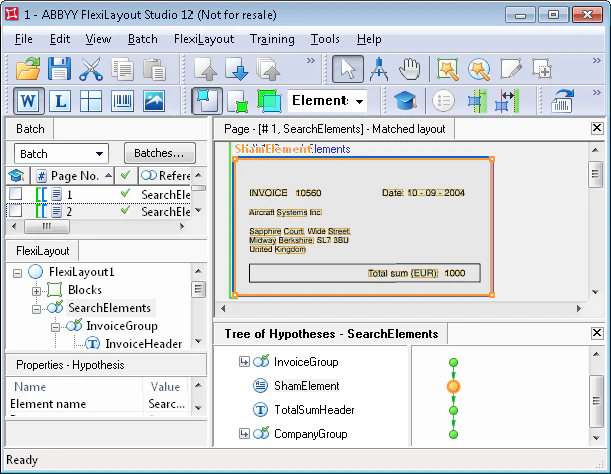
To check that the code is correct, run the FlexiLayout matching procedure on all the pages. On pages 1 and 3, where the date field is located to the right of the invoice number, a null hypothesis was generated for the **ShamElement** element. On the other two pages, text fragments were detected.
## Check the field arrangement with the ShamElement auxiliary element
After the elements required to search for the fields "Invoice number" and "Invoice date" have been described, the next step is the search for the fields "Company name" and "Company address".
The project uses a **Paragraph** element named **ShamElement**. This element serves as an auxiliary element and is used exclusively to check the mutual location of the fields "Invoice number" and "Invoice date".
The **Advanced pre-search relations** section of the auxiliary element contains the following code:
```text theme={null}
Let Date1 = InvoiceGroup.DateGroup.Date;
Let Date2 = InvoiceGroup.DateGroup.DateAsString;
Let DateGroup = InvoiceGroup.DateGroup;
Let InvoiceHeader = InvoiceGroup.InvoiceHeader;
Let InvoiceNumber = InvoiceGroup.InvoiceNum;
if ((not InvoiceHeader.IsNull) or (not InvoiceNumber.IsNull)) and
(
((Date1.IsNull == FALSE) and ((max (InvoiceHeader.Rect.YCenter - Date1.Rect.YCenter, Date1.Rect.YCenter - InvoiceHeader.Rect.YCenter ) < 30dt) or (max (InvoiceNumber.Rect.YCenter - Date1.Rect.YCenter, Date1.Rect.YCenter - InvoiceNumber.Rect.YCenter ) < 30dt)) and ((Date1.Rect.Left - InvoiceHeader.Rect.Right > 100dt) or (Date1.Rect.Left - InvoiceNumber.Rect.Right > 50dt)))
or
((Date2.IsNull == FALSE) and ((max (InvoiceHeader.Rect.YCenter - Date2.Rect.YCenter, Date2.Rect.YCenter - InvoiceHeader.Rect.YCenter ) < 30dt) or (max (InvoiceNumber.Rect.YCenter - Date2.Rect.YCenter, Date2.Rect.YCenter - InvoiceNumber.Rect.YCenter ) < 30dt)) and ((Date2.Rect.Left - InvoiceHeader.Rect.Right > 100dt) or (Date2.Rect.Left - InvoiceNumber.Rect.Right > 50dt)))
)
then
{ Dontfind(); }
else
{ Below: PageRect.Top; }
```
Despite the simplicity of the constraints checked by this code, the code itself is rather bulky.
The idea is that if the date field detected by means of one of the **Date** or **DateAsString** elements is located to the right of the invoice number field but on the same level (with a vertical tolerance of 30 dt), FlexiLayout Studio is told that a null hypothesis must be generated for the auxiliary element.
In the other cases, the **ShamElement** element will be looked for below the top edge of the page. Since the auxiliary element is a **Paragraph** element without any additional search constraints, it will enclose all text objects on the page, and a single hypothesis will be generated.
Nearly all the constraints to be checked are intuitively clear, so only the most complicated of them are described here.
```text theme={null}
max (InvoiceHeader.Rect.YCenter - Date1.Rect.YCenter, Date1.Rect.YCenter - InvoiceHeader.Rect.YCenter ) < 30dt
```
This part of the code checks that the date field (in this case, if it is detected by the **Date** element) is located on the same horizontal level as the element of the name of the field "Invoice number". The date may be slightly higher or lower than the name (because of the possible errors during scanning or document filling).
The maximum difference is specified as 30 dt. The mutual vertical location of the fields "Invoice date" and "Invoice number" is checked by the same method.
```text theme={null}
Date1.Rect.Left - InvoiceHeader.Rect.Right > 100dt
```
This line checks that the date field is located to the right of the name of the field "Invoice number" (the coordinate of the left boundary of the date is greater than that of the right boundary of the name).
A tolerance of 100dt is specified because the invoice number itself must be between the name and the date. The date field is located to the right of the field "Invoice number".
All the conditions of the check are then duplicated for the **DateAsString** element.
To check that the code is correct, run the FlexiLayout matching procedure on all the pages. On pages 1 and 3, where the date field is located to the right of the invoice number, a null hypothesis was generated for the **ShamElement** element. On the other two pages, text fragments were detected.
 ## Search for the company name relative to the invoice fields
To detect the company details, the project uses a **Group** element **CompanyGroup**. It groups the **CompanyName** element of type **Character String** (the company name on test images is written in a single line) and the **Address** element of type **Paragraph**. The latter element is used to search for the block containing the company address.
The use of the auxiliary element helps to simplify the code which describes the search constraints of the element in the **Advanced pre-search relations** section.
If the auxiliary element is not detected (that is, a null hypothesis is generated for it), this means that the date field is located to the right of the invoice field. In this case, the field "Company name" will be looked for below the field "Invoice number".
If the auxiliary element is detected, the field "Company name" will be looked for above the field "Invoice number".
```text theme={null}
if ShamElement.IsNull then
{ Below: InvoiceGroup.InvoiceHeader;
Below: InvoiceGroup.InvoiceNum;
NearestY: PageRect.Top;
}
else
{ Above: InvoiceGroup.InvoiceHeader;
Above: InvoiceGroup.InvoiceNum;
}
```
In this case, the `Nearest` function can be used, as it helps to detect the field containing the company name unambiguously and accurately (there are no objects matching the same search constraints).
The **Advanced post-search relations** section of the **CompanyName** element contains the following code.
```text theme={null}
if not IsNull then
{ FuzzyQuality: Rect.Left - PageRect.Left, {0, 0, 0, 50000}*dt;
FuzzyQuality: Rect.Top - PageRect.Top, {0, 0, 0, 50000}*dt;
FuzzyQuality: 100dt - Height, {0, 0, 0, 10000}*dt;
}
```
This code works when the single-line field "Company name" is looked for above the field of the invoice number. The sought fields do not have names. At the same time, the mutual location of the fields "Company name" and "Company address" is different on pages 2 and 4.
The constraints `Above: InvoiceGroup.InvoiceHeader;` and `Above: InvoiceGroup.InvoiceNum;` are met not only by the string with the company name, but also by the strings in the address field.
## Search for the company name relative to the invoice fields
To detect the company details, the project uses a **Group** element **CompanyGroup**. It groups the **CompanyName** element of type **Character String** (the company name on test images is written in a single line) and the **Address** element of type **Paragraph**. The latter element is used to search for the block containing the company address.
The use of the auxiliary element helps to simplify the code which describes the search constraints of the element in the **Advanced pre-search relations** section.
If the auxiliary element is not detected (that is, a null hypothesis is generated for it), this means that the date field is located to the right of the invoice field. In this case, the field "Company name" will be looked for below the field "Invoice number".
If the auxiliary element is detected, the field "Company name" will be looked for above the field "Invoice number".
```text theme={null}
if ShamElement.IsNull then
{ Below: InvoiceGroup.InvoiceHeader;
Below: InvoiceGroup.InvoiceNum;
NearestY: PageRect.Top;
}
else
{ Above: InvoiceGroup.InvoiceHeader;
Above: InvoiceGroup.InvoiceNum;
}
```
In this case, the `Nearest` function can be used, as it helps to detect the field containing the company name unambiguously and accurately (there are no objects matching the same search constraints).
The **Advanced post-search relations** section of the **CompanyName** element contains the following code.
```text theme={null}
if not IsNull then
{ FuzzyQuality: Rect.Left - PageRect.Left, {0, 0, 0, 50000}*dt;
FuzzyQuality: Rect.Top - PageRect.Top, {0, 0, 0, 50000}*dt;
FuzzyQuality: 100dt - Height, {0, 0, 0, 10000}*dt;
}
```
This code works when the single-line field "Company name" is looked for above the field of the invoice number. The sought fields do not have names. At the same time, the mutual location of the fields "Company name" and "Company address" is different on pages 2 and 4.
The constraints `Above: InvoiceGroup.InvoiceHeader;` and `Above: InvoiceGroup.InvoiceNum;` are met not only by the string with the company name, but also by the strings in the address field.
 To select the only correct hypothesis among all the generated hypotheses, the following code in the **Advanced post-search relations** section is used.
The lines
```text theme={null}
FuzzyQuality: Rect.Left - PageRect.Left, {0, 0, 0, 50000}*dt;
```
and
```text theme={null}
FuzzyQuality: Rect.Top -PageRect.Top, {0, 0, 0, 50000}*dt;
```
tell FlexiLayout Studio to apply stronger penalties to hypotheses with objects close to the bottom and right boundaries of the image.
However, on page 2 the field "Company name" is located to the left of the address field but lower than its upper line. So the described constraints are not sufficient to detect the sought field "Company name", and one more constraint is needed.
```text theme={null}
FuzzyQuality: 100dt - Height, {0, 0, 0, 10000}*dt;
```
This line tells FlexiLayout Studio to check the height of all the lines for the generated hypotheses. The taller the characters in the line are, the higher the quality of the corresponding hypothesis.
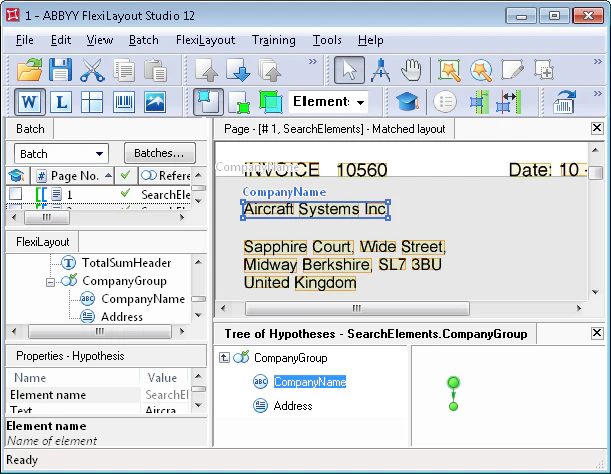
After matching the FlexiLayout, you can see that the field "Company name" has been successfully detected on all the pages.
## Search for the address field with the auxiliary element
To detect the address field, the following code is written in the **Advanced pre-search relations** section of the **Address** element:
```text theme={null}
if ShamElement.IsNull then
{ Below: CompanyName;
Above: TotalSumHeader.Rect.Top;
}
else
{
Above: InvoiceGroup.InvoiceHeader;
Above: InvoiceGroup.InvoiceNum;
RightOf: CompanyName.Rect.Left;
Exclude: CompanyName;
}
```
Here again, the auxiliary element **ShamElement** is used, which helps to simplify the code.
The creation of the FlexiLayout is now complete. Once you have run the FlexiLayout matching procedure, you will see that all the fields have been successfully detected.
To select the only correct hypothesis among all the generated hypotheses, the following code in the **Advanced post-search relations** section is used.
The lines
```text theme={null}
FuzzyQuality: Rect.Left - PageRect.Left, {0, 0, 0, 50000}*dt;
```
and
```text theme={null}
FuzzyQuality: Rect.Top -PageRect.Top, {0, 0, 0, 50000}*dt;
```
tell FlexiLayout Studio to apply stronger penalties to hypotheses with objects close to the bottom and right boundaries of the image.
However, on page 2 the field "Company name" is located to the left of the address field but lower than its upper line. So the described constraints are not sufficient to detect the sought field "Company name", and one more constraint is needed.
```text theme={null}
FuzzyQuality: 100dt - Height, {0, 0, 0, 10000}*dt;
```
This line tells FlexiLayout Studio to check the height of all the lines for the generated hypotheses. The taller the characters in the line are, the higher the quality of the corresponding hypothesis.
After matching the FlexiLayout, you can see that the field "Company name" has been successfully detected on all the pages.
## Search for the address field with the auxiliary element
To detect the address field, the following code is written in the **Advanced pre-search relations** section of the **Address** element:
```text theme={null}
if ShamElement.IsNull then
{ Below: CompanyName;
Above: TotalSumHeader.Rect.Top;
}
else
{
Above: InvoiceGroup.InvoiceHeader;
Above: InvoiceGroup.InvoiceNum;
RightOf: CompanyName.Rect.Left;
Exclude: CompanyName;
}
```
Here again, the auxiliary element **ShamElement** is used, which helps to simplify the code.
The creation of the FlexiLayout is now complete. Once you have run the FlexiLayout matching procedure, you will see that all the fields have been successfully detected.