> ## Documentation Index
> Fetch the complete documentation index at: https://docs.abbyy.com/llms.txt
> Use this file to discover all available pages before exploring further.
# Optimize FlexiLayout structure and search with Group elements
> Group related elements to reduce hypothesis combinations and speed up FlexiLayout matching, illustrated step by step in the GroupSample.fsp project.
Using **Group** elements to search for objects is most efficient, because grouping elements together reduces the number of hypotheses for an element and speeds up the search for the resulting hypothesis for the whole FlexiLayout. Moreover, if the grouping of the elements reflects the logic of the document, it helps to optimize the structure of the FlexiLayout and makes it more explicit.
Grouping several elements together into one Group element enables FlexiLayout Studio to treat this set of elements as a whole with its own hypothesis (composed of individual hypotheses for elements in the group).
Analysis of hypotheses and their elements takes place within the Group element, and only the user-specified number of the best hypotheses (1 by default) is used in the subsequent search for other elements.
The entire tree of elements can be regarded as one Group element, the best hypothesis for which is the result of matching the FlexiLayout.
## The GroupSample.fsp sample project
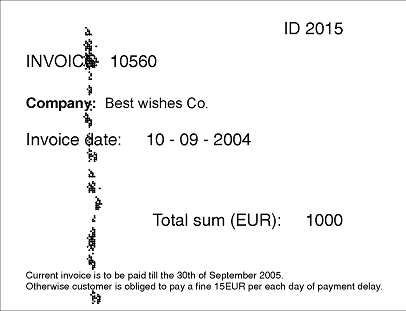
The `GroupSample.fsp` project (folder `%public%\ABBYY\FlexiCapture\12.0\Samples\FLS\Tips and Tricks\Group\Project1`) shows how Group elements can be used. The goal is to detect the fields with the invoice number, the invoice date, and the invoice sum on the image.
 ## Group the invoice fields into InvoiceRequisiteGroup
As the image shows (and as is usually true for all financial documents), the number and the date of the document are neighboring fields. Even if the arrangement of the fields on another document is different, they will still be close to each other.
Furthermore, they are connected by the logic of the document, as they describe certain bank details and form a logical block. To make the structure of the FlexiLayout more explicit, the project groups them into a Group element named **InvoiceRequisiteGroup**.
Before the elements were grouped, a special identifying element was created. (Identifier elements are described in detail in [FlexiLayout identification and processing in ABBYY FlexiCapture](/flexi-capture/fls/dif/form-reader-batch).) This element was only created to illustrate the "branching out" of the tree of hypotheses caused by the presence or absence of Group elements in it.
Assume that all the elements in the tree, except the identifier element, are optional, and their null hypotheses have the default quality of 0.97.
The first element in the Group is an element of type **Static Text**, named **InvoiceNumHeader**, which describes the search constraints for the name of the field "Invoice number". The string "Invoice" is specified as the value of this element.
Based on an analysis of the available images, the invoice number is searched for to the right of the name, with the help of an element named **InvoiceNum**.
Similarly, under the line with the invoice number, the project contains an element for the date field, named **InvoiceDateHeader**. To search for the date itself, the project uses the group **DateGroup** with the following subelements: **InvoiceDate** and **InvoiceDateAsString**. For more information, see [Date search after high or low-quality recognition](/flexi-capture/fls/tips-tricks/date2).
To detect the field with the invoice sum, the project uses two elements: a **Static Text** element named **TotalSumHeader** (its value "Totalsum(EUR):" is written without spaces), and a **Character String** element named **TotalSum**, which looks directly for the sum.
The settings of the elements are not described here. You can look them up directly in the project.
The string "Invoice", specified as the value of the element **InvoiceNumHeader**, can be encountered on the test images three times: as the name of the field "Invoice number", as a substring of the name of the field "Invoice date", and at the bottom of the invoice, as a substring in the invoice conditions: "Current **invoice** is…".
Note also that the name "INVOICE" (which the **InvoiceNumHeader** element is meant to detect) is very noisy, which caused an error in the name. In the other lines, the string "Invoice" is clear, and the quality of the corresponding hypotheses must be higher than that of the hypothesis for the name.
## How the group selects the best chain of hypotheses
Now try matching the FlexiLayout with the test images in the batch.
Once you have started the FlexiLayout matching procedure by selecting the **Match** command, you will see that the tree of hypotheses consists of a single chain.
## Group the invoice fields into InvoiceRequisiteGroup
As the image shows (and as is usually true for all financial documents), the number and the date of the document are neighboring fields. Even if the arrangement of the fields on another document is different, they will still be close to each other.
Furthermore, they are connected by the logic of the document, as they describe certain bank details and form a logical block. To make the structure of the FlexiLayout more explicit, the project groups them into a Group element named **InvoiceRequisiteGroup**.
Before the elements were grouped, a special identifying element was created. (Identifier elements are described in detail in [FlexiLayout identification and processing in ABBYY FlexiCapture](/flexi-capture/fls/dif/form-reader-batch).) This element was only created to illustrate the "branching out" of the tree of hypotheses caused by the presence or absence of Group elements in it.
Assume that all the elements in the tree, except the identifier element, are optional, and their null hypotheses have the default quality of 0.97.
The first element in the Group is an element of type **Static Text**, named **InvoiceNumHeader**, which describes the search constraints for the name of the field "Invoice number". The string "Invoice" is specified as the value of this element.
Based on an analysis of the available images, the invoice number is searched for to the right of the name, with the help of an element named **InvoiceNum**.
Similarly, under the line with the invoice number, the project contains an element for the date field, named **InvoiceDateHeader**. To search for the date itself, the project uses the group **DateGroup** with the following subelements: **InvoiceDate** and **InvoiceDateAsString**. For more information, see [Date search after high or low-quality recognition](/flexi-capture/fls/tips-tricks/date2).
To detect the field with the invoice sum, the project uses two elements: a **Static Text** element named **TotalSumHeader** (its value "Totalsum(EUR):" is written without spaces), and a **Character String** element named **TotalSum**, which looks directly for the sum.
The settings of the elements are not described here. You can look them up directly in the project.
The string "Invoice", specified as the value of the element **InvoiceNumHeader**, can be encountered on the test images three times: as the name of the field "Invoice number", as a substring of the name of the field "Invoice date", and at the bottom of the invoice, as a substring in the invoice conditions: "Current **invoice** is…".
Note also that the name "INVOICE" (which the **InvoiceNumHeader** element is meant to detect) is very noisy, which caused an error in the name. In the other lines, the string "Invoice" is clear, and the quality of the corresponding hypotheses must be higher than that of the hypothesis for the name.
## How the group selects the best chain of hypotheses
Now try matching the FlexiLayout with the test images in the batch.
Once you have started the FlexiLayout matching procedure by selecting the **Match** command, you will see that the tree of hypotheses consists of a single chain.
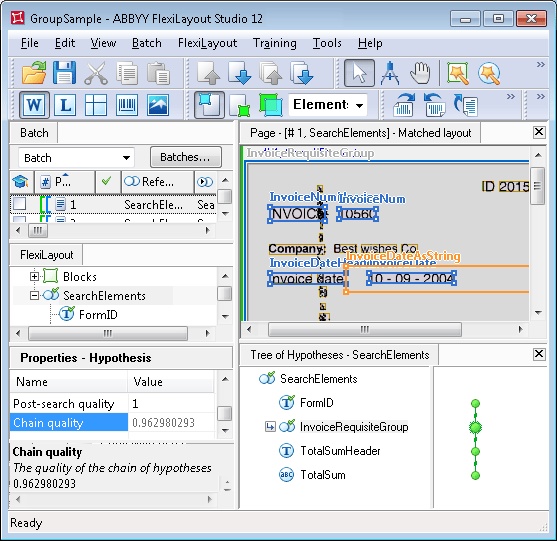 Double-click **InvoiceRequisiteGroup** to open its Properties dialog box, where you can see which hypotheses were generated for its subelements, which chain in the Group turned out to be the best, and why.
There are three hypotheses for the **InvoiceNumHeader** element, matching the number of "invoice" strings detected.
The quality of the hypothesis of interest is lower (approximately 0.99), because its area on the image is noisy and FlexiLayout Studio could only recognize "INVOIC" instead of "INVOICE". The quality of the other two hypotheses, however, is the maximum (**Chain quality** = 1).
The properties of the **InvoiceNum** element specify that the invoice number can have any number of digits and should be sought to the right of the name. On this image, these conditions are met in all three cases, which enabled FlexiLayout Studio to continue creating a chain of hypotheses for each of the hypotheses for the name of the "Invoice number" field.
Although the Pre-search quality of each of the hypotheses of the **InvoiceNum** element is 1, the correct chain is still the worst. This happens because chain quality is assessed by multiplying the qualities of all the hypotheses forming the chain.
For the required name this quality is about 0.99. If the Group did not have any other elements, the final choice at this stage would be incorrect.
**Post-search relations** are not specified for any of the elements, so for each element Post-search quality = 1, and you can judge the quality of any given hypothesis by its Pre-search quality.
Double-click **InvoiceRequisiteGroup** to open its Properties dialog box, where you can see which hypotheses were generated for its subelements, which chain in the Group turned out to be the best, and why.
There are three hypotheses for the **InvoiceNumHeader** element, matching the number of "invoice" strings detected.
The quality of the hypothesis of interest is lower (approximately 0.99), because its area on the image is noisy and FlexiLayout Studio could only recognize "INVOIC" instead of "INVOICE". The quality of the other two hypotheses, however, is the maximum (**Chain quality** = 1).
The properties of the **InvoiceNum** element specify that the invoice number can have any number of digits and should be sought to the right of the name. On this image, these conditions are met in all three cases, which enabled FlexiLayout Studio to continue creating a chain of hypotheses for each of the hypotheses for the name of the "Invoice number" field.
Although the Pre-search quality of each of the hypotheses of the **InvoiceNum** element is 1, the correct chain is still the worst. This happens because chain quality is assessed by multiplying the qualities of all the hypotheses forming the chain.
For the required name this quality is about 0.99. If the Group did not have any other elements, the final choice at this stage would be incorrect.
**Post-search relations** are not specified for any of the elements, so for each element Post-search quality = 1, and you can judge the quality of any given hypothesis by its Pre-search quality.
 ## Why the correct chain wins despite lower initial quality
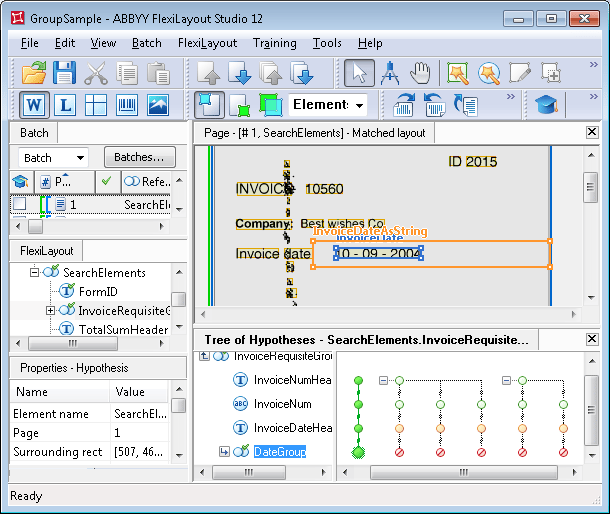
As noted earlier, the properties of the **InvoiceDateHeader** element specify that it should be sought under the line with the invoice number. However, none of the chains with the best quality (Chain quality = 1) resulted in a hypothesis for the name of the date field. Consequently, null hypotheses were formed in these chains for the **InvoiceDateHeader** element.
Since the default quality of a null hypothesis was not changed, the resulting Chain quality of the corresponding chains dropped to 0.97. At the same time, the element corresponding to the name of the date field was found for the chain that had the lowest quality. The quality of its hypothesis is approximately 0.993.
It is less than 1 because the image in the area of the name is noisy, which resulted in a recognition error and an incomplete match between the recognized text and the value specified in the properties of the **InvoiceDateHeader** element. As a result, the found hypothesis was penalized and its final quality is about 0.98 (the result of multiplying 0.99 by 0.993).
Nevertheless, the final quality of this hypothesis is higher than that of the others (0.97), so at this stage this chain is the best.
To detect the date field, the project uses the Group element **DateGroup**, which specifies that at least one of the elements cannot be found if the other has been found (the `Dontfind` function was used).
Because of the document layout features and the properties specified for the **InvoiceDateAsString** element (its alphabet allows digits), FlexiLayout Studio managed to find the date field for all the chains, though only one of the three hypotheses is actually correct.
Since in each Group one of the elements has been found while the other has not, the final quality of the chain in each of the **DateGroup** groups is 0.97 (1 multiplied by 0.97, the default quality of the null hypothesis).
In this example, the final quality of the **DateGroup** chains will not affect the "balance" among the hypotheses at the moment of detecting the **InvoiceDateHeader** element, that is, the quality of each of the chains is multiplied further by 0.97.
In the end, FlexiLayout Studio generated a single hypothesis for the Group element **InvoiceRequisiteGroup**, which corresponds to the best chain in the Group. Its quality is approximately 0.953, that is, the "group approach" helped the right hypothesis win, even though its initial quality was lower.
## The tree of hypotheses without Group elements
To see how the tree of hypotheses would look without Group elements in the FlexiLayout, open the `GroupSample.fsp` project in the `Group\Project2` folder. The tree is shown in the following figure.
As is clear from the figure, after detecting the **FormID** element, the tree of hypotheses branched out because several hypotheses are generated for the **InvoiceNumHeader** element. As a result, FlexiLayout Studio has to compare the qualities of each of the chains, starting every time from its very first element and moving down to the last.
Moreover, for any document with a layout more complex than the one in this example, a FlexiLayout without Group elements will produce a tree of hypotheses with too many branches, which will make FlexiLayout matching more difficult.
Avoid placing all the sought elements into one root group. This is only suitable for very simple FlexiLayouts with fewer than 10 elements, which is very rare in real-life tasks.
An increase in the number of elements in the root Group causes massive growth of the number of hypotheses, until it reaches its limit of 10,000 or the memory allocated for the tree of hypotheses is all used up. In either case, matching the FlexiLayout may fail.
In real-life tasks there is usually no need to explore all the possible combinations of every hypothesis for one element with every hypothesis for every other element, as most of the elements might be detected independently of one another.
That is why you should group elements into the smallest possible Group elements, to reduce the number of combinations to analyze and speed up the search.
## Why the correct chain wins despite lower initial quality
As noted earlier, the properties of the **InvoiceDateHeader** element specify that it should be sought under the line with the invoice number. However, none of the chains with the best quality (Chain quality = 1) resulted in a hypothesis for the name of the date field. Consequently, null hypotheses were formed in these chains for the **InvoiceDateHeader** element.
Since the default quality of a null hypothesis was not changed, the resulting Chain quality of the corresponding chains dropped to 0.97. At the same time, the element corresponding to the name of the date field was found for the chain that had the lowest quality. The quality of its hypothesis is approximately 0.993.
It is less than 1 because the image in the area of the name is noisy, which resulted in a recognition error and an incomplete match between the recognized text and the value specified in the properties of the **InvoiceDateHeader** element. As a result, the found hypothesis was penalized and its final quality is about 0.98 (the result of multiplying 0.99 by 0.993).
Nevertheless, the final quality of this hypothesis is higher than that of the others (0.97), so at this stage this chain is the best.
To detect the date field, the project uses the Group element **DateGroup**, which specifies that at least one of the elements cannot be found if the other has been found (the `Dontfind` function was used).
Because of the document layout features and the properties specified for the **InvoiceDateAsString** element (its alphabet allows digits), FlexiLayout Studio managed to find the date field for all the chains, though only one of the three hypotheses is actually correct.
Since in each Group one of the elements has been found while the other has not, the final quality of the chain in each of the **DateGroup** groups is 0.97 (1 multiplied by 0.97, the default quality of the null hypothesis).
In this example, the final quality of the **DateGroup** chains will not affect the "balance" among the hypotheses at the moment of detecting the **InvoiceDateHeader** element, that is, the quality of each of the chains is multiplied further by 0.97.
In the end, FlexiLayout Studio generated a single hypothesis for the Group element **InvoiceRequisiteGroup**, which corresponds to the best chain in the Group. Its quality is approximately 0.953, that is, the "group approach" helped the right hypothesis win, even though its initial quality was lower.
## The tree of hypotheses without Group elements
To see how the tree of hypotheses would look without Group elements in the FlexiLayout, open the `GroupSample.fsp` project in the `Group\Project2` folder. The tree is shown in the following figure.
As is clear from the figure, after detecting the **FormID** element, the tree of hypotheses branched out because several hypotheses are generated for the **InvoiceNumHeader** element. As a result, FlexiLayout Studio has to compare the qualities of each of the chains, starting every time from its very first element and moving down to the last.
Moreover, for any document with a layout more complex than the one in this example, a FlexiLayout without Group elements will produce a tree of hypotheses with too many branches, which will make FlexiLayout matching more difficult.
Avoid placing all the sought elements into one root group. This is only suitable for very simple FlexiLayouts with fewer than 10 elements, which is very rare in real-life tasks.
An increase in the number of elements in the root Group causes massive growth of the number of hypotheses, until it reaches its limit of 10,000 or the memory allocated for the tree of hypotheses is all used up. In either case, matching the FlexiLayout may fail.
In real-life tasks there is usually no need to explore all the possible combinations of every hypothesis for one element with every hypothesis for every other element, as most of the elements might be detected independently of one another.
That is why you should group elements into the smallest possible Group elements, to reduce the number of combinations to analyze and speed up the search.
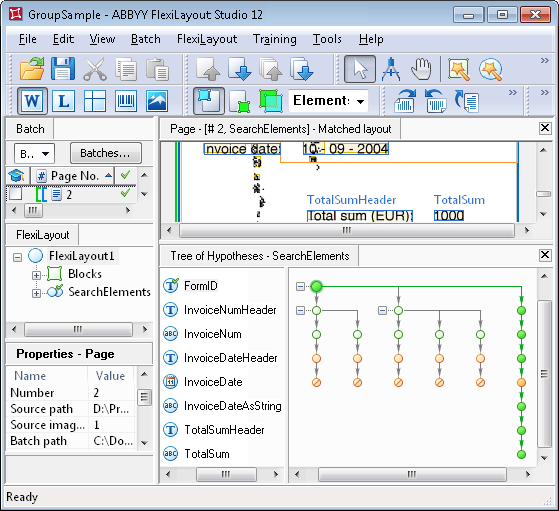 Moreover, since the quality of the final chain is calculated by multiplying the qualities of all the hypotheses in that chain, the volume of calculations may be much higher in a tree with too many branches, which will result in slower FlexiLayout matching.