> ## Documentation Index
> Fetch the complete documentation index at: https://docs.abbyy.com/llms.txt
> Use this file to discover all available pages before exploring further.
# Search for single-line Static Text elements
> Speed up Static Text searches in FlexiLayout Studio by entering single-line values without spaces, and see how spaces affect error limits and quality.
If you need to detect a string of static text and you know that this field has only one line on all the images, it is advisable to enter the text value without spaces. It speeds up the search and does not affect the quality of the found hypothesis.
This is only true if the name's static text has been recognized without errors. This is because the maximum number of errors (set for **Static Text** elements by two parameters, **Max number of errors** and **Max error percentage**) refers to the number of errors in a word.
Thus, if **Max number of errors** is set to 1, the name consists of 3 words, and the value of the **Static Text** is entered without spaces, FlexiLayout Studio can make no more than 1 mistake during recognition. When the name is entered without spaces, FlexiLayout Studio treats it as a single word, regardless of the actual number of words in it.
But if you separate the words in the name with spaces, the allowed number or percentage of errors will apply to each of the words you typed in the **Search text** field. If any recognition errors are made in a **Static Text**, the hypothesis is penalized in accordance with a certain algorithm, and the quality of the hypotheses with and without spaces may be different.
## The Spaces.fsp sample project
The `Spaces.fsp` project (folder `%public%\ABBYY\FlexiCapture\12.0\Samples\FLS\Tips and Tricks\Spaces in StaticText\Project1`) demonstrates some methods of working with Static Text elements.
The project has two pages:
* **Page 1** – The quality of the image is good.
* **Page 2** – The name of the data field is noisy.
The goal is to find the data field "Father's name" related to the name "Please indicate your father’s name here:".
 ## Enter the static text value as a single word without spaces
The project contains a **Static Text** element named **NameOfFatherHeader**. Its value is specified as one word without spaces (that is, **Pleaseindicateyourfather'snamehere:**). Letter case in the name is irrelevant.
All the other properties of the element keep their default values. The maximum number of errors in the name is 10 characters (30% of the 35 characters which make up the text).
Once you have run the FlexiLayout matching procedure by selecting the **Match** command, you will see that the name has been successfully detected on both pages. However, on Page 2 the **Chain quality** of the element hypothesis is about 0.994, because it has been penalized for the recognition error caused by the noise on the document.
## Enter the static text value as a single word without spaces
The project contains a **Static Text** element named **NameOfFatherHeader**. Its value is specified as one word without spaces (that is, **Pleaseindicateyourfather'snamehere:**). Letter case in the name is irrelevant.
All the other properties of the element keep their default values. The maximum number of errors in the name is 10 characters (30% of the 35 characters which make up the text).
Once you have run the FlexiLayout matching procedure by selecting the **Match** command, you will see that the name has been successfully detected on both pages. However, on Page 2 the **Chain quality** of the element hypothesis is about 0.994, because it has been penalized for the recognition error caused by the noise on the document.
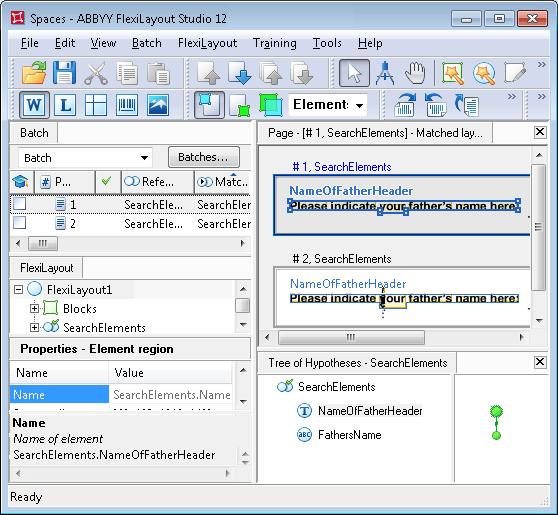 To see the pre-recognition results for the sought name, click **L** (**Show Recognized Lines**) on the toolbar and point at the text of the name. The pre-recognition result for the field name on Page 2 will look like this: `PLEASEINDICATE|OURFATHER'SNAMEHERE:`.
Alternatively, you can display the detected **Static Text** by selecting the hypothesis of the **NameOfFatherHeader** element in the **Tree of Hypotheses** window and moving your mouse pointer to the line **Keyword** in the **Properties-Hypothesis** window. In this case the pre-recognition results and detected errors (if any) will be displayed in the bottom part of the **Properties-Hypotheses** window.
To detect the data field "Father's name", the project uses a **Character String** element, because the sought data field has only one line and its value, unlike **Static Text**, changes from document to document.
The element is named **FathersName**, and its properties are specified in the **Relations** section. The FlexiLayout also contains a block with the same name whose region coincides with the region of the **FathersName** element (the **FathersName** element is selected in the **Source element** field).
## Enter the value as words separated by spaces
Now try matching the FlexiLayout with the same images, but with the value of the **NameOfFatherHeader** element entered as words separated by spaces.
To do this, open the `Spaces.fsp` project in the `Spaces in StaticText\Project2` folder. The value for the element **NameOfFatherHeader** looks like this: **Please indicate your father's name here:**. All the other settings are left unchanged (they are identical to those of the `Spaces.fsp` project located in the `Spaces in StaticText\Project1` folder).
Once you have run the FlexiLayout matching procedure by selecting the **Match** command, you will see that the field name has been successfully detected on both pages.
However, the **Chain quality** for the hypothesis of the **NameOfFatherHeader** element on Page 2 is now about 0.987, because the hypothesis was penalized for one recognition error caused by the low quality of the initial image.
To see the pre-recognition results for the sought name, click **L** (**Show Recognized Lines**) on the toolbar and point at the text of the name. The pre-recognition result for the field name on Page 2 will look like this: `PLEASEINDICATE|OURFATHER'SNAMEHERE:`.
Alternatively, you can display the detected **Static Text** by selecting the hypothesis of the **NameOfFatherHeader** element in the **Tree of Hypotheses** window and moving your mouse pointer to the line **Keyword** in the **Properties-Hypothesis** window. In this case the pre-recognition results and detected errors (if any) will be displayed in the bottom part of the **Properties-Hypotheses** window.
To detect the data field "Father's name", the project uses a **Character String** element, because the sought data field has only one line and its value, unlike **Static Text**, changes from document to document.
The element is named **FathersName**, and its properties are specified in the **Relations** section. The FlexiLayout also contains a block with the same name whose region coincides with the region of the **FathersName** element (the **FathersName** element is selected in the **Source element** field).
## Enter the value as words separated by spaces
Now try matching the FlexiLayout with the same images, but with the value of the **NameOfFatherHeader** element entered as words separated by spaces.
To do this, open the `Spaces.fsp` project in the `Spaces in StaticText\Project2` folder. The value for the element **NameOfFatherHeader** looks like this: **Please indicate your father's name here:**. All the other settings are left unchanged (they are identical to those of the `Spaces.fsp` project located in the `Spaces in StaticText\Project1` folder).
Once you have run the FlexiLayout matching procedure by selecting the **Match** command, you will see that the field name has been successfully detected on both pages.
However, the **Chain quality** for the hypothesis of the **NameOfFatherHeader** element on Page 2 is now about 0.987, because the hypothesis was penalized for one recognition error caused by the low quality of the initial image.
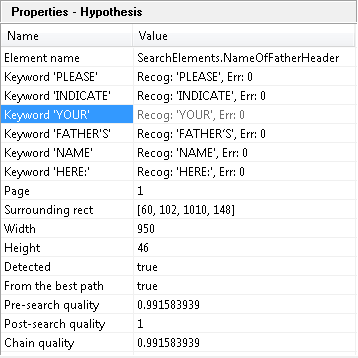 If there are spaces in the Static Text value you type in the **Search text** field, each word will be analyzed individually and the maximum number or percentage of errors will apply to each of the words. The final quality of the Static Text hypothesis will then depend on the qualities of these separate words.