> ## Documentation Index
> Fetch the complete documentation index at: https://docs.abbyy.com/llms.txt
> Use this file to discover all available pages before exploring further.
# Sample 1. Step 14: Describing the YOUR PLANET NAME field with a PlanetName block
> Define the PlanetName Text block in FlexiLayout Studio Sample 1, setting its location by choosing the PlanetName element as the block's source element.
To create a block corresponding to the YOUR PLANET NAME field:
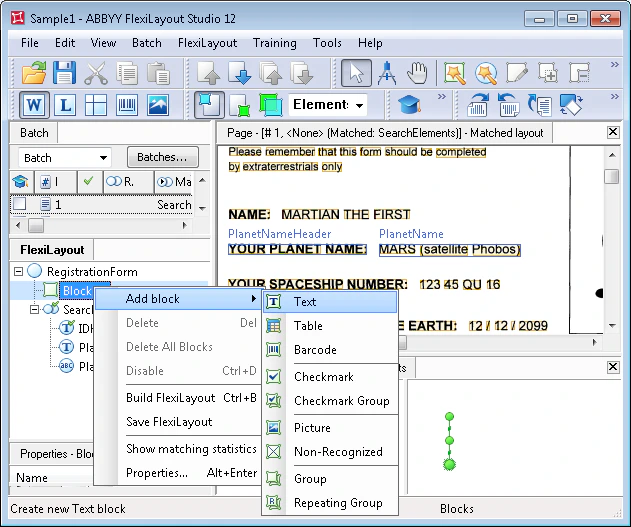
1. Click the **FlexiLayout** tab in the program main window.
2. Select Blocks in the FlexiLayout tree.
3. Select **Add Blocks → Text** in the **FlexiLayout** menu or **New → Text** in the shortcut menu.
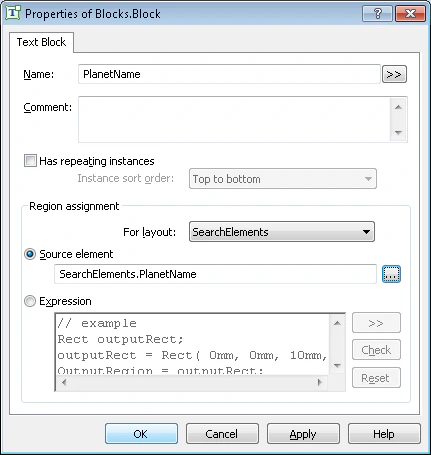
 1. In the Properties dialog box, type a name for the block in the Name field, for example, **PlanetName**.
The name of the block need not coincide with the name of the element corresponding to the YOUR PLANET NAME field, but this is convenient when working with the FlexiLayout.
2. To describe the location of the block, select Source element. Click
1. In the Properties dialog box, type a name for the block in the Name field, for example, **PlanetName**.
The name of the block need not coincide with the name of the element corresponding to the YOUR PLANET NAME field, but this is convenient when working with the FlexiLayout.
2. To describe the location of the block, select Source element. Click  and specify the **PlanetName** element as the source element.