> ## Documentation Index
> Fetch the complete documentation index at: https://docs.abbyy.com/llms.txt
> Use this file to discover all available pages before exploring further.
# Sample 1. Step 18: Describing the YOUR IDENTITY NUMBER ON THE PARTY field
> Detect the YOUR IDENTITY NUMBER ON THE PARTY field in Sample 1 with an IdentityNumber Barcode element set to EAN13 and left-to-right orientation.
To describe the location of the block corresponding to the YOUR IDENTITY NUMBER ON THE PARTY field:
1. Create an element of type [Static Text](/flexi-capture/fls/template/static-text) and name it **BarcodeHeader**. This element will correspond to the name of the YOUR IDENTITY NUMBER ON THE PARTY field.
2. Create an element of type [Barcode](/flexi-capture/fls/template/barcode) and name it **IdentityNumber**. This element will correspond to the YOUR IDENTITY NUMBER ON THE PARTY field proper.
3. Create a block and name it **IdentityNumber**. This block will correspond to the YOUR IDENTITY NUMBER ON THE PARTY field.
The elements and block for this field are created as described in [Steps 10](/flexi-capture/fls/tutorial/step10) to [14](/flexi-capture/fls/tutorial/step14) with the following exceptions:
* For the YOUR IDENTITY NUMBER ON THE PARTY field, create an element of type Barcode and name it **IdentityNumber**. For the **IdentityNumber** element, specify the type of barcode (**EAN13**) and its orientation (Left-to-Right) on the Barcode tab.
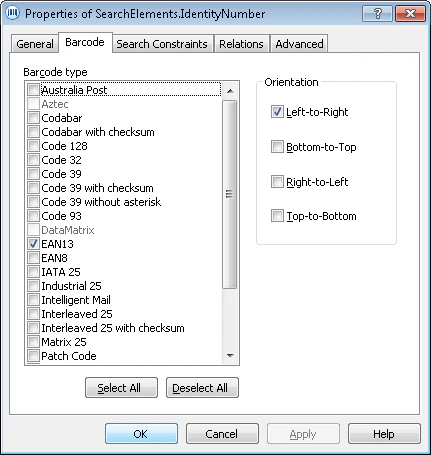 * When creating an **IdentityNumber** block, specify the **IdentityNumber** element as the source element.