> ## Documentation Index
> Fetch the complete documentation index at: https://docs.abbyy.com/llms.txt
> Use this file to discover all available pages before exploring further.
# Sample 1. Introduction
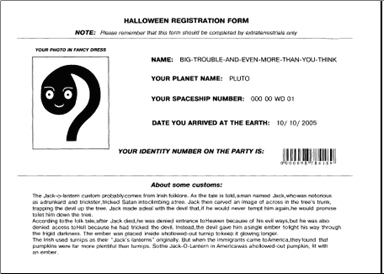
> Introduction to FlexiLayout Studio Sample 1: build a FlexiLayout for a Halloween registration form that locates name, date, barcode, and photo fields.
For the sake of simplicity, a one-page document is used in this sample.
This sample document is a typical example of a registration form for which a FlexiLayout must be created. You go through all the steps required to create a FlexiLayout that detects the following elements: **Static Text**, **Character String**, **Barcode**, **Paragraph**, **Date**, **Separator**, and **Object Collection**.
The ultimate goal is to create a FlexiLayout that enables ABBYY FlexiCapture to locate the following fields on all the test pages:
* **NAME**
* **YOUR PLANET NAME**
* **YOUR SPACESHIP NUMBER**
* **DATE YOU ARRIVED AT THE EARTH**
* **YOUR IDENTITY NUMBER ON THE PARTY**
* **YOUR PHOTO IN FANCY DRESS**
Additionally, the FlexiLayout must enable FlexiCapture to find a text field in which the guest has entered the information they managed to find about Halloween. Unlike the other fields, the exact name of this field is not known in advance.
The following image shows the sample registration form.