> ## Documentation Index
> Fetch the complete documentation index at: https://docs.abbyy.com/llms.txt
> Use this file to discover all available pages before exploring further.
# Sample 2. Step 14: Describing the Ingredients field
> Capture the Ingredients field by grouping an IngredientsHeader, a horizontal Separator, and a Paragraph element inside a RecipeContents Group element.
Judging by the test images, the list of ingredients is a text fragment which is always located below the name of the Ingredients field but above the separator located over the name of the Cooking field.
To make these elements easier to describe and to restrict the number of possible hypotheses, group them into a Group element:
1. Create a [Group](/flexi-capture/fls/template/elements-simple) element and name it **RecipeContents**.
2. Within the **RecipeContents** element, create an element of type Static Text and name it **IngredientsHeader**. This element will correspond to the name **Ingredients**. Specify the properties of the element as in [Step 10](/flexi-capture/fls/tutorial2/2step10) for the **Recipe** element.
3. Within the **RecipeContents** element, create an element of type [Separator](/flexi-capture/fls/template/separator) which will correspond to the separator above the name **Cooking**. On the Separator tab, specify the orientation of the separator: Horizontal. In the element's **Properties** dialog box, click the Relations tab and specify the search constraints: below the name **Ingredients:** (that is, Below the **IngredientsHeader** element).\
If you try matching the FlexiLayout, you will see that sometimes the program treats the lower boundary of an image as a separator.\
The problem can be solved by adding another search constraint. In the Advanced pre-search relations field (Properties dialog box, Advanced tab), add this search constraint: Look for the separator closest to the name **Ingredients:**. In the [FlexiLayout language](/flexi-capture/fls/code/general-code) this must be written as follows:\
`Nearest: SearchElements.RecipeContents.IngredientsHeader;`
The same constraint can also be specified via the program’s graphical user interface. Click the Relations tab, select Nearest, and in the To drop-down list select Element and specify **IngredientsHeader** as the Reference element.
4. Match the adjusted FlexiLayout once again.
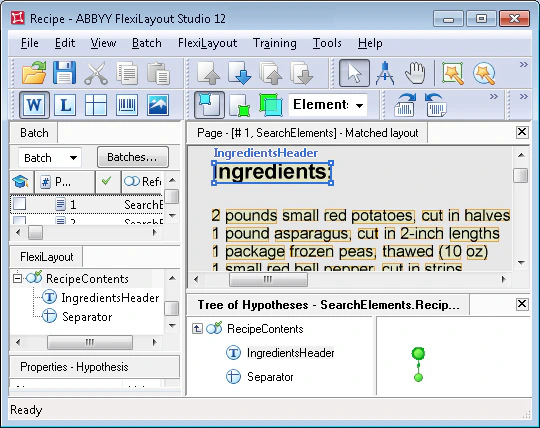 5. You can also add another search constraint for the **IngredientsHeader** element. In the Advanced pre-search relations field (Properties dialog box, Advanced tab), add this search constraint: Look for the field name in the upper part of the image. In the [FlexiLayout language](/flexi-capture/fls/code/general-code) this must be written as follows:\
`Above: PageRect.top + PageRect.Height/2;`
6. Within the **RecipeContents** element, create an element of type [Paragraph](/flexi-capture/fls/template/text-chain) and name it **Ingredients**. This element will correspond to the **Ingredients** field.\
Set the search constraints (element's **Properties** dialog box, Relations tab): below the **Ingredients:** heading (Below the **IngredientsHeader**), but above the separator (Above the **Separator** element).\
Try matching the FlexiLayout with the test images and make sure that the program successfully finds the **Ingredients** field on all the images.
Finally, create the **Ingredients** block. The **Ingredients** block is created similarly to the **RecipeNumber** block. The only exception is that you must specify the Ingredients element as the source element for the **Ingredients** block.
5. You can also add another search constraint for the **IngredientsHeader** element. In the Advanced pre-search relations field (Properties dialog box, Advanced tab), add this search constraint: Look for the field name in the upper part of the image. In the [FlexiLayout language](/flexi-capture/fls/code/general-code) this must be written as follows:\
`Above: PageRect.top + PageRect.Height/2;`
6. Within the **RecipeContents** element, create an element of type [Paragraph](/flexi-capture/fls/template/text-chain) and name it **Ingredients**. This element will correspond to the **Ingredients** field.\
Set the search constraints (element's **Properties** dialog box, Relations tab): below the **Ingredients:** heading (Below the **IngredientsHeader**), but above the separator (Above the **Separator** element).\
Try matching the FlexiLayout with the test images and make sure that the program successfully finds the **Ingredients** field on all the images.
Finally, create the **Ingredients** block. The **Ingredients** block is created similarly to the **RecipeNumber** block. The only exception is that you must specify the Ingredients element as the source element for the **Ingredients** block.