> ## Documentation Index
> Fetch the complete documentation index at: https://docs.abbyy.com/llms.txt
> Use this file to discover all available pages before exploring further.
# Easiest Recipes
> Overview of the Easiest Recipes sample: build a FlexiLayout that detects recipe name, number, ingredients, cooking time, and description fields.
For the sake of simplicity, a one-page document is used in this sample.
This sample illustrates how to create a FlexiLayout for a document that has more field types than the Halloween Registration Form. This sample not only helps you go through all the steps of FlexiLayout creation, but also teaches you some techniques for describing the position of objects on the document image.
The FlexiLayout Studio project with the test images and a ready-made FlexiLayout is located in `%public%\ABBYY\FlexiCapture\12.0\Samples\FLS\English\Recipe`.
The FlexiLayout must reliably detect the following fields on all the test pages:
* **Recipe Name**
* **Recipe #**
* **Ingredients**
* **Cooking Time**
* **Cooking Description**
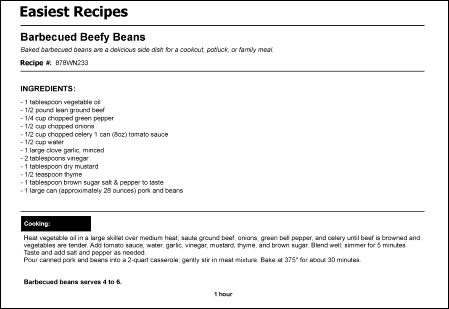
The following image shows the sample recipe document with the fields that the FlexiLayout must detect.