> ## Documentation Index
> Fetch the complete documentation index at: https://docs.abbyy.com/llms.txt
> Use this file to discover all available pages before exploring further.
# Sample 4. Step 6.3: The final part of the document, LongFooter element
> Describe the LongFooter Static Text element that detects the TOTALAMOUNTMUST, Carriedover, and TotalCHF keywords marking the final part of the invoice.
## Create the LongFooter element
In the **InvoiceFooter** element, create an optional element of type **Static Text** and name it **LongFooter**.
On the **Static Text** tab, in the **Search text** field, type `TOTALAMOUNTMUST|Carriedover|TotalCHF`.
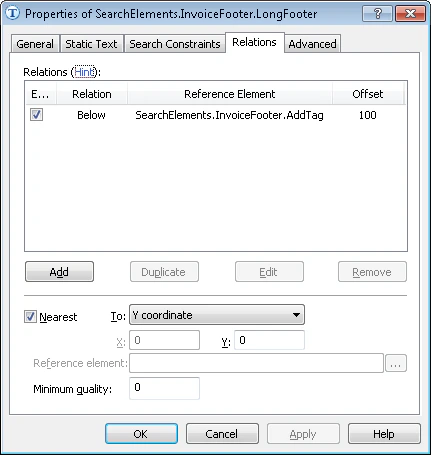
Because the search text is always located under the name of the **Description** column, click the **Relations** tab and specify this relation:
* Below the **AddTag** element, **Offset** = 100.
On some documents (for example, documents 3 and 9), the program finds several text variants and selects the wrong one, so you must impose additional constraints. After you analyze the images, you will notice that the text of interest is the topmost text in the search area. You want the text that is closest to the table, because it can then be used as the **Footer** of the table. On the **Relations** tab, specify an additional search constraint that finds the string closest to the upper boundary of the document:
* Select the **Nearest** option.
* In the **To** field, select **Y coordinate** from the drop-down list.
* In the **Y** field, type **0**.
The following screenshot shows the **Relations** tab of the **LongFooter** element with the **Nearest** constraint applied so the topmost matching text is selected.