> ## Documentation Index
> Fetch the complete documentation index at: https://docs.abbyy.com/llms.txt
> Use this file to discover all available pages before exploring further.
# Sample 4. Step 7.5: Name of Total column, kwTotal element
> Pinpoint the Total column name with a kwTotal Static Text element searched to the right of kwUnitPrice and nearest to a given X coordinate on the page.
You will notice that the Total column on all the images is located to the right of the Unit Price column. Therefore, you can search for the Total column relative to the Unit Price column.
To create a kwTotal element:
1. In the **TableHeader** element, create an element of type Static Text and name it **kwTotal**.
2. Click the Static Text tab.
3. In the Search text field, specify the text to search for: `TotalChf|Total|Extension|AMOUNT|PRODUCTTOTAL`.
4. To specify that the name being searched for is located on the same level as the name **Designation**, click the Relations tab and specify the following additional constraints. For more information, see [Step 7.2](/flexi-capture/fls/tutorial4/4step7-2).
5. On the Relations tab, specify the following condition: search for an element closest to the X coordinate with value=6000.
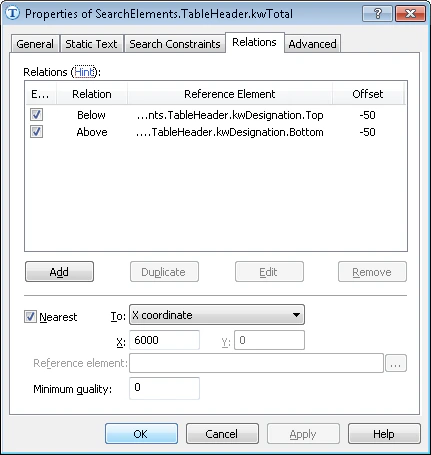 6. Click the Advanced tab.
7. Since the name of the **Total** column is located to the right of the name of the **kwUnitPrice** column (if the latter is present on the image), specify an additional condition in Advanced pre-search relations: If the **kwUnitPrice** element is detected, search for the image object to the right of the **kwUnitPrice** element. In the [FlexiLayout language](/flexi-capture/fls/code/general-code), this condition can be written as follows:
```text theme={null}
If Not (TableHeader.kwUnitPrice.IsNull) Then
RightOf: TableHeader.kwUnitPrice, 0 * dot;
```
8. To optimize the search process, specify an additional condition: Do not search for the name if the name **Designation** has not been detected. For more information, see [Step 7.2](/flexi-capture/fls/tutorial4/4step7-2).
9. Match the FlexiLayout to make sure that the element is detected on the first page of the document.
6. Click the Advanced tab.
7. Since the name of the **Total** column is located to the right of the name of the **kwUnitPrice** column (if the latter is present on the image), specify an additional condition in Advanced pre-search relations: If the **kwUnitPrice** element is detected, search for the image object to the right of the **kwUnitPrice** element. In the [FlexiLayout language](/flexi-capture/fls/code/general-code), this condition can be written as follows:
```text theme={null}
If Not (TableHeader.kwUnitPrice.IsNull) Then
RightOf: TableHeader.kwUnitPrice, 0 * dot;
```
8. To optimize the search process, specify an additional condition: Do not search for the name if the name **Designation** has not been detected. For more information, see [Step 7.2](/flexi-capture/fls/tutorial4/4step7-2).
9. Match the FlexiLayout to make sure that the element is detected on the first page of the document.