> ## Documentation Index
> Fetch the complete documentation index at: https://docs.abbyy.com/llms.txt
> Use this file to discover all available pages before exploring further.
# Sample 4. Step 9.1: Total Amount name, kwTotal element
> Spot the Total Amount field name with a SumGroup.kwTotal Static Text element limited to the last page and scored by its distance from the table bottom.
This field name occurs on the images as "Total Chf", "Carried Over", or "Total". It is located below the table (this constraint has already been specified for the SumGroup element) and always occurs on the last page.
To create a kwTotal element:
1. In the **SumGroup** element, create an element of type Static Text and name it **kwTotal**.
2. Click the **Static Text** tab.
3. In the Search text field, specify the text to search for: `TotalChf|CarriedOver|Total`.
4. Set Max error percentage to 20.
5. Click the Search Constraints tab and limit the search area to the last page:
* Select Absolute search area constraints
* In the Pages field, select Last from the drop-down list
* Do not select any other options
* Click the Add button. The search area will appear in the **Search areas** list
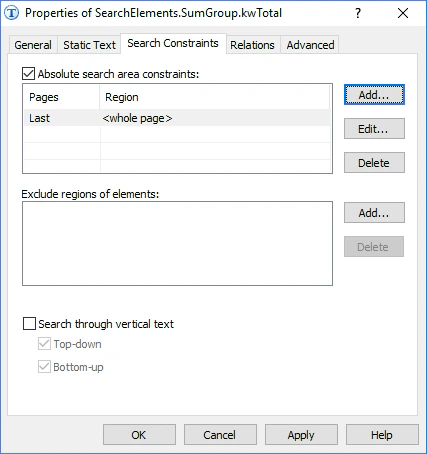 6. Click the Advanced tab.
7. Among the many detected elements that contain the specified text, you must select the one that is located closest to the bottom boundary of the table. This location allows you to influence the quality of the hypotheses. In Advanced post-search relations specify additional parameters for the hypothesis: If a non-null hypothesis has been generated, calculate the distance between the upper boundary of the detected element and the bottom boundary of the last table detected in the document. Then check if this distance belongs to the specified fuzzy interval. In the [FlexiLayout language](/flexi-capture/fls/code/general-code), this condition can be written as follows:
```text theme={null}
If not IsNull then
{ FuzzyQuality: Top - InvoiceTable.LastSubTable.Body.Rect.Bottom, {0,0,0, 50000}*dt;
}
//This check means that the greater the distance between the boundaries, the greater the penalty coefficient
```
6. Click the Advanced tab.
7. Among the many detected elements that contain the specified text, you must select the one that is located closest to the bottom boundary of the table. This location allows you to influence the quality of the hypotheses. In Advanced post-search relations specify additional parameters for the hypothesis: If a non-null hypothesis has been generated, calculate the distance between the upper boundary of the detected element and the bottom boundary of the last table detected in the document. Then check if this distance belongs to the specified fuzzy interval. In the [FlexiLayout language](/flexi-capture/fls/code/general-code), this condition can be written as follows:
```text theme={null}
If not IsNull then
{ FuzzyQuality: Top - InvoiceTable.LastSubTable.Body.Rect.Bottom, {0,0,0, 50000}*dt;
}
//This check means that the greater the distance between the boundaries, the greater the penalty coefficient
```