> ## Documentation Index
> Fetch the complete documentation index at: https://docs.abbyy.com/llms.txt
> Use this file to discover all available pages before exploring further.
# Page Properties
> Configure page size, orientation, margins, style, background color, and default font in the Page Properties dialog box of ABBYY FormDesigner.
Page settings determine the size of the page, its orientation, indents, and style. To change the settings of a page, select **Form →** Page Properties... or right-click the page and select Page Properties... on the shortcut menu.
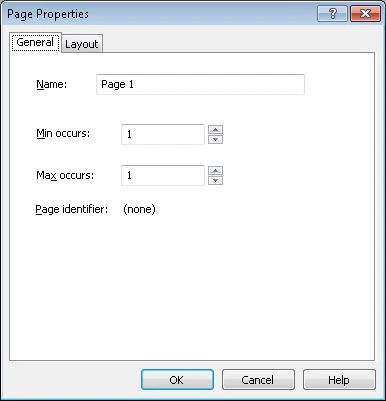 ## General tab
**Name** — Sets the name of a page.
**Min occurs** — Sets the minimum number of occurrences of the current page in the form.
**Max occurs** — Sets the maximum number of occurrences of the current page in the form.
**Page identifier** — Displays the value of the page identifier.
## Layout tab
**Style** — Sets the form style:
* Gray drop-out form
* Black and white form
* Orange drop-out form
* Red drop-out form
* Green drop-out form
* Color form (printing is not recommended)
### Paper size
**Size** — Select one of the standard page sizes from the drop-down list (A3, A4, A5, US Legal, or US Letter), or set your own custom page size. To set your own page size, select the Custom size item in the list and specify the required width and height in the corresponding fields.
**Width** — Sets page width.
**Height** — Sets page height.
### Margins
**Top** — Sets the width of the top margin.
**Bottom** — Sets the width of the bottom margin.
**Left** — Sets the width of the left margin.
**Right** — Sets the width of the right margin.
### Background
**Color** — Selects a form background color from the drop-down list for dropout forms or from the palette for color forms.
The range of available colors depends on the type of your form (black and white or color).
Color can only be selected for color and dropout forms. White is the default color for black and white forms.
**Size** — Use this list to select the area covered with the background color. You have two choices:
* Whole page (all the page except for the form elements will be filled in).
* Inside margins (the page will be filled in but the page margins and the form elements will be left white).
For black and white forms, the option is not available.
### Orientation
**Portrait** — Sets portrait page orientation.
**Landscape** — Sets landscape page orientation.
### Default font
Selects [font](/flexi-capture/form-designer/page-settings#font) for empty pages from the drop-down list and specify the font size.
You may purchase additional fonts and multilingual font support at [www.paratype.com](https://www.paratype.com/).
## General tab
**Name** — Sets the name of a page.
**Min occurs** — Sets the minimum number of occurrences of the current page in the form.
**Max occurs** — Sets the maximum number of occurrences of the current page in the form.
**Page identifier** — Displays the value of the page identifier.
## Layout tab
**Style** — Sets the form style:
* Gray drop-out form
* Black and white form
* Orange drop-out form
* Red drop-out form
* Green drop-out form
* Color form (printing is not recommended)
### Paper size
**Size** — Select one of the standard page sizes from the drop-down list (A3, A4, A5, US Legal, or US Letter), or set your own custom page size. To set your own page size, select the Custom size item in the list and specify the required width and height in the corresponding fields.
**Width** — Sets page width.
**Height** — Sets page height.
### Margins
**Top** — Sets the width of the top margin.
**Bottom** — Sets the width of the bottom margin.
**Left** — Sets the width of the left margin.
**Right** — Sets the width of the right margin.
### Background
**Color** — Selects a form background color from the drop-down list for dropout forms or from the palette for color forms.
The range of available colors depends on the type of your form (black and white or color).
Color can only be selected for color and dropout forms. White is the default color for black and white forms.
**Size** — Use this list to select the area covered with the background color. You have two choices:
* Whole page (all the page except for the form elements will be filled in).
* Inside margins (the page will be filled in but the page margins and the form elements will be left white).
For black and white forms, the option is not available.
### Orientation
**Portrait** — Sets portrait page orientation.
**Landscape** — Sets landscape page orientation.
### Default font
Selects [font](/flexi-capture/form-designer/page-settings#font) for empty pages from the drop-down list and specify the font size.
You may purchase additional fonts and multilingual font support at [www.paratype.com](https://www.paratype.com/).