> ## Documentation Index
> Fetch the complete documentation index at: https://docs.abbyy.com/llms.txt
> Use this file to discover all available pages before exploring further.
# Paragraph properties
> Set paragraph alignment, indentation, and spacing for text elements in the Paragraph properties dialog box of ABBYY FormDesigner.
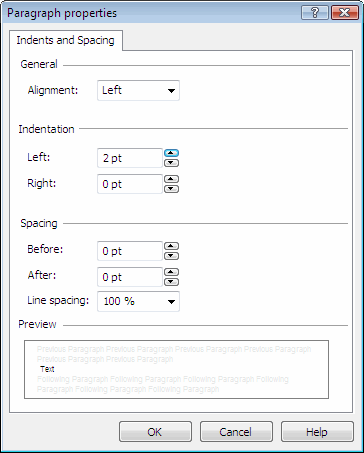
You can set the main paragraph properties in the **Paragraph properties** dialog box. To open it, in text editing mode select **Paragraph properties** on the **Text** shortcut menu.
 ## General
| Setting | Description |
| ------------- | -------------------------------------------------------------------------------------- |
| **Alignment** | Aligns the text to the left or right border, centers it, or fits it to the page width. |
## Indentation
| Setting | Description |
| --------------- | --------------------------- |
| **Before text** | Sets the left indentation. |
| **After text** | Sets the right indentation. |
## Spacing
| Setting | Description |
| ---------------- | ---------------------------------------- |
| **Before** | Sets the space before the paragraph. |
| **After** | Sets the space after the paragraph. |
| **Line spacing** | Changes the interval between text lines. |
## General
| Setting | Description |
| ------------- | -------------------------------------------------------------------------------------- |
| **Alignment** | Aligns the text to the left or right border, centers it, or fits it to the page width. |
## Indentation
| Setting | Description |
| --------------- | --------------------------- |
| **Before text** | Sets the left indentation. |
| **After text** | Sets the right indentation. |
## Spacing
| Setting | Description |
| ---------------- | ---------------------------------------- |
| **Before** | Sets the space before the paragraph. |
| **After** | Sets the space after the paragraph. |
| **Line spacing** | Changes the interval between text lines. |