> ## Documentation Index
> Fetch the complete documentation index at: https://docs.abbyy.com/llms.txt
> Use this file to discover all available pages before exploring further.
# Address parsing
> Parse vendor and business unit addresses into Postal Code, Country, City, and Street components with the address parsing feature in FlexiCapture for Invoices.
When processing invoices and purchase orders, you need to extract vendor and business unit addresses. Before such addresses can be exported to a back-end system, they should be parsed into the following components: Postal Code (ZIP Code), Country, City, and Street. For this purpose, FlexiCapture for Invoices includes an address parsing feature.
You do not need this feature if your Document Definition uses vendor and business unit databases, in which case the required addresses are taken from the corresponding database fields.
## Limitations
* Address parsing requires the [NLP module](/flexi-capture/nlp-install) to be installed.
* Only English and German addresses can be parsed. If the feature is used for addresses in unsupported languages, the corresponding fields may be populated incorrectly.
* Enabling this feature may slow down document processing for certain document types and for very complicated addresses.
## Enable address parsing
By default, address parsing is disabled. To enable address parsing:
Click **Document Definition → Document Definition Properties...**.
In the dialog box that opens, click the **Document Definition Settings** tab.
Under **Additional Fields and Features**, click **Edit...**.
In the dialog box that opens, select **Address Parsing**.
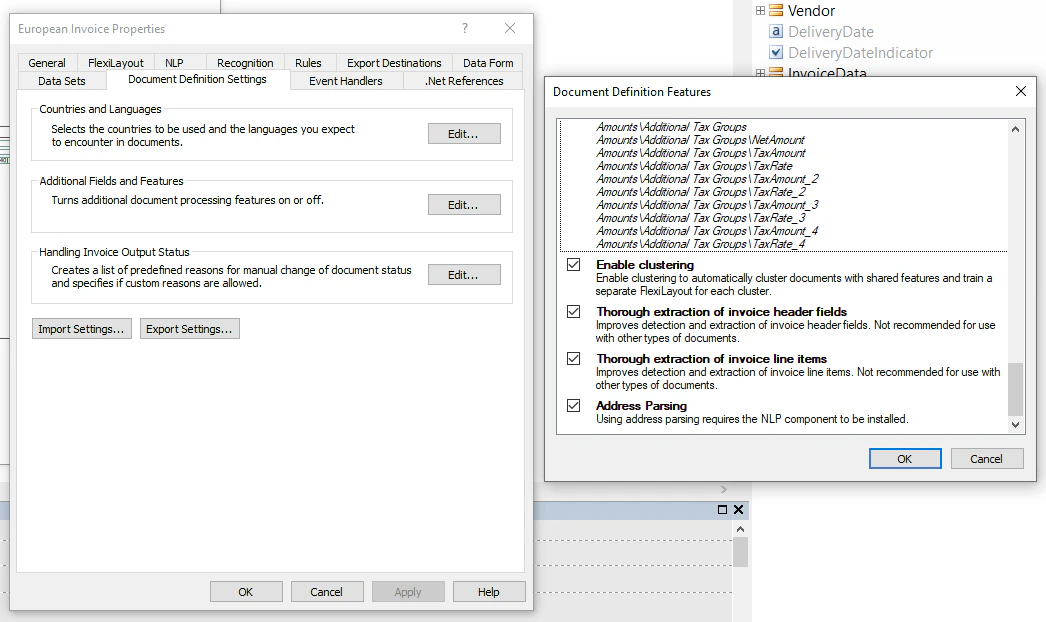 As a result, vendor and business unit addresses in the **Address** field are parsed into the following components: Postal Code (ZIP Code), Country, City, and Street. The **Street** field may include additional information, such as house number, apartment number, and PO box. To parse other address fields, such as **Ship To** or **Bill To**, you need to create a custom rule (a sample script is provided in the "Address parsing" section of [Sample scripts for creating custom rules](/flexi-capture/appendix/scripts/scripting-rules-ex#address-parsing)).
If your project uses vendor and business unit databases, the program first looks up the required addresses in these databases:
* If the required address is found in the vendor or business unit database and has a high confidence score, the program exports the found address.
* If the program fails to find the required address in the vendor or business unit database, or if the found address has a low confidence score, the program parses and exports the address captured from the image.
## Enable address parsing for projects from earlier versions
To enable address parsing for a project created in a version of the program earlier than ABBYY FlexiCapture Release 3 Update 4:
Update your project.
In the **Document Definition Settings** dialog box, select the **Address Parsing** version.
Create a rule chain from the new **BU Address Parsing** rule from the **BU/Address** field and from the old **Business unit must be found in database** rule from the **BU** group.
Create a rule chain from the new **Vendor Address Parsing** rule from the **Vendor/Address** field and from the old **Vendor must be found in database** rule from the **Vendor** group.
Enable the **BU Address Parsing** and **Vendor Address Parsing** rules.
As a result, vendor and business unit addresses in the **Address** field are parsed into the following components: Postal Code (ZIP Code), Country, City, and Street. The **Street** field may include additional information, such as house number, apartment number, and PO box. To parse other address fields, such as **Ship To** or **Bill To**, you need to create a custom rule (a sample script is provided in the "Address parsing" section of [Sample scripts for creating custom rules](/flexi-capture/appendix/scripts/scripting-rules-ex#address-parsing)).
If your project uses vendor and business unit databases, the program first looks up the required addresses in these databases:
* If the required address is found in the vendor or business unit database and has a high confidence score, the program exports the found address.
* If the program fails to find the required address in the vendor or business unit database, or if the found address has a low confidence score, the program parses and exports the address captured from the image.
## Enable address parsing for projects from earlier versions
To enable address parsing for a project created in a version of the program earlier than ABBYY FlexiCapture Release 3 Update 4:
Update your project.
In the **Document Definition Settings** dialog box, select the **Address Parsing** version.
Create a rule chain from the new **BU Address Parsing** rule from the **BU/Address** field and from the old **Business unit must be found in database** rule from the **BU** group.
Create a rule chain from the new **Vendor Address Parsing** rule from the **Vendor/Address** field and from the old **Vendor must be found in database** rule from the **Vendor** group.
Enable the **BU Address Parsing** and **Vendor Address Parsing** rules.