> ## Documentation Index
> Fetch the complete documentation index at: https://docs.abbyy.com/llms.txt
> Use this file to discover all available pages before exploring further.
# How to capture invoices
> Overview of the invoice capture workflow in ABBYY FlexiCapture for Invoices, linking to steps for adding and recognizing images, verification, and export.
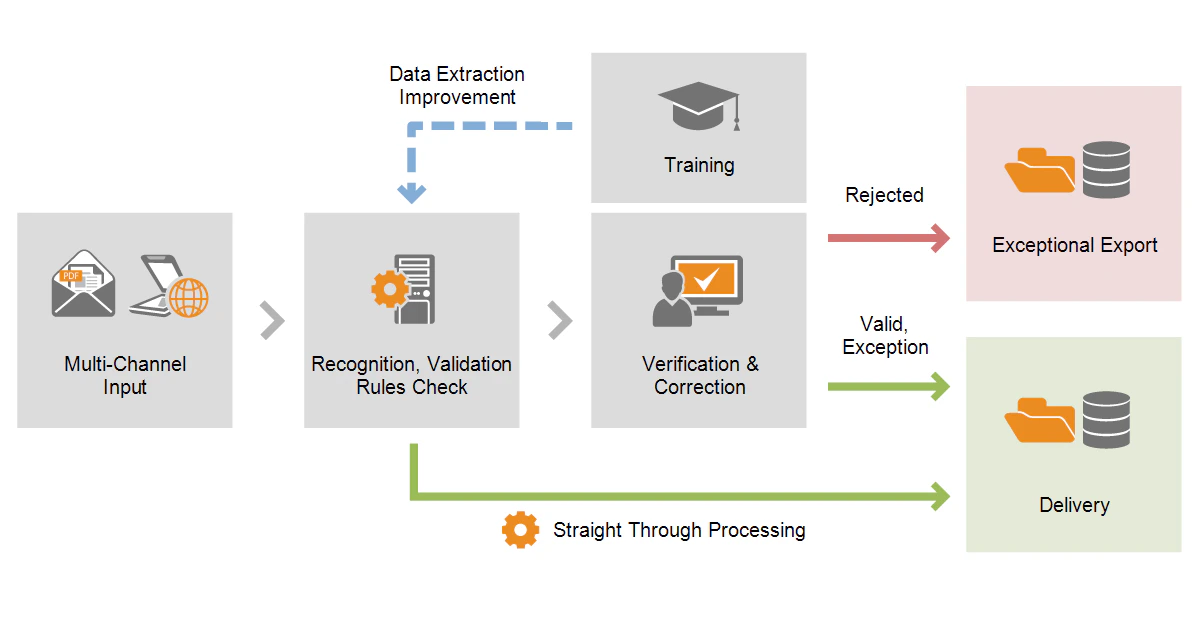 The invoice capture process includes the following steps:
* [Adding and recognizing images](/flexi-capture/invoice-reader/ir-image-adding-and-recognition)
* [Verification](/flexi-capture/invoice-reader/ir-verification) and [correction of errors](/flexi-capture/invoice-reader/ir-correcting)
* [Exporting the verified data](/flexi-capture/invoice-reader/ir-data-export)
The invoice capture process includes the following steps:
* [Adding and recognizing images](/flexi-capture/invoice-reader/ir-image-adding-and-recognition)
* [Verification](/flexi-capture/invoice-reader/ir-verification) and [correction of errors](/flexi-capture/invoice-reader/ir-correcting)
* [Exporting the verified data](/flexi-capture/invoice-reader/ir-data-export)